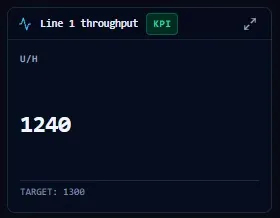
KPI card
One value, large: its unit, its quality, the change over the last 15 minutes to 24 hours (from the historian) and an optional target. A badge appears only for a Bad or Uncertain value or an active alarm on the tag. Without a tag the card shows a fixed value marked STATIC, or a dash: never an invented reading.
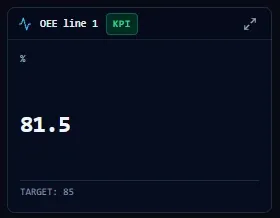
| Card palette | Display Widgets › Digital KPI Metric Card |
| Card kind | kpi_card (body.widget) |
| Default size | 3 × 2 grid cells |
Settings
Section titled “Settings”Double-click the card (or select it and press Enter) to open its settings. The settings are stored in the card’s body.params.
| Shown as | Key (body.params) |
Type | Unit | Default | Allowed values | What it does |
|---|---|---|---|---|---|---|
| Tag | tagPath |
Tag path (read) | — | The tag shown. A card without a tag shows its fixed value marked STATIC, or a dash. Settings hint: Without a tag the card shows the fixed value below, marked STATIC. | ||
| Unit | unit |
Text | "" |
Unit shown after the value. Display only. | ||
| Decimals | decimals |
Number | — | Decimals shown. Empty: automatic from the range. | ||
| Target | target |
Number | "" |
A reference value shown under the value (a production target). Settings hint: Optional reference shown under the value. | ||
| Change over | deltaWindow |
Choice | — | 15m1h8h24h |
The change shown is the value now minus the value at the start of this window, read from the historian. Settings hint: The change shown is the value now minus the value at the start of this window (historian). | |
| Fixed value (no tag) | value |
Text | "—" |
A fixed value shown when no tag is set, marked STATIC. The palette places a dash. |
Quality and parameters
Section titled “Quality and parameters”Values come with their quality: a Bad or Uncertain value is marked on the card, and a value not yet received shows a dash, never an invented number. A card on a screen with parameters takes {Name} in its tag paths.
Examples
Section titled “Examples”Line 1 throughput against its target
Section titled “Line 1 throughput against its target”The throughput of line 1 in units per hour, with its target of 1300.
- Click Digital KPI Metric Card in the dashboard palette (or an empty cell).
- Double-click the card: Tag
Plant/Processing/Lines/L1/Throughput, Unitu/h, Decimals 0, Target 1300, Change over 8h. - Title
Line 1 throughput.