Gauge card
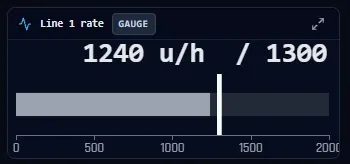
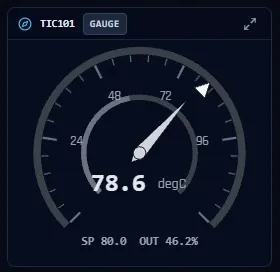
Any kind of the gauge on a card: progress arc, ring, zoned dial, multi-pointer (PV, SP, OUT), level bar, bullet with a target, or sparkline. The dashboard palette offers one item per kind (Progress Arc Gauge, Ring Gauge, Zoned / Grade Dial, PV / SP / OUT Dial, Level Bar Gauge, Bullet Gauge with Target); they are the same card with another gaugeKind.
| Card palette | Display Widgets › Progress Arc Gauge Display Widgets › Ring Gauge Display Widgets › Zoned / Grade Dial Display Widgets › PV / SP / OUT Dial Display Widgets › Level Bar Gauge Display Widgets › Bullet Gauge with Target |
| Card kind | eax_gauge (body.widget) |
| Default size | 3 × 3 grid cells |
Settings
Section titled “Settings”Double-click the card (or select it and press Enter) to open its settings. The settings are stored in the card’s body.params.
| Shown as | Key (body.params) |
Type | Unit | Default | Allowed values | What it does |
|---|---|---|---|---|---|---|
| Gauge | gaugeKind |
Choice | "arc" |
radialarcringzonedmultilinearbulletsparkline |
The drawing (see the gauge’s kinds). | |
| Value tag (PV) | tagPath |
Tag path (read) | — | The value shown (PV). | ||
| Setpoint tag (multi) | spTag |
Tag path (read) | — | Multi-pointer: the setpoint tag. | ||
| Output tag (multi, inner ring) | outTag |
Tag path (read) | — | Multi-pointer: the controller output tag (inner ring). | ||
| Target tag (bullet) | targetTag |
Tag path (read) | — | Bullet: the target tag. | ||
| Fixed target (bullet) | target |
Number | — | Bullet: a fixed target, when no target tag is set. | ||
| Unit | unit |
Text | "" |
Unit shown after the value. Display only. | ||
| Minimum | min |
Number | 0 |
Value at the start of the scale. | ||
| Maximum | max |
Number | 100 |
Value at the end of the scale. | ||
| Decimals | decimals |
Number | — | Decimals shown. Empty: automatic from the range. Settings hint: Empty = automatic from the range. | ||
| Bands | bandsSource |
Choice | — | alarms manual none |
Where the bands come from: alarms (the tag’s LL / L / H / HH alarm limits), manual (the limits below) or none. Settings hint: alarms = the tag’s LL / L / H / HH alarm limits; manual = the limits below. | |
| Band display | bandStyle |
Choice | "auto" |
zones marks track auto |
How the bands are drawn: zones (coloured bands to the scale ends), marks (grey scale, colour only beyond a limit), track (thin band track outside the scale) or auto (marks when the bands would cover over 40 % of the scale). Settings hint: zones = coloured bands to the scale ends; marks = grey scale with limit marks, colour only beyond a limit; track = thin band track outside the scale; auto = marks when the bands cover over 40 % of the scale. | |
| Manual LL | limitLL |
Number | — | Manual low-low limit (bands manual). | ||
| Manual L | limitL |
Number | — | Manual low limit. | ||
| Manual H | limitH |
Number | — | Manual high limit. | ||
| Manual HH | limitHH |
Number | — | Manual high-high limit. | ||
| Needle / bar colour (empty = theme grey) | needleColor |
Text | — | Colour of the needle or bar. Empty: the theme grey; a value in an alarm band takes the band’s colour. | ||
| Bar orientation | orientation |
Choice | — | verticalhorizontal |
Level bar: vertical or horizontal. | |
| Pointer (radial) | pointerStyle |
Choice | — | needleprogressboth |
Radial: a needle, a progress arc, or both. | |
| Sparkline window (minutes) | historyMinutes |
Number | min | — | Sparkline: the time window. Default 15. |
Quality and parameters
Section titled “Quality and parameters”The card reads its tags live, with their quality, and shows it on the face as the gauge does: a Bad, Uncertain or stale value is dimmed, hatched and labelled BAD QUALITY, UNCERTAIN or NO LINK - STALE, and before a first value the card shows a dash and NO DATA, never an invented number. When every Bad tag the card reads is not readable for the signed-in account, it shows a dash, a padlock and NOT READABLE on a blue label (NO ACCESS on a small card), with no number, needle, bar or trend; a device Bad on any of its tags keeps BAD QUALITY. A setpoint, output or target tag the account may not read draws no marker and no number. A card on a screen with parameters takes {Name} in its tag paths.
Examples
Section titled “Examples”Line 1 throughput against its target
Section titled “Line 1 throughput against its target”A bullet gauge: line 1’s throughput as a bar, its target tag as a marker.
- Click Bullet Gauge with Target in the dashboard palette.
- Double-click it: Value tag
Plant/Processing/Lines/L1/Throughput, Target tagPlant/Processing/Lines/L1/Target, Minimum 0, Maximum 2000, Unitu/h.