

Connect to a Logix controller
Migrated page, not yet verified against the current code. Treat values, paths and examples as indicative until this notice is removed.
eaxScada reads and writes the tags of Rockwell / Allen-Bradley Logix controllers (ControlLogix, CompactLogix) and of Micro800 controllers (Micro820/850/870), by name over EtherNet/IP (CIP, TCP port 44818). The protocol id in the configuration is ETHERNET_IP.
What is supported
Section titled “What is supported”Supported:
- Rockwell / Allen-Bradley ControlLogix (1756): set the controller’s slot in the chassis, or a route through other modules.
- Rockwell / Allen-Bradley CompactLogix (1769, 5370, 5380, 5069): slot 0.
- Rockwell / Allen-Bradley Micro800 (Micro820, Micro850, Micro870): choose Micro800 as the controller. A Micro800 has no chassis backplane, so eaxScada connects with no route at all and the slot is not used. Its global variables are read by name.
- Tags by name: controller tags (
Tank_Level), UDT members (Tank101.Level) and program tags (Program:Main.Speed). - Types: BOOL, DINT (Int32), REAL (Float32). INT (Int16) and LREAL (Float64) are accepted but not yet verified on a controller.
- Browse tags lists the controller-scope tags read from the controller. Program tags are typed by address.
- GuardLogix: standard tags, as on ControlLogix and CompactLogix (not yet verified on a controller).
- Array elements (
Tag[3]): accepted, not yet verified on a controller.
Not supported:
- MicroLogix, SLC 500 and PLC-5: they use the older PCCC protocol. Use the connection kind Rockwell / Allen-Bradley MicroLogix, SLC 500, PLC-5 (PCCC), which reads their data table by address (
N7:0,F8:3): see Connect to a MicroLogix, SLC 500 or PLC-5. - Micro800 program-scope variables and system/global-system variables: only controller-global variables are read by name.
- Drives, remote I/O adapters and other EtherNet/IP devices: they are not Logix controllers. Use the connection kind EtherNet/IP device (drives, I/O adapters), which reads them by class, instance and attribute: see Connect to an EtherNet/IP device.
- Implicit (Class 1) I/O connections, and produced/consumed tags.
- STRING tags, and a whole UDT or array as one value.
The ControlLogix / CompactLogix lines are verified against eaxware’s Logix controller simulator (connection with the slot route, a refused wrong slot, reads of controller, UDT member and program tags, BOOL, DINT and REAL, a write read back, a refused write, an unknown tag, the tag browse). The Micro800 support is verified against eaxware’s Micro800 simulator (a session opened with an empty route, a refused backplane-slot route, reads of BOOL, DINT and REAL by name, a write read back, an unknown tag and the tag browse). Neither is yet verified against a controller in the test bench; the Micro800 path has not been run against real Micro820/850/870 hardware.
Set up the controller
Section titled “Set up the controller”- Each tag you write needs External Access set to Read/Write. Read Only refuses writes; None hides the tag. On a Micro800 (Connected Components Workbench) this is the variable’s read/write external access.
- TCP port 44818 must be open between eaxScada and the controller’s Ethernet port or module.
- For a ControlLogix, note the slot of the controller (not of the Ethernet module) in the chassis. A Micro800 has no slot.
Add the connection
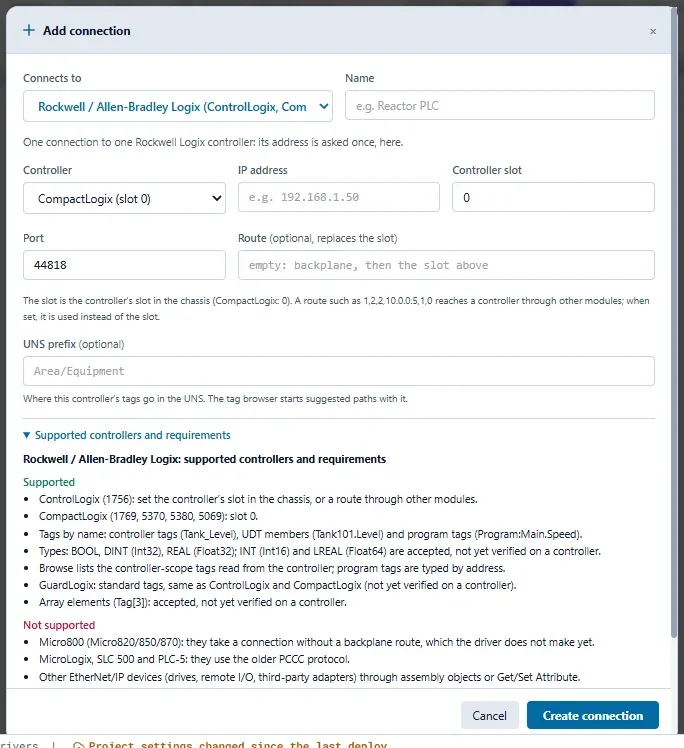
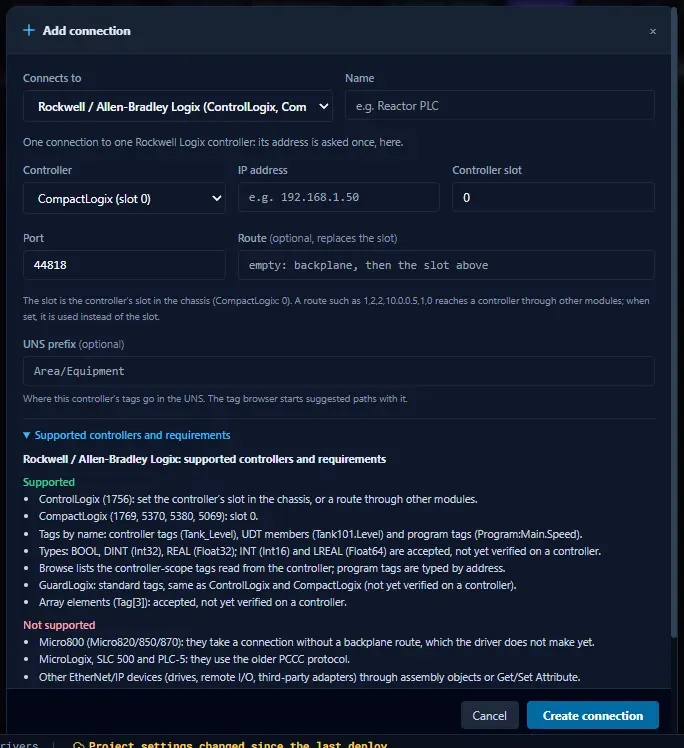
Section titled “Add the connection”- Drivers → Add connection, and choose Rockwell / Allen-Bradley Logix (ControlLogix, CompactLogix — EtherNet/IP).
- Controller: CompactLogix (slot 0), ControlLogix (set the slot), or Micro800 (Micro820/850/870 — no backplane). The “other EtherNet/IP device” entry cannot be created here: it points to the EtherNet/IP device (drives, I/O adapters) connection kind.
- IP address of the controller or of the Ethernet module in its chassis.
- Controller slot (ControlLogix / CompactLogix only). Leave Route empty: the route is then the backplane and that slot (
1,<slot>). To reach a controller through other modules, enter the full route (for example1,2,2,10.0.0.5,1,0); a route replaces the slot. For a Micro800 the slot is hidden and not used - eaxScada connects with no route; a route you enter here still overrides. - UNS prefix (optional): where this controller’s tags go in the UNS. A Logix tag carries at most program and UDT structure, so the prefix supplies the site, area and line.
- Create connection, then Test connection. A success means the controller accepted a CIP session (RegisterSession and Forward Open) at that slot or route, not only that port 44818 is open.
- Browse tags opens the tag browser on the new connection.
- Product
- Device or controller
- Bus or line
Read as text
eaxScada opens EtherNet/IP on TCP port 44818 to the IP address of the controller or of the Ethernet module in its chassis. In an Allen-Bradley ControlLogix chassis the route goes over the backplane to the controller's slot (1,<slot>). A CompactLogix takes slot 0 (1,0). A Micro800 has no backplane, so there is no route. A full route through other modules, entered in Route, replaces the slot.
Parts
- eaxScada (product): EtherNet/IP, TCP port 44818
- Ethernet module (device or controller, inside Allen-Bradley ControlLogix chassis): its IP address
- Backplane (bus or line, inside Allen-Bradley ControlLogix chassis)
- Controller (device or controller, inside Allen-Bradley ControlLogix chassis): in its slot
- CompactLogix (device or controller): slot 0
- Micro800 (device or controller): Micro820, 850, 870: no backplane
Connections
- eaxScada → Ethernet module (relation): route 1,<slot>
- Ethernet module → Backplane (relation)
- Backplane → Controller (relation)
- eaxScada → CompactLogix (relation): route 1,0
- eaxScada → Micro800 (relation): no route
Reads, writes and errors
Section titled “Reads, writes and errors”A tag that does not exist, or a write the controller refuses (External Access Read Only), is reported with the reason, the controller’s CIP status where it gives one; a failed read makes the tag’s quality BAD and never shows an invented value.
The connection afterwards
Section titled “The connection afterwards”The Connection tab holds the controller, address, slot and route, with the same requirements panel; Polling & UNS the scan rate and the UNS prefix; Tag Mappings the mapped tags.
Connections saved before this version keep their route: one saved with the route 1,0 still reaches slot 0, whatever its slot field says. Clear the route to use the slot.