

Limit tag writes
Migrated page, not yet verified against the current code. Treat values, paths and examples as indicative until this notice is removed.
The speed setpoint of pump P-201 accepts 20 to 95 % in steps of 0.5, and its mode only 0, 1 or 2. Any other value is refused by the server, whoever sends it: a screen, a script, an API client, a NATS command, an assistant’s setpoint or a recipe.
Where limits come from
Section titled “Where limits come from”Every limit below applies. When several limit the same tag, the strictest wins: the highest minimum, the lowest maximum.
| Source | Set in | Checked for |
|---|---|---|
| The tag’s write range | Drivers → tag mappings (Write range action); for an eaxTag, its editor (Edit range…) | every writer through eaxScada, and again by the driver just before the device (recipe downloads included) |
| An input object’s limits (numeric entry, slider, spinner): minimum, maximum, step | the inspector | every writer of that tag, from the moment the screen is saved |
| A limit bound to a tag (Minimum from tag, Maximum from tag) | the inspector | every writer; read when the write arrives |
A faceplate’s setpoint limits (spMin, spMax), on a screen or a dashboard |
the faceplate | every writer of the setpoint tag |
| The engineering range of the tag | the tag definition | every writer (refused with 422) |
- Service or process
- Device or controller
- File or document
- Check or decision
- Data or telemetry
- Command to equipment
- Configuration or deploy
- Refusal
Read as text
A write from any writer that goes through eaxScada passes these checks of the server in order. A tag that does not exist is refused first, before any limit. A write sent from a screen the writer may not open, or opened with parameters it does not admit, is refused next. Then every limit on the tag applies at once and the strictest wins: the fixed limits (the write range of the tag, the limits of the inputs and faceplates on saved screens) and a limit bound to another tag, which is read when the write arrives. Then the engineering range of the tag. A write that passes goes on to the interlock, signature and confirmation checks, which are not drawn, and for a tag mapped to a device the driver checks the write range once more before it sends anything.
Parts
- Any writer (service or process): a screen, a script, an API client, a NATS command, an assistant's setpoint
- Does the tag exist? (check or decision): before any limit or signature
- Its screen allowed? (check or decision): level and parameters, when sent from a screen
- Every limit on the tag (check or decision): the strictest wins
- Engineering range (check or decision): of the tag definition
- Driver (check or decision): the write range again
- Fixed limits (file or document): the tag's write range, input limits, faceplate spMin and spMax
- A limit bound to a tag (service or process): read when the write arrives; missing or not Good: refused
- Device (device or controller)
- Refused: 404 (outcome): unknown_tag WRITE_DENIED_UNKNOWN_TAG
- Refused: 403 (outcome): screen_access_denied or parameters_refused. The audit codes are WRITE_DENIED_SCREEN_ACCESS and WRITE_DENIED_SCREEN_PARAMETERS.
- Refused: 400 (outcome): out_of_range WRITE_DENIED_OUT_OF_RANGE. The answer carries the minimum and the maximum that apply.
- Refused: 422 (outcome): refused. The audit code is WRITE_DENIED_OUT_OF_ENG_RANGE.
- Refused: 409 (outcome): refused, nothing is sent. For a write through POST /api/tags/write, the audit trail records MANUAL_OVERRIDE_REFUSED after the record of the write.
Connections
- Any writer → Does the tag exist? (command to equipment). A write through POST /api/tags/write, a NATS command or an assistant's setpoint. For a request of a signed-in user, the permission to write the tag is checked before. Raising the plant emergency-stop signal skips every check of the write policy.
- Does the tag exist? → Refused: 404 (refusal). No eaxTag, driver tag mapping or live tag has this path. A write never creates a tag.
- Does the tag exist? → Its screen allowed? (command to equipment)
- Its screen allowed? → Refused: 403 (refusal). The write was sent from a screen whose Required Access Level is above the writer's, or from a screen opened with parameters its declaration does not admit.
- Its screen allowed? → Every limit on the tag (command to equipment)
- Fixed limits → Every limit on the tag (configuration or deploy). The write range comes from the tag mapping or the eaxTag; the limits of inputs and faceplates come from every saved screen that writes the tag.
- A limit bound to a tag → Every limit on the tag (data or telemetry). Minimum from tag, Maximum from tag: the server reads the bound tag when the write arrives.
- Every limit on the tag → Refused: 400 (refusal). The value is below the highest minimum, above the lowest maximum, off the step or not one of the allowed values, or a bound limit cannot be read.
- Every limit on the tag → Engineering range (command to equipment)
- Engineering range → Refused: 422 (refusal). The value is outside the engineering range of the tag.
- Engineering range → Driver (command to equipment). In between, not drawn: the interlock check, the signature and the confirmation the tag asks for, and the audit record. Only a tag mapped to a device reaches a driver.
- Driver → Refused: 409 (refusal). The value is outside the write range of the tag mapping, or not a value its data type can hold.
- Driver → Device (command to equipment). The value is inside the write range: the driver sends it.
1. Set the tag’s write range
Section titled “1. Set the tag’s write range”-
Open Drivers → tag mappings and click Write range on the tag’s row (offered for writable mappings). For an eaxTag, open Drivers → Local tags (eaxTags), click edit on the tag and Edit range….
-
Fill in what the tag accepts:
Field Example Meaning Lowest value 20Highest value 95Step 0.5a value must be the lowest value plus a whole number of steps: 20, 20.5, 21… Only these values 0, 1, 2for a mode or a selector: nothing else is accepted For a String tag: Longest text (characters; 256 when empty) and Only these texts (one per line).
-
Save. Empty fields set no limit; clearing every field removes the range.
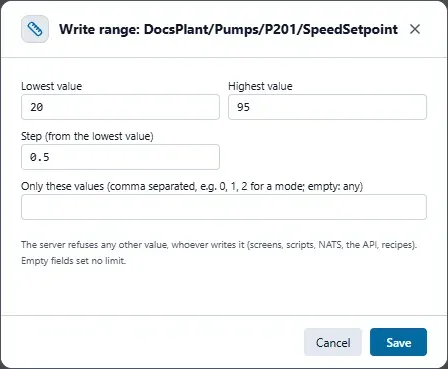
For an eaxTag the range is saved with the tag: click Save in the tag editor as well (the editor says “Changed: saved with the tag.”). The editor shows the current range under Write range; a tag saved without opening Edit range… keeps its stored range.
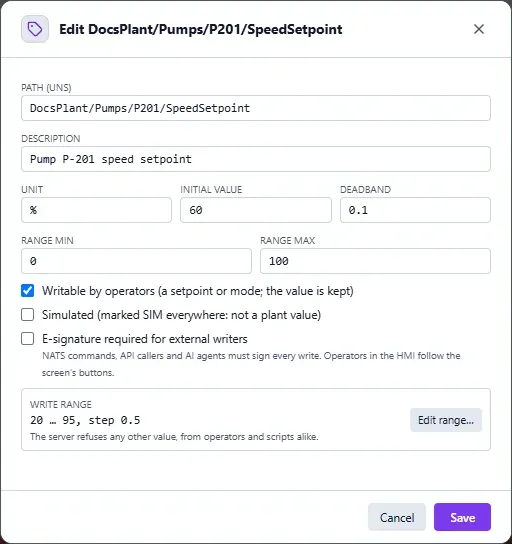
In the eaxTags file or the API, the member is write_range, as on a driver tag mapping (the other members of a definition are listed in eaxTags local tags):
{ "path": "DocsPlant/Pumps/P201/SpeedSetpoint", "writable": true, "write_range": { "min": 20, "max": 95, "step": 0.5 } }{ "path": "DocsPlant/Pumps/P201/Mode", "writable": true, "write_range": { "values": [0, 1, 2] } }2. Limit the input on the screen
Section titled “2. Limit the input on the screen”On the numeric entry, slider or spinner that writes the setpoint, set Minimum, Maximum and Step too. The screen then refuses a wrong value before sending it and tells the operator why; the keypad shows the range. See Add setpoint inputs.
To follow a limit that changes (a recipe’s maximum), bind Maximum from tag. The bound tag is read when the write arrives. If it is missing or its quality is not Good, every write is refused, and the object says why: a limit that cannot be read never lets a value through.
3. What a refused write looks like
Section titled “3. What a refused write looks like”{ "status": "out_of_range", "error": "...", "path": "DocsPlant/Pumps/P201/SpeedSetpoint", "min": 20, "max": 95 }The answer is 400; the audit trail records WRITE_DENIED_OUT_OF_RANGE with the user and the value tried, and the tag keeps its value. An electronic signature never lifts a limit. In the runtime the operator reads “Refused by the server (allowed 20 … 95)” and the field returns to the live value.
Writes to tags that do not exist
Section titled “Writes to tags that do not exist”A write to a path that no eaxTag, driver tag mapping or live tag has is refused with 404:
{ "status": "unknown_tag", "path": "DocsPlant/Pumps/P210/SpeedSetpoint" }It is journaled as WRITE_DENIED_UNKNOWN_TAG, before any limit or signature. A write never creates a tag. Earlier versions created a memory tag of that name and answered 200, so a mistyped folder looked accepted while the real tag never changed. The same applies to NATS commands and to assistant setpoints when they are staged and approved. The plant emergency-stop signal always exists. If a screen or integration relied on a write to create a memory tag, define the tag as an eaxTag.
The Problems panel lists every screen reference to a tag that does not exist (broken-tag).
Text tags
Section titled “Text tags”A driver tag mapping whose data type is String takes text, never a number; every other tag takes numbers, never text. Text must be valid UTF-8 without control characters, at most the range’s Longest text, and one of Only these texts when set. Omron FINS, Mitsubishi Electric MC protocol / SLMP, OPC UA, MQTT (JSON) and the NATS bridge write text (the NATS bridge never on a uns.telemetry subject, and a write its broker refuses is reported as failed); station-addressed drivers (serial lines, buses, gateways) and every other driver refuse it and send nothing. FINS and MC protocol also read a String tag’s text and show it, with its quality, in the Tag Mappings grid; their text is printable ASCII and at most the string’s length in controller memory, so set Longest text to that length. The tag engine holds numbers, so the written text is sent and journaled, not shown as the tag’s value on screens. See Connect to Omron CJ2, CS1, CP1 and NJ/NX controllers (FINS) and Connect to Mitsubishi Electric MELSEC iQ-R, iQ-F, Q and L controllers.
Verify
Section titled “Verify”- Write 96 to the setpoint from the runtime: the input refuses it before sending.
- Send it with the API:
400 out_of_rangewithmin20 andmax95. - Write 20.25: refused, it is not on the step of 0.5.
- Write 3 to the mode: refused, it is not one of 0, 1, 2.
Related
Section titled “Related”- How eaxScada protects tag writes: the order of the server’s checks.
- Enforce interlocks on the server