

Apply fieldbus changes without stopping the other devices
Change one device of a running fieldbus configuration (a register, an I/O entry, a timeout) and apply it while the PLC runs, without interrupting the devices you did not touch. eaxPLC compares the new configuration with the running one and restarts only what changed. Afterwards Last Apply shows, device by device, what was kept running, started, restarted or stopped.
1. Change and apply
Section titled “1. Change and apply”- Open Fieldbus, change the bus or the device, and click Validate.
- Click Apply, type the reason (it goes to the audit trail) and give your e-signature. Applying a fieldbus configuration needs an engineer and the e-signature, because it drives real outputs.
The whole new configuration is validated, and every device prepared, before anything is stopped: a refused configuration changes nothing, and the running devices keep running as they were.
2. What restarts
Section titled “2. What restarts”A device is identified by its bus id and its device id; a bus by its id. Names change nothing. Renaming an id is removing the device (or bus) and adding a new one.
- A device changes when anything of it but its name changes: enabled, address, timings, identity, PDOs, boot SDOs, device file, behaviour, status bit, any I/O entry, or the PLC addresses its entries resolve to.
- A bus changes when anything of the bus but its devices and its name changes: type, enabled, local IP, network interface, cycle time, bit rate, SYNC period, master node id and heartbeat, the MQTT broker connection (and, for MQTT, whether the PLC is simulated).
What restarts then depends on the bus type:
| Bus type | One device changed | The bus’s own settings changed |
|---|---|---|
| Modbus TCP | that device alone (its connection) | the whole bus |
| EtherNet/IP | that device alone (its Class 1 connection); the bus’s I/O port (UDP 2222) stays open | the whole bus, I/O port included |
| EtherCAT | the whole line: one frame cycles every slave, and the line is configured and brought to OP as a whole | the whole line |
| CANopen | the whole bus: the master boots its nodes and runs one SYNC | the whole bus |
| MQTT | the whole connection: one broker connection serves all its sources | the whole connection |
In every case other buses keep running, of any type, as long as their own configuration is unchanged. Added devices start; removed and disabled devices stop.


When every device restarts
Section titled “When every device restarts”The result is then full (or start), with the reason, and the PLC log warns:
- after the PLC memory layout changed (a change of CPU tier): the image addresses may have moved;
- when the configuration has a bus type the per-device apply does not know;
- when nothing was running: the first start, the start of the PLC process, and the first Apply after a halt (result start: every device started).
MQTT secrets and the loop guard
Section titled “MQTT secrets and the loop guard”- An Apply that changes MQTT secrets (a password, a client key or certificate, Clear secrets) reconnects every MQTT bus of the configuration, so each connection is made again with the secrets as they are now.
- An unchanged MQTT bus is checked again against this PLC’s own publisher at every Apply; if the check now refuses it, it restarts (and does not start). See Connect MQTT and Sparkplug B inputs.
What a stop does
Section titled “What a stop does”A device that stops (removed, disabled, or the old instance of one that restarts) stops as before, by its driver:
| Bus type | Stop |
|---|---|
| Modbus TCP | the connection closes; nothing more is written |
| EtherNet/IP | the connection closes; the adapter’s watchdog applies its idle state |
| EtherCAT | the line leaves OP |
| CANopen | NMT stop |
Its inputs are no longer copied into %I. The old instance ends before its replacement starts.
3. Read the last Apply
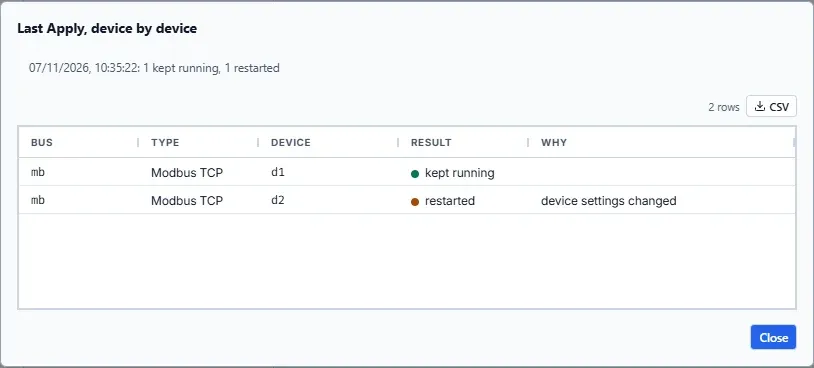
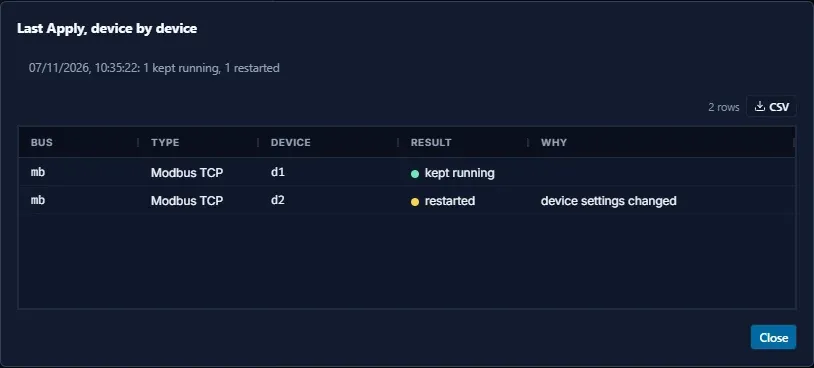
Section titled “3. Read the last Apply”The Fieldbus status line ends with Last Apply: and a summary, for example “1 kept running, 1 restarted”, or “every device restarted (the PLC memory layout changed): …”. Click it for the list of devices.
| Result | Means |
|---|---|
| kept running | Unchanged: its connection, driver, counters and process images stayed; its inputs and outputs were exchanged without a gap or a zero. |
| started | New (new device) or enabled (enabled). |
| restarted | Stopped, then started. Why says which: device settings changed, bus settings changed: the whole bus restarts, a device on this bus changed: an EtherCAT line restarts as a whole (or a CANopen bus, an MQTT connection), the MQTT secrets changed: the connection is made again, the MQTT loop guard refuses the bus now, or full restart: <reason>. |
| stopped | Removed (removed from the configuration) or disabled (disabled). |
| disabled | Disabled, and not running before either. |
The Studio that applied the change also writes them to its Diagnostics & events log (every device started, restarted or stopped, with why), and the PLC writes them to its own log.
The last Apply is kept in the PLC’s memory only: after the PLC process restarts it shows the start (start, every device started) until the next Apply.
HTTP API
Section titled “HTTP API”PUT /api/fieldbus (engineer, with the e-signature) answers, besides config and status, the result of this Apply as apply; GET /api/fieldbus (any signed-in user) gives the last one as last_apply (absent before the first):
{ "mode": "per_device", "at": 1794047722000, "kept": 1, "started": 0, "restarted": 1, "stopped": 0, "devices": [ { "bus": "mb", "type": "modbus_tcp", "device": "d1", "action": "kept" }, { "bus": "mb", "type": "modbus_tcp", "device": "d2", "action": "restarted", "why": "device settings changed" } ]}| Member | |
|---|---|
mode |
per_device (only what changed restarted), full (every device restarted; reason says why), start (nothing was running: every device started) |
at |
when, in Unix milliseconds |
kept, started, restarted, stopped |
counts (a device that stays disabled is in none) |
devices[] |
bus, type, device, action (kept, started, restarted, stopped, disabled) and why |
Applies are run one at a time; the scan reads the running set without waiting for them.