

Set external access and write limits
You decide, per variable, what clients outside the program may do with it (HMI writes over the runtime API, OPC UA, UNS, Modbus TCP, direct-address writes, forces) and which values they may write. The PLC enforces it; see Data model for the rules.
Before you start
Section titled “Before you start”- You are an engineer (Lead_Engineer or Administrator).
- The declaring POU (the global variable list or program) is not checked out by someone else, and has no unsaved edits open in your editor. If it has, save it first: the tag database refuses so that the two edits do not overwrite each other.
- Access and write range are part of the signed program. A change runs only after a Test edits or a Build & Deploy, with its e-signature as your deploy settings require.
1. Open the tag database
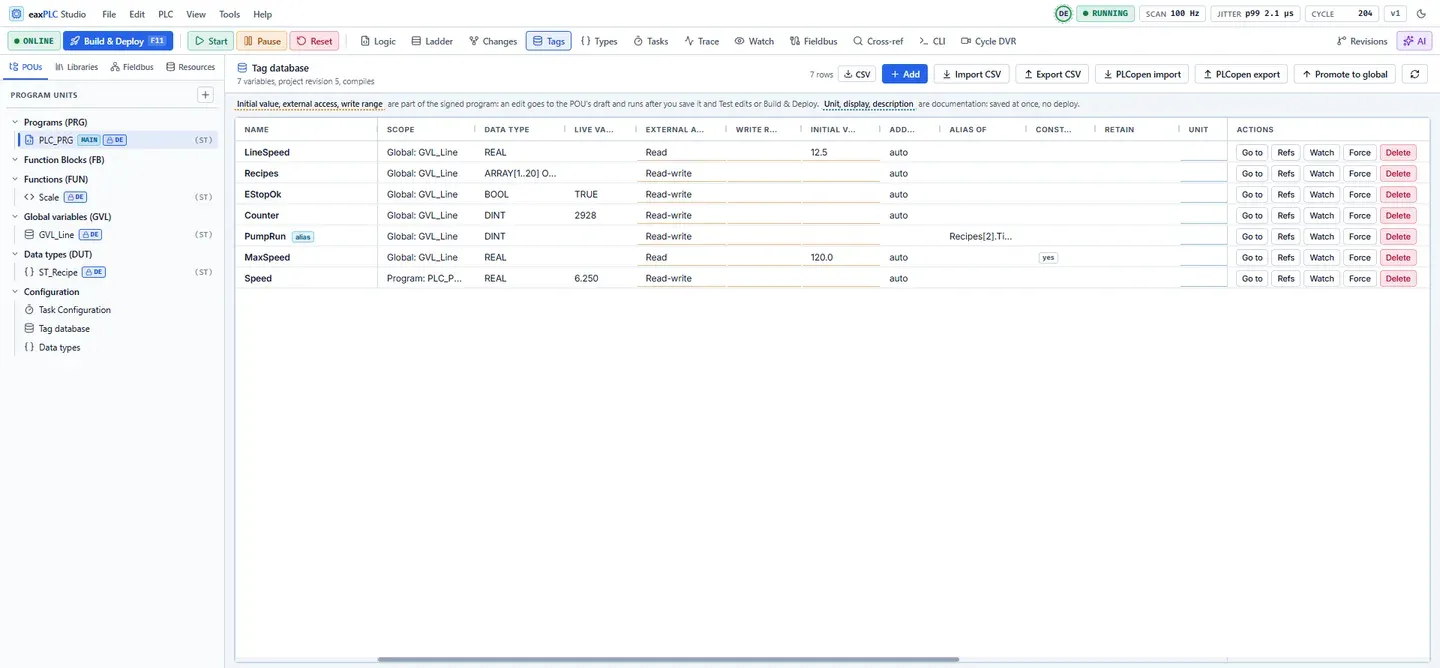
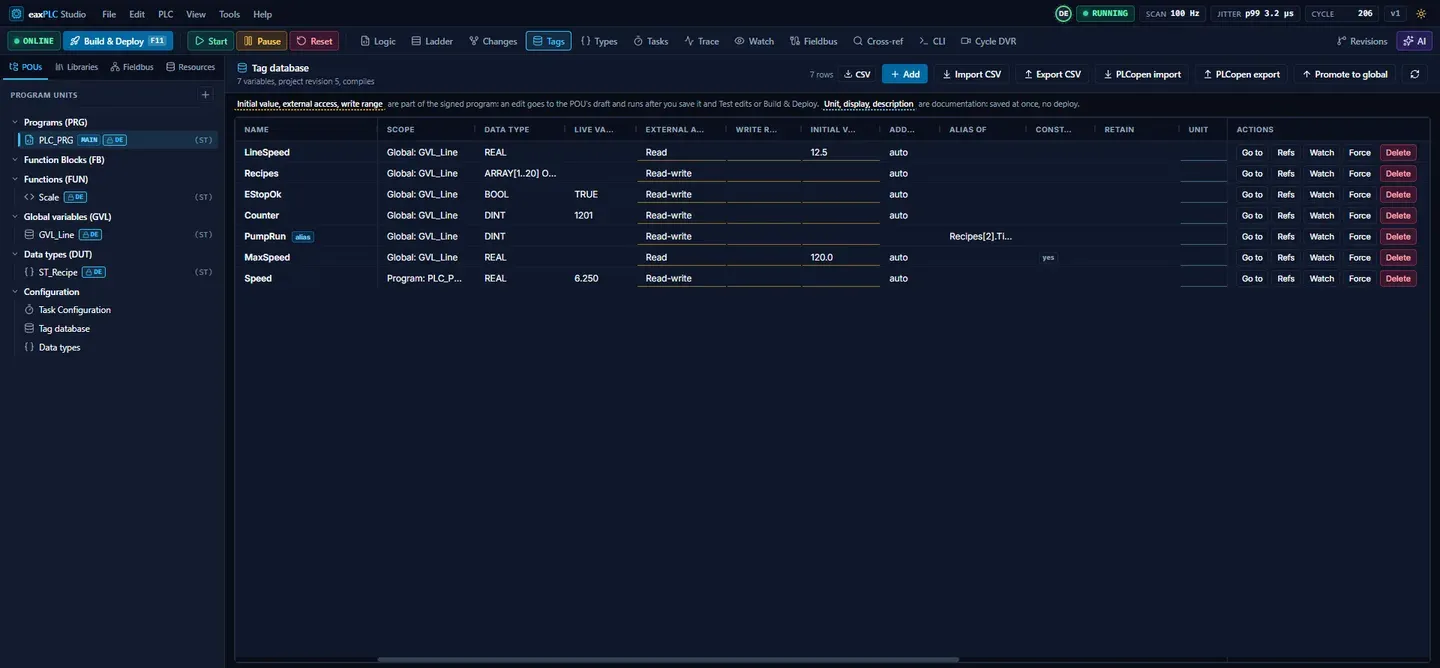
Section titled “1. Open the tag database”Click Tags in the toolbar. There is one row per global, program variable and alias, with its scope, data type, live value, External access, Write range and Initial value.
2. Set the access
Section titled “2. Set the access”- Double-click the variable’s External access cell and choose None, Read or Read-write.
- The first edit of a POU offers to check it out. Accept.
- The cell shows the new value with a draft mark. The change is in the POU’s draft, not in the running program, and not yet in the saved project. The pending chip above the grid counts the draft changes and filters to them.
A CONSTANT is always read-only from outside, whatever you choose. An alias can only narrow its target’s access, and its own narrower access applies to the alias’s name only.
3. Set a write range
Section titled “3. Set a write range”- Double-click the Write range cell and type
low..high, for example0.0..120.0(numbers, low not above high). Leave it empty to remove the range. - It applies to numeric variables. A subrange type (
INT(0..3000)) already limits writes to its bounds; a write range can narrow them further. To bound one member of a structure or function block in every instance, put thewrite_rangeattribute on the member in its data type or block.
The edit writes this into the declaration text, keeping every other byte of the POU, comments included:
{attribute 'access' := 'read_write'}{attribute 'write_range' := '0.0..120.0'}LineSpeed : REAL := 12.5;You can also type the attributes in the code editor yourself; the result is the same.
4. Save and apply
Section titled “4. Save and apply”- In the row, click Go to: the POU opens with your draft restored. Check the text and save it (Ctrl+S).
- Click Test edits. The impact report’s Access tab lists every variable whose effective access widens or narrows. A widening on a safety target is shown in rose; for an AI-made program it blocks the test (
ai_widens_access). - Sign and test. The new access applies from the test’s first cycle. Untest puts the accepted program’s access back at once; Accept makes it permanent.
Without an online edit, Build & Deploy applies it at the deploy.
5. Check it
Section titled “5. Check it”From an HMI or any client with the write right:
| Write | Answer |
|---|---|
| By name to a variable with access read or none | 403, WRITE_ACCESS_DENIED: LineSpeed is read-only from outside (access read) in the running program ... |
| Outside the write range | 400, WRITE_OUT_OF_RANGE: 150 is outside the write range of LineSpeed (0..120) ... |
By member path (Recipes[2].Temp_SP) |
the same checks on the member: access narrowed through each member, its own write range or the enclosing one |
By path to a function block output or internal variable (Line2.Valves[3].Out) |
400: only a function block’s VAR_INPUTs are written or forced from outside |
By direct address over the protected storage (%MD...) |
the same refusals, naming the variable |
| A force on access none | 403, FORCE_ACCESS_DENIED (access read can be forced) |
| OPC UA | access none: the node is gone from the address space; read: BadNotWritable; out of range: BadOutOfRange; without the plc.write right: BadUserAccessDenied |
| UNS | access none: no longer published; read: the command answers an error |
Each refusal is in the PLC’s audit trail (WRITE_DENIED, WRITE_REFUSED or FORCE_DENIED).
Troubleshooting
Section titled “Troubleshooting”| Message or code | Cause and fix |
|---|---|
423, you do not hold the lock of GVL_Line |
Someone else has the POU checked out. Ask them to release it. |
409, GVL_Line changed since you opened it |
The POU was saved meanwhile. Reload the view and edit again. |
| attribute ‘access’ := ‘rw’: the access is none, read or read_write | A hand-written attribute has a bad value. Use none, read or read_write. |
| attribute ‘write_range’ := ‘120..0’: expected ‘low..high’ (numbers, low <= high) | Swap the bounds, or fix the numbers. |
forced_symbol_changes on Test edits |
The test makes a forced variable access none. Release the force first, then test. |
| An eaxScada tag stopped updating | Its variable is now access none, so it is no longer published. Use read to publish it read-only. |