

Buttons, indicators and faceplates
Objects an operator presses or reads at a glance: buttons, multistate indicators and ISA-101 faceplates.
| Object | Name | What it is for |
|---|---|---|
 | Button | A push button with a released, a pressed, an active and a disabled look. |
 | Multistate indicator | A tile that shows one of several states of a tag: each state has its own colours, caption, icon and blink. |
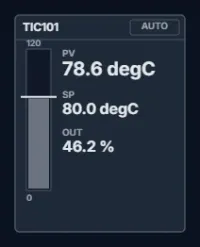 | Faceplate | An ISA-101 faceplate for a PID controller, a motor or a valve: grey in normal operation, colour only for an abnormal condition (interlock amber, fault red, manual mode blue, value out of range). |