

Security and 21 CFR Part 11
Migrated page, not yet verified against the current code. Treat values, paths and examples as indicative until this notice is removed.
Industrial control systems operate under strict regulation. Life-sciences, pharmaceutical and critical chemical plants must comply with FDA 21 CFR Part 11 and EU GMP Annex 11 for electronic records and signatures, and with IEC 62443-4-2 for industrial security.
This page explains eaxScada’s security model: role-based access control (RBAC), IEC 62443 account lockout, enterprise single sign-on (LDAP, SAML, OIDC), and the regulated compliance engine with an append-only SHA-256 chained audit trail in its own database, genesis record, chain verifier and 21 CFR Part 11 electronic signatures.
1. Overview
Section titled “1. Overview”- Data store
- Person or role
- External system
- Check or decision
- Trust boundary
- Data or telemetry
- Configuration or deploy
- Authentication
Read as text
A person signs in with a local account or, in Pro and Enterprise, through LDAP, OIDC or SAML; five wrong passwords in a row lock the account for 15 minutes, and a session lasts 12 hours. A program uses an API token. A NATS client is checked by the broker when it connects. Every request is then checked against the permission rules of the roles, where a deny wins over an allow. Sign-ins, refusals and signatures go to the Access audit, in every edition; the actions that change the plant or the project go to the audit trail, from Starter up.
Parts
- eaxScada server (trust boundary)
- Person (person or role): a browser
- Program (external system): an API token
- NATS client (external system): eaxPLC, an MES
- Sign-in (check or decision, inside eaxScada server): local users (bcrypt); LDAP, OIDC, SAML in Pro and up; 5 wrong passwords: locked 15 min
- Permissions (check or decision, inside eaxScada server): roles with rules per topic, screen, feature and API; a deny wins over an allow
- NATS broker (check or decision, inside eaxScada server): NKey, session token or password; only the subjects of the role
- Access audit (data store): sign-ins, refusals, signatures; every edition
- Audit trail (data store): audit.duckdb, chained; Starter and up
Connections
- Person → Sign-in (authentication). A person signs in with a user name and password.
- Sign-in → Permissions (authentication): session, 12 h. A sign-in opens a session of 12 hours; each request of the session is checked against the permissions.
- Program → Permissions (authentication). A program sends its API token with each request; an API token never signs.
- NATS client → NATS broker (authentication). A NATS client is checked when it connects; anonymous clients are refused.
- NATS broker → Permissions (configuration or deploy): rules of the role. The broker gets its subject permissions from the rules of the roles: a tag-path rule becomes the tag's telemetry subjects, a deny wins, and a rule that cannot be written as a subject fails closed.
- Sign-in → Access audit (data or telemetry). Sign-ins, failed and refused sign-ins and lockouts are recorded in the Access audit.
- Permissions → Access audit (data or telemetry). A refusal by a deny rule is recorded AUTHZ_DENIED in the Access audit; a refused tag write WRITE_DENIED.
- Permissions → Audit trail (data or telemetry). The actions the permissions allow that change the plant, a safety setting, the project or who may do what are recorded in the audit trail before they are done.
1.1 Security capabilities per edition
Section titled “1.1 Security capabilities per edition”| Capability | Starter | Pro | Enterprise |
|---|---|---|---|
| Authentication | Local bcrypt, 32-byte session tokens | Local, plus enterprise SSO | Local, plus enterprise SSO |
| Enterprise SSO | No (local users only) | LDAP / Active Directory, OIDC / OAuth2, SAML 2.0 | Same as Pro |
| Account lockout | IEC 62443 SR 1.3 (5 wrong passwords from one address lock the account from that address, 20 from all addresses lock it everywhere, for 15 minutes) | Same | Same |
| Idle time and session maximum | Per group, enforced by the server, with a countdown (IEC 62443 SR 2.5, SR 2.6) | Same | Same |
| View-only stations | Paired screens that show chosen screens with nobody signed in, never acting | Same | Same |
| Access control (RBAC) | 6 roles, explicit DENY precedence |
Same | Same |
| Audit trail | SHA-256 chained, in its own database (audit.duckdb), with genesis record and verifier |
Same | Same, replicated to the standby in a high availability pair |
| 21 CFR Part 11 / EU Annex 11 | Hash chaining, chain verifier, e-signatures | Same | Same |
| Electronic signatures | The signed-in user’s password with the meaning shown, recorded in the audit trail | Same | Same |
| Verification API | /api/audit/verify tamper check |
Same | Same |
The lockout, the session limits and the view-only stations are in Free too.
The Free edition has no audit trail. See 2.0 Which editions record for what that means. The sign-in trail (the Access audit) is kept in every edition, Free included.
See Editions for everything else each edition includes.
2. SHA-256 chained audit trail (Starter, Pro, Enterprise)
Section titled “2. SHA-256 chained audit trail (Starter, Pro, Enterprise)”21 CFR Part 11 §11.10(e) requires secure, computer-generated, time-stamped audit trails that independently record the date and time of operator entries and actions that create, modify or delete electronic records.
Starter, Pro and Enterprise record every operational, engineering and administrative event in the audit trail: a cryptographic hash chain with a genesis record, kept in its own DuckDB database, audit.duckdb in the audit folder (security.audit_data_dir, ./data/audit by default). It is a separate file from the historian’s store: nothing else is written into it, and no JSON or CSV copy of the records is written beside it.
Every record is hashed over its origin and its place in the origin’s chain, its timestamp, identity, category, action, resource, change, reason, signature, context and the previous record’s hash. The local sequence number is not hashed.
2.0 Which editions record
Section titled “2.0 Which editions record”| Edition | Audit trail |
|---|---|
| Starter, Pro, Enterprise | Recorded. An action that must be recorded first is refused when its record cannot be written (Recorded first, refused without the record). |
| Free | No audit trail. Nothing is created in the audit folder. |
| A build without DuckDB | No audit trail, whatever the licence. |
What the Free edition does instead:
- Actions that record first go ahead without a record. Their other checks stay: rights, the reason, the e-signature, the two-person rule.
GET /api/auditandGET /api/audit/verifyanswer403with the codeNO_AUDIT_TRAILand the text “The audit trail requires a Starter licence or higher; this server has no audit trail.” Security > Operations audit shows this as a state, not an error: a note above the grid, “The audit trail is part of Starter, Pro and Enterprise; this server records nothing.”, an empty grid, and no chain chip or Verify.- Two actions are refused, because they would leave no record where one matters: the AI co-pilot’s actions on equipment (staging and approving a setpoint, PLC program deploy, I/O force, PLC control such as start, stop and mode, rollback) and the genealogy purge. They are refused before anything is staged, sent or deleted: the HTTP routes answer
403 NO_AUDIT_TRAIL, and the MCP tools return the refusal as their error. - A trail kept from a paid period is read-only. A server that ran Starter, Pro or Enterprise and now runs Free still has its
audit.duckdb: the Operations audit shows it under an amber note (“Free edition: this is the audit trail kept from a paid period, read only. Nothing new is recorded; Verify still checks it.”), Verify checks it, and nothing is written into it. It goes into server backups. If its folder is inside or around the historian’s folder, the Free server does not open it (a warning in the log) and runs as if there were no trail. - The audit folder is not checked when a Free server has no trail to open. An audit folder inside or around the historian’s stops only a paid edition’s start (When the trail is down).
- The sign-in trail stays. The Access audit (sign-ins, refused sign-ins, lockouts, account, role, token and signature changes, in the security store) is kept in every edition. It is a separate trail with its own chain (2.4). Features that write there (eaxTags, PLC safety targets, security administration, signature tickets) keep their records in Free.
Licence changes while the server runs.
- A licence that includes the audit trail, installed while the server runs Free, starts the trail at once. When the folder has no trail yet: the genesis record, then
AUDIT_TRAIL_STARTED(“A licence that includes the audit trail was installed while the server ran: the audit trail records from here on.”). When a trail from a paid period is there, its chain continues withAUDIT_TRAIL_RESUMED, which states the gap: “… The audit trail records again: no records were kept from <its last record> to <now> (Free edition).” The gap is recorded once. If the trail then does not open, or its folder does not meet the system requirements, or the folder is inside or around the historian’s, it is down (actions that record first are refused), never absent; it is checked again every 30 seconds. - A licence removed, or one that expires, while the server runs keeps the trail recording until the server stops. The server is Free from its next start.
2.1 Hash chaining
Section titled “2.1 Hash chaining”RecordHash = SHA-256( "eaxscada-audit/2" ‖ Origin ‖ OriginSeq ‖ Node ‖ Timestamp ‖ TimestampISO ‖ UserID ‖ UserRole ‖ Category ‖ Action ‖ Resource ‖ ResourceName ‖ OldVal ‖ NewVal ‖ Diff ‖ VersionRef ‖ Reason ‖ Signature ‖ Context ‖ PrevHash )where each field is written as its length (8 bytes) followed by its bytes, so no value can shift into the next field. Records written before records had an origin keep the hash of their release, over Seq ‖ Timestamp ‖ UserID ‖ UserRole ‖ Action ‖ Resource ‖ OldVal ‖ NewVal ‖ Reason ‖ Signature ‖ PrevHash.
- File or document
- Check or decision
- Data or telemetry
Read as text
The first record of a new trail, GENESIS, carries a fixed start value as its previous hash. Every record after it carries the hash of the record before it. A record's own hash is SHA-256 over all its fields and that previous hash. Verify works out each hash again and names the first record where the chain breaks.
Parts
- Start value (file or document): GENESIS_BLOCK_000... the same everywhere
- GENESIS (file or document): SYSTEM_INIT the first record
- AUDIT_TRAIL_STARTED (file or document): the second record, then each next one
- Record hash: SHA-256 (check or decision): over eaxscada-audit/2, origin, origin sequence, node, time, user, role, category, action, resource, values before and after, diff, version, reason, signature, context, previous hash
- Verify (check or decision): recomputes each hash; broken at #N
Connections
- Start value → GENESIS (data or telemetry): start. The start value is the previous hash of the GENESIS record.
- GENESIS → AUDIT_TRAIL_STARTED (data or telemetry): hash. Each record carries the hash of the record before it as its previous hash.
- GENESIS → Record hash: SHA-256 (data or telemetry): fields. The fields of a record and its previous hash, each with its length; the local sequence number is not hashed.
- Record hash: SHA-256 → AUDIT_TRAIL_STARTED (data or telemetry): previous hash of the next. The hash of a record is the previous hash of the record after it.
- Record hash: SHA-256 → Verify (data or telemetry). Verify recomputes each record hash and compares it, and each previous hash, with what is stored.
2.2 Genesis record and one store
Section titled “2.2 Genesis record and one store”When the trail is created on a clean system:
- Genesis record: the chain starts from the anchor
GENESIS_BLOCK_00000000000000000000000000000000000000000000000000000000. The first record isGENESIS(resourceSYSTEM_INIT).AUDIT_TRAIL_STARTEDfollows every genesis the server writes: “The audit trail starts here (eaxScada <version>).”, or, when a licence installed while the server runs starts the trail, “A licence that includes the audit trail was installed while the server ran: the audit trail records from here on.” When an earlier JSON trail is in the audit folder, the record also names it. A trail started byeaxscada audit-set-asidehasLEDGER_FILE_SET_ASIDEafter its genesis instead. - One store: the records live in
audit.duckdbonly, one committed database transaction per record, on disk before the action that wrote it goes ahead (the audit trail on disk). There is no second copy beside it: no JSON file, no CSV, no spool.
2.3 Chain verifier (/api/audit/verify)
Section titled “2.3 Chain verifier (/api/audit/verify)”Inspectors can check the integrity of the ledger at any time:
curl -i http://localhost:8080/api/audit/verifyHow verification works
Section titled “How verification works”Each record carries sequence, its place in this node’s ledger. On an HA cluster every node keeps every node’s records, so sequence is per node: the same record can have a different sequence on each node. Records written by current builds also carry:
origin: the run of the server that wrote the record (a random id taken at each start of the ledger, so a restarted node, or a node cloned from another node’s data folder, never reuses one);origin_seq: the record’s place in that run’s own chain (1, 2, …);node: the HA node name of the writer, when known.
The record hash covers origin, origin_seq, node and every other field of the record, except sequence and the hash itself. Records written before this format have no origin; they keep their original hash and verify as before.
-
The verifier walks the records in ledger order, from the first to the last.
-
Records without an origin form one chain in ledger order. For each one it checks that
PreviousHash[i] == RecordHash[i−1](the genesis anchor for the first record) and recomputes the SHA-256 digest over the record fields:ComputedHash[i] == RecordHash[i]. -
Records with an origin form one chain per origin. Each record must point at the previous record of its origin and have the next
origin_seq, and its content must give its hash. The first record of a chain points at the genesis anchor or at a record the ledger held before it. When it points at a record this node does not hold (a record its writer held before the cluster replicated audit records), the chain is counted as unanchored: that link is checked on the writer’s node. -
Tamper detection: at the first record that does not follow, the verifier stops and reports it.
reasonis:previous_hashwhen the record does not point at the one before it (a record was inserted or reordered);record_hashwhen its content no longer gives its hash (it was changed), or when the context stored with it is not the one its hash covers;missing_recordwhen a place in the trail is empty (a record was removed; every record has its place, 1, 2, 3 …, and none may be missing);tip_anchorwhen the trail ends before the last record the server knew of (its last records were cut off, or the file was replaced by an older copy; see the tip anchor in 2.5);unreadablewhen the database cannot be read (errornames the fault).
Every check reads the records from the database itself, so a record changed on disk is found at the next check:
{"valid": false,"total_records": 5834,"verified_records": 1420,"broken_seq": 1421,"reason": "record_hash","expected_hash": "9c1f…","actual_hash": "e9b4…","error": "tamper detected at sequence 1421: hash mismatch"} -
If the chain is intact, it returns:
{"valid": true,"total_records": 5834,"verified_records": 5834,"chains": 3,"legacy_records": 1200}chainsis the number of origin chains checked (one per run of a server, on any node of the cluster),legacy_recordsthe number of records written before origins, checked as one chain, andunanchored_chainsthe number of chains whose first record points at a record this node does not hold. Each of the three is left out when it is zero. On a break,broken_seqis the record’ssequenceon this node.
2.4 The two audit trails in the Studio
Section titled “2.4 The two audit trails in the Studio”eaxScada keeps two SHA-256 chained trails. Both are tabs of the Security workspace, read only, for the Administrator and Compliance_Auditor roles; Lead_Engineer and Process_Supervisor also see the Operations audit, read only. How to read and verify them: Keep accounts and audit trails in order.
| Tab | What it records | Read | Verify |
|---|---|---|---|
| Operations audit | Screen, configuration, tag write, alarm and historian changes (the audit trail, audit.duckdb; Starter, Pro and Enterprise) |
GET /api/audit (Audit trail API) |
GET /api/audit/verify |
| Access audit | Sign-ins, refused sign-ins and access, lockouts, password, account and API token changes (the security store; every edition) | GET /api/auth/audit (Administrator, Compliance_Auditor) |
GET /api/auth/audit/verify (Administrator, Compliance_Auditor) |
Each tab has its own grid with column filters and a CSV export, its own Verify button and a status chip: Not verified, Verified · N records or Broken at #N. A break marks the record in the grid. Its card names the chain, shows the expected and the stored hash, and says what the break means. The Operations audit receives new records live. The Access audit is read again every 15 seconds while its tab is open. The Access audit check returns valid, total_records, from_seq (the first record of its chain), and on a break broken_seq, broken_id, expected_hash and actual_hash. supported: false means the store cannot be checked on request; the tab then shows Not verified.
2.5 The audit trail on disk
Section titled “2.5 The audit trail on disk”The Operations audit is the DuckDB database audit.duckdb in the audit folder (security.audit_data_dir in the server configuration, ./data/audit by default), with DuckDB’s write-ahead log audit.duckdb.wal beside it. Nothing else holds the records. When historian.tde_encryption is on, the file is encrypted with the historian’s key (Encryption).
Durability.
- One record, one committed database transaction. An action that records first goes ahead only after the commit of its record has returned: each record is on disk before the action goes ahead. Records that arrive together are written in order, each in its own transaction: when one fails, the records after it fail too, and the records before it are in the trail.
- A record whose commit fails is not in the trail: not in the database, not sent to the other node of a high availability pair. The action is refused (
503 AUDIT_NOT_WRITTEN) and the trail is down until it records again (When the trail is down). There is no spool and no second copy to fall back on. - A commit that reported an error but reached the disk anyway is found when the trail is opened again:
LEDGER_COMMIT_UNCONFIRMEDnames those records and says that their actions were refused. The chain stays valid. - Append-only in code. The server never changes or deletes a record: its only write is the insert of a new record.
- The server holds the file exclusively while it runs. A second process (another eaxScada on the same folder, an offline command, a database tool) cannot open it. Do not copy, move or replace the file while the server runs.
- An action that changes the plant, a safety setting, the project or who may do what writes its record first, and is refused with nothing changed when the record cannot be written. The full list is under Recorded first, refused without the record below.
- An action that brings the plant toward rest, or that is already done, still goes ahead and reports the missing record in a
warning(list below). - When an action fails after its record was written, a second record says so (
<ACTION>_FAILED, orMANUAL_OVERRIDE_REFUSED“after its record” for a tag write), so the trail never shows a change that did not happen. - In a high availability pair, a record is sent to the other node only once it is committed where it was written, and records received from the other node are committed before they count as held.
- Text that is not valid UTF-8 is recorded with U+FFFD (the replacement character) in place of the invalid bytes, and its hash is worked out on that text.
Reading. Queries, the chain check, exports and HA replication read the database; no record is held in memory for them. security.audit_memory_records and security.audit_memory_bytes no longer apply: they are accepted, ignored, and the server logs a warning at start when they are set. A negative or unreadable value is still refused (Audit trail memory). GET /api/audit pages through the trail with a cursor and filters (Audit trail API).
A trail that cannot be read is never hidden. When the database cannot be read:
GET /api/auditanswers500with an error naming the fault, instead of a shorter list that looks complete;- a server backup fails (
BACKUP_FAILED) rather than holding a short trail; - “what this user changed” (
GET /api/xref/uses?kind=user) answers500with an error, instead of a shorter list (Find where things are used); - genealogy Verify refuses with
500and"status": "anchors_unreadable", recorded asGENEALOGY_VERIFY“not verified: anchors unreadable”, instead of checking the chain against fewer anchors (2.6); - System Health says so: the HA panel shows Audit trail unreadable and does not claim “none observed” for the last takeover, and the Backup panel shows Last historian restore: unreadable instead of “none recorded” (System Health);
- the chain check reports reason
unreadable.
The trail is evidence: do not edit, delete or restore its files by hand. Note the time and the server’s message, and report it to your quality or IT security lead.
The tip anchor. A hash chain shows a record changed or removed in the middle, but not the last records cut off, nor the whole file put back from an older copy: what remains is a valid chain. The server therefore also keeps the trail’s last record (its place and hash) in the security store. At the next start, a trail that ends before that record, or holds another record at its place, is recorded as LEDGER_TIP_MISMATCH (the start continues), and Verify reports reason tip_anchor until the server restarts. A restore from a server backup and eaxscada audit-set-aside reset the anchor, so the trail they put in place is not taken for a cut one.
Recorded first, refused without the record
Section titled “Recorded first, refused without the record”These actions write their audit record before anything changes. When the record cannot be written, nothing changes: no tag is written, nothing is saved, deployed, sent to a PLC or signed. The Operations audit holds the plant and project records; the Access audit holds the account, role, token and signature records (2.4).
- Product
- Data store
- Device or controller
- Person or role
- Data or telemetry
- Command to equipment
- Replication
- Refusal
Read as text
An operator's tag write passes its checks, then eaxScada writes its MANUAL_OVERRIDE record in its own database transaction. Only once the commit has returned is the value written to the controller. If the commit fails, the write is refused with 503 AUDIT_NOT_WRITTEN, nothing is written, and the trail is down until it records again. In a high availability pair the record is sent to the other node only once committed. A write that fails after its record gets a second record that says so.
Participants
- Operator (person or role): screen or API
- eaxScada (product): server
- Audit trail (data store): audit.duckdb
- Other node (product): HA pair only
- Controller (device or controller): PLC or device
Steps, in order
- Operator → eaxScada (command to equipment): POST /api/tags/write. path, value, reason
- eaxScada: Checks first: permission on the tag path; the write checks: limits, interlocks, signature
- A check fails:
- eaxScada → Operator (refusal): Refused, with the reason. no record of the write, nothing written
- eaxScada → Audit trail (data or telemetry): MANUAL_OVERRIDE. its own transaction: BEGIN, INSERT, COMMIT
- The commit fails:
- eaxScada: The trail is down: every record-first action is refused; opened again: at a record, at most every 5 s, and every 30 s
- eaxScada → Operator (refusal): 503 AUDIT_NOT_WRITTEN. nothing written to the controller
- Committed:
- eaxScada → Other node (replication): The record, once committed
- eaxScada → Controller (command to equipment): Writes the value. through the driver
- The write fails:
- eaxScada → Audit trail (data or telemetry): MANUAL_OVERRIDE_REFUSED. after its record; answered 409
- eaxScada → Operator (reply): Answers with the result
| Area | Actions |
|---|---|
| Plant commands | an operator’s tag write (driver, eaxPLC and text tags), recorded MANUAL_OVERRIDE before it is sent; the alarm manager’s handshake write; AI setpoint staging and approval (an approval refused stays pending); PLC deploy, rollback, force, start and reset from the AI tools |
| Alarms | alarm shelving (ALARM_SHELVE); alarm classes (ALARM_CLASSES UPDATE, with both documents and the SHA-256 of each); alarm definitions: create, change and delete (ALARM CREATE, ALARM UPDATE, ALARM DELETE, with the definition before and after and the SHA-256 of each), including an approved AI proposal and the replay of an approved live change. Alarm definitions were not recorded at all before this release |
| Checkpoint revert and backup restore | before anything is applied, one record per alarm definition the revert or restore adds, changes or removes (ALARM CREATE, UPDATE, DELETE), one for the alarm classes when they change (ALARM_CLASSES CREATE, UPDATE, DELETE, with the SHA-256 of both documents) and one per plant e-stop setting (PROJECT PLANT_ESTOP_TAG); the reason names the checkpoint or the backup. Without them a revert is refused (503 AUDIT_NOT_WRITTEN, journaled CHECKPOINT_REVERT_REFUSED) and a restore waits, its marker kept, and is tried again. A revert or restore that then fails follows the records with their _FAILED records. See Records written before a revert or restore |
| Plant e-stop signal tag | every change of safety.plant_estop_tag and every move of the live signal (PROJECT PLANT_ESTOP_TAG, with the old and new tag and the signed-in user): project save, making a project active, deleting the active project, a deploy that moves the live signal (explicit: by the deployer; automatic: Auto Deployer), checkpoint revert and backup restore. Without the record the signal does not move; an automatic deploy is refused (AUTO_DEPLOY_REFUSED), the previous screens stay live and it is tried again at the next load. See Project settings |
| Connections | driver channel, device and tag-mapping saves and deletes |
| eaxTags | tag save, tag delete, script save, script delete and import (EAXTAG_SAVED, EAXTAG_DELETED, EAXTAG_SCRIPT_SAVED, EAXTAG_SCRIPT_DELETED, EAXTAG_IMPORTED), with the SHA-256 of the definition or script source before and after (none for a new or deleted one) |
| Starter templates | TEMPLATE_APPLY before anything is added, then TEMPLATE_APPLY_DONE with the items added, or TEMPLATE_APPLY_FAILED; each local tag it adds has its own EAXTAG_SAVED record and each alarm its own ALARM CREATE (an alarm whose record cannot be written is not added). An apply whose alarms name a tag the user may not read (the alarm’s tag, or its ack, shown or PLC ack tag) is refused before any record, 403 with denied_tags, nothing applied, as a manual alarm save is |
| Project files and assets | screens, folders, UDTs (and their instantiation) and components, including Find and replace and Make translatable; fonts; project drawings (SVG import); 3D models, bindings, thumbnails, model packs and the built-in 3D library |
| Dashboards, translations, styles | dashboard create, rename, duplicate, delete and card save (DASHBOARD UPDATE); project styles; project languages and translations |
| Server files | writing or deleting a file, creating a folder, and an administrator saving or deleting a root (category SERVER_FILES, see below and Use server files) |
| Deploys | every explicit project deploy (the Deploy button or POST /api/dev/projects/{id}/deploy) records DEPLOY first, with the project, the user, the project revision, the previous manifest, the manifest bound by an approved review or an e-signature, and whether it is signed or gated; one outcome record follows (table below). Before this release a successful deploy without an e-signature left no record |
| Deploys under review | a project deploy or a PLC program change that an approved review lets through records DEPLOY_REVIEW_SATISFIED first; without it nothing is deployed and nothing is sent to the PLC. With live editing on and a review policy, the automatic deploy of a save writes DEPLOY_REVIEW_SATISFIED first too (once per approved manifest); without it the deploy is refused (AUTO_DEPLOY_REFUSED) and the previous deploy stays live |
| PLC safety targets | pushing the signed safety-target list to the PLCs (PLC_SAFETY_TARGETS_PUSH, then PLC_SAFETY_TARGETS_PUSH_DONE with each PLC’s answer); changing the tags protected from AI programs (PLC_SAFETY_TARGETS_PROTECTED) |
| Collaboration reviews and claims | comment threads, replies, resolve and reopen; review requests (project, PLC, live) and approvals; the review policy change; the claim of a live change (LIVE_CHANGE_CLAIMED: a live change is never applied without it) |
| Identity administration | account creation and edits, unlock, password reset and default-password change; roles, groups, permission rules, identity providers and integration identities; the first-start Administrator |
| Tokens | API tokens and PLC tokens |
| Signatures | signature tickets (tag and object) issued and redeemed, and signature verification; signed integration commands; signatures for backup settings and the recovery key, checkpoint revert and delete, the deploy e-signature (signing, a signed deploy, turning the requirement off) and batch co-signatures |
| Server and licence | runtime session start; licence install and removal |
| Recipes and batches | see Record lots and measured amounts |
Server files are recorded twice per change: the intent before it (WRITE, DELETE, MKDIR, ROOT_SAVE, ROOT_DELETE), then the outcome: <OP>_DONE, with the size and SHA-256 of the bytes written, or <OP>_FAILED. So an auditor can match each file written through Server files to the record of who wrote it, and see a change that was asked for but did not happen.
Deploys under review. When the deploy fails after its DEPLOY_REVIEW_SATISFIED record, DEPLOY_REVIEW_SATISFIED_FAILED follows it. For an automatic deploy, that manifest’s automatic deploy then stays refused until the project changes or is deployed explicitly.
Record sequence of a deploy. A deploy refused because its DEPLOY record cannot be written answers 503 AUDIT_NOT_WRITTEN; nothing is deployed and operators keep the previous version.
- Step
- Record that must be written, or the change
- Moment
- Refused
Read as text
An explicit deploy first runs its checks: the review gate, the acknowledgement of the preview, the e-signature, a check of a plant e-stop move and the lint gate. A refused check is recorded and nothing changes. Then the deploy records DEPLOY, and DEPLOY_REVIEW_SATISFIED under a review gate, before anything changes; a record that cannot be written refuses the deploy. The automatic checkpoint follows, then the plant e-stop signal moves when the project changes its tag, with its own record first, and the screens go live. DEPLOY_SIGNED and DEPLOY_DONE close it.
Time runs left to right: checks, then records, then change, then after. The lengths are not to scale.
Checks, in order
- 1. Review gate: refused: DEPLOY_GATED (409)
- 2. Preview acknowledged: refused: DEPLOY_PREVIEW_REFUSED
- 3. E-signature: refused: DEPLOY_SIGNATURE_REFUSED (403)
- 4. Plant e-stop move: checked only, not moved
- 5. Lint gate: override: DEPLOY_LINT_OVERRIDDEN. Only when the project blocks a deploy on lint errors: errors refuse the deploy (409) unless a reason of at least 10 characters overrides them; the override is recorded DEPLOY_LINT_OVERRIDDEN before DEPLOY.
Records first, then the change
- 6. DEPLOY: not written: 503, nothing deployed (on disk)
- 7. DEPLOY_REVIEW_SATISFIED: under a review gate only
- 8. Automatic checkpoint: never fails the deploy
- 9. PLANT_ESTOP_TAG, signal moved: only when the tag changes (moved). Refused here (the signal set since the checks: 409; the record not written: 503), the deploy fails with the signal not moved.
- 10. Screens go live: failed: signal moved back (live). A deploy that fails here moves the signal back (PLANT_ESTOP_TAG_FAILED) and is recorded DEPLOY_FAILED, or DEPLOY_REVIEW_SATISFIED_FAILED under a review gate; the previous screens stay live.
After the deploy
- 11. DEPLOY_SIGNED: when e-signed
- 12. DEPLOY_DONE: not written: logged only
| Deploy | Success | Failure (the previous deploy stays live) |
|---|---|---|
| Explicit, no review gate, no e-signature | DEPLOY, DEPLOY_DONE |
DEPLOY, DEPLOY_FAILED |
| Explicit, allowed by an approved review | DEPLOY, DEPLOY_REVIEW_SATISFIED, DEPLOY_DONE |
DEPLOY, DEPLOY_REVIEW_SATISFIED, DEPLOY_REVIEW_SATISFIED_FAILED |
| Explicit, e-signed | DEPLOY, DEPLOY_SIGNED, DEPLOY_DONE |
DEPLOY, DEPLOY_FAILED |
| Automatic (live editing), under a review gate | DEPLOY_REVIEW_SATISFIED (once per approved manifest) |
DEPLOY_REVIEW_SATISFIED, DEPLOY_REVIEW_SATISFIED_FAILED |
| Automatic (live editing), no review gate | DEPLOY_AUTO_DONE, after the fact |
DEPLOY_AUTO_FAILED, after the fact |
- A deploy that moves the live plant e-stop signal (the active project’s tag differs from the signal in force) moves it last. The deploy’s checks only check the move; the signal moves once every check has passed and, for an explicit deploy, after
DEPLOY(andDEPLOY_REVIEW_SATISFIED) is written, immediately before the screens go live.PROJECT PLANT_ESTOP_TAGis written just before the move: by the deployer for an explicit deploy, byAuto Deployerfor an automatic one. A deploy refused by a check (the lint gate, the review, the e-signature, theDEPLOYrecord) therefore leaves the signal where it was. The sequences are in the table below. Before this release the e-stop record was written during the checks, ahead ofDEPLOY, and a deploy refused by a later check could leave the signal moved while the previous screens stayed live. - When the move is refused at that last step, the deploy fails with the signal not moved and the previous screens live:
409when the current signal was set between the checks and the move,503 AUDIT_NOT_WRITTENwhen thePROJECT PLANT_ESTOP_TAGrecord cannot be written. An explicit deploy recordsDEPLOY, thenDEPLOY_FAILED(DEPLOY_REVIEW_SATISFIED_FAILEDunder a review gate). An automatic deploy is refused (AUTO_DEPLOY_REFUSED) and tried again at the next load. - A deploy that fails after the move moves the signal back to the tag it had, and
PLANT_ESTOP_TAG_FAILEDfollows thePROJECT PLANT_ESTOP_TAGrecord. If the signal was set in the meantime it is never dropped: it stays on the new tag, and thePLANT_ESTOP_TAG_FAILEDrecord says that it could not be moved back.
| Deploy that moves the e-stop signal | Records, in order |
|---|---|
| Explicit | DEPLOY, PLANT_ESTOP_TAG, DEPLOY_DONE |
| Explicit, lint errors overridden with a reason | DEPLOY_LINT_OVERRIDDEN, DEPLOY, [DEPLOY_REVIEW_SATISFIED], PLANT_ESTOP_TAG, DEPLOY_DONE |
| Explicit, allowed by an approved review | DEPLOY, DEPLOY_REVIEW_SATISFIED, PLANT_ESTOP_TAG, DEPLOY_DONE |
| Explicit, e-signed | DEPLOY, PLANT_ESTOP_TAG, DEPLOY_SIGNED, DEPLOY_DONE |
| Explicit, failed after the move | DEPLOY, PLANT_ESTOP_TAG, PLANT_ESTOP_TAG_FAILED, DEPLOY_FAILED |
Explicit, move refused (signal set meanwhile: 409) |
DEPLOY, DEPLOY_FAILED |
| Automatic, no review gate | PLANT_ESTOP_TAG, DEPLOY_AUTO_DONE |
| Automatic, under a review gate | DEPLOY_REVIEW_SATISFIED (once per approved manifest), PLANT_ESTOP_TAG |
| Automatic, failed after the move | PLANT_ESTOP_TAG, PLANT_ESTOP_TAG_FAILED, DEPLOY_AUTO_FAILED |
PLANT_ESTOP_TAG stands for the PROJECT PLANT_ESTOP_TAG record. Audit reports that read the e-stop change as the record before a deploy must now read it as the record after DEPLOY (explicit) or before DEPLOY_AUTO_DONE (automatic).
DEPLOY_DONEholds the hash of the manifest that went live.DEPLOY_FAILEDholds the project, the user and the error. A failure under a review gate is recorded once, asDEPLOY_REVIEW_SATISFIED_FAILED, never also asDEPLOY_FAILED.- When the
DEPLOY_REVIEW_SATISFIEDrecord of an explicit deploy cannot be written, the deploy is refused (503 AUDIT_NOT_WRITTEN) andDEPLOY_FAILEDcloses theDEPLOY. - When the project is saved during the deploy, so that the bound manifest is no longer the one that would go live, the outcome is the refusal record instead (
DEPLOY_SIGNATURE_REFUSEDorDEPLOY_GATED). - The
DEPLOYrecord carries the deploy preview (eaxScada): its hash, the counts of screens, command targets, scripts and write-policy changes, and, when the deploy changes command targets, scripts or the write policy, who acknowledged the changes and the reason. A deploy refused because that acknowledgement is missing or no longer matches is recordedDEPLOY_PREVIEW_REFUSED(nothing deployed, noDEPLOY); a deploy whose project was saved after the preview was checked is closed byDEPLOY_FAILED. An automatic deploy is never asked for the acknowledgement:DEPLOY_AUTO_PREVIEWrecords the summary of such changes once per preview, before it goes live. See Deploy preview API. - A
DEPLOY_DONEthat cannot be written is logged: the deploy has already gone live. - Automatic deploys without a review gate are after-records. With live editing on and no review gate, each automatic deploy is recorded in the Operations audit and the Access audit once per manifest, after the fact:
DEPLOY_AUTO_DONE(the project, the manifest now live, the previous one, and who saved the changes, up to 3 names), orDEPLOY_AUTO_FAILED(nothing deployed, the previous deploy stays live, with the error). Nothing changes in what is deployed or when. Repeated loads of the same manifest write no record, and an HA standby writes none; after a failover the new primary may repeat the old primary’s record for the same manifest (a duplicate is preferred to a missing record). ADEPLOY_AUTO_*record that cannot be written is logged and does not stop the deploy. Projects with a review gate keepDEPLOY_REVIEW_SATISFIEDand get noDEPLOY_AUTO_*.
What integrators see. Every such refusal answers HTTP 503 with the one code AUDIT_NOT_WRITTEN:
{"status": "refused", "code": "AUDIT_NOT_WRITTEN", "error": "... refused, nothing changed: the audit trail could not be written ..."}A few Studio pages answer "status": "audit_not_written" with the same 503. Treat 503 AUDIT_NOT_WRITTEN as “nothing changed; retry once the audit trail is back”. A signature whose record cannot be written answers this 503 too, never 401 or 403: the password was not judged wrong. A command over NATS signed with a ticket or an integration key is refused with a message naming the record that was not written, not “signature rejected”.
An alarm shelve or alarm definition change that the alarm store (not the audit trail) cannot write answers 503 with the code ALARM_STORE_NOT_WRITTEN (before this release 400 for a shelve, 500 for a definition): nothing changed, the alarm stays shown and the definitions are unchanged. Treat it as “retry once the alarm store is back” (system alarm ALM-SYS-ALARM-STORE, see Store before live).
Goes ahead, with a warning
Section titled “Goes ahead, with a warning”These actions bring the plant toward rest, take a right away, or report something already done. Refusing them could leave the plant running or an account open, so they go ahead when their record fails. The error is logged, and the HTTP answer carries a "warning" naming the missing record:
- alarm acknowledgement and unshelve (an unshelve also carries a warning while the alarm store has not saved it yet; see Store before live);
- the outcome records of a deploy that has already gone live or failed:
DEPLOY_DONE, and the after-recordsDEPLOY_AUTO_DONEandDEPLOY_AUTO_FAILEDof an automatic deploy without a review gate (logged in the server log, the deploy is not affected); - rejecting or withdrawing an AI write (answers
200with the warning); - releasing a force, clearing all forces, stopping the PLC;
- rejecting or withdrawing a review, and the outcome of applying a live review;
- locking an account, deleting an account or an integration, revoking a token;
- every refusal record.
Sign-in and sign-out always go ahead. When their record cannot be written, the error is logged in the server log: an operator must always be able to sign in to bring the plant to rest.
In builds without the embedded database (the command-line tools), the security store is a file: a record that could not be written is not kept in memory either, and the file is cut back to its previous length, so the trail never holds half a record.
When the trail is down
Section titled “When the trail is down”In Starter, Pro and Enterprise the server never runs without its trail, and never stops because of it. When audit.duckdb does not open, does not take a write, or its folder does not meet the system requirements, the trail is down:
- the server starts and keeps running: monitoring, alarms, trends and the actions that record after the fact go on;
- the critical system alarm ALM-SYS-AUDIT-DOWN (“Audit trail down - actions that need an audit record are refused”) is active, and the server log names the cause;
- every action that must be recorded first is refused with
503 AUDIT_NOT_WRITTEN, nothing changed; - the trail is tried again every 30 seconds (and at an action, at most every 5 seconds). When it opens, it continues with
AUDIT_TRAIL_RESUMEDand the alarm clears; - it is shown: a rose note above the Operations audit grid, the Audit trail card of System Health with the reason (and a line in its banner), and the line “Audit trail: down (reason)” in the licence dialog (The trail’s state).
A damaged file is never set aside automatically: a wrong key or a passing lock must never look like damage and cost the chain. An administrator sets it aside offline with eaxscada audit-set-aside, e-signed. A trail that does not open because a checkpoint was cut short (a power loss or a killed process during a checkpoint) can be repaired instead, never automatically: the dry run checks a copy (every table, the hash chain from the start, the tip anchor), and eaxscada audit-set-aside --repair --confirm, signed like a set-aside, puts the verified copy in place, keeps the original as audit.torn-<UTC time>.duckdb, and the chain continues with LEDGER_FILE_REPAIRED and both files’ SHA-256. An encrypted trail is never repaired. What to do for each cause: When the audit trail is down.
The one fatal case: in Starter, Pro and Enterprise, an audit folder that is the historian’s folder, inside it, or around it (the historian folder inside the audit folder) stops the start, with “security.audit_data_dir (…) is the historian folder, inside it or around it (…): the audit trail must be its own database file outside it”. Both stores would be at risk: a historian set-aside or restore renames files in its own folder. The Free edition starts with such a folder (it records nothing; a trail kept there from a paid period is not opened, and the log says so). A licence installed while the server runs with such a folder puts the trail down, never recording there: fix security.audit_data_dir and restart.
Low disk while recording. The system alarm ALM-SYS-AUDIT-DISK (“Audit trail disk low - under 10 GB free”, medium) is active while the trail records, or must record (it is down), and the audit folder’s volume has less than 10 GB free. The trail keeps recording until the disk refuses a write; from then on it is down (ALM-SYS-AUDIT-DOWN, 503). The alarm clears when the volume has 10 GB free again. It is never raised in the Free edition. Its metric condition is AuditTrailDiskLow.
The trail’s state
Section titled “The trail’s state”Read as text
At start, a server with a paid licence records; without one it keeps an earlier trail readable (READ_ONLY) or keeps none (NONE). Installing a paid licence starts recording. A trail that records goes DOWN when a write fails or a requirement is refused, and records again once it can be opened. While it is down every action that records first is refused.
States
- NONE (state): no trail kept: no paid licence, no trail file
- READ_ONLY (state): no paid licence: an earlier trail, read
- RECORDING (state): each record committed
- DOWN (state): actions refused
Transitions
- Start → NONE (transition). At start without a paid licence and without a trail file, no trail is kept.
- Start → READ_ONLY (transition). At start without a paid licence, an earlier trail file is kept readable and nothing is written to it.
- Start → RECORDING (transition): paid licence. At start with a paid licence the trail records; it starts DOWN when it cannot be opened or a requirement is refused. Its first record is AUDIT_TRAIL_STARTED.
- NONE → RECORDING (transition): paid licence installed. AUDIT_TRAIL_RESUMED records the gap when an earlier trail is continued.
- READ_ONLY → RECORDING (transition): paid licence installed
- RECORDING → DOWN (transition): a write fails. Also when a requirement of the trail is refused.
- DOWN → RECORDING (transition): opened again. Tried at the next record, at most every 5 seconds, and every 30 seconds in the background. The first record after it is AUDIT_TRAIL_RESUMED.
The trail is in one of four modes, shown in three places:
| Mode | Meaning | Operations audit | System Health, Audit trail card | Licence dialog |
|---|---|---|---|---|
recording |
A paid edition, the trail takes records. | No note. | recording, with the file, size and records, last append, append time, encryption and system requirements. | “Audit trail: recording” |
down |
A paid edition, the trail does not open or take writes. | Rose note: “The audit trail is down: every action that needs an audit record is refused until it records again. System Health has the reason.” | down with the reason; a line in the banner. | “Audit trail: down (reason)”, rose |
read_only |
The Free edition with a trail kept from a paid period. | Amber note: “Free edition: this is the audit trail kept from a paid period, read only. …” Verify stays. | read-only, with the file and its records. | “Audit trail: read-only (the trail kept from a paid period; nothing new is recorded)”, amber |
none |
The Free edition, or a build without DuckDB. | Note: “The audit trail is part of Starter, Pro and Enterprise; this server records nothing.” No chain chip, no Verify. | none (Free), with no other rows. | “Audit trail: none (Free). Starter, Pro and Enterprise record changes and commands.” (a build without DuckDB: “none (this build has no audit trail)”) |
The System Health card shows the append time as p50 / p99 over the last 1,000 appends, amber above 50 ms, and lists the system requirement warnings found at start (2.5a); while the trail records, a warning is also a line in the banner. The APIs: audit_trail in GET /api/system/health, GET /api/system/info and GET /api/licence, and the header X-Audit-Trail-Mode on GET /api/audit and GET /api/audit/verify (Audit trail API).
2.5a Audit trail system requirements
Section titled “2.5a Audit trail system requirements”The audit trail runs on servers, not on edge devices. Each record waits for a synced write, so the disk under the audit folder must sync honestly and in reasonable time. The server checks the folder when a paid edition’s trail opens:
| Check | Result |
|---|---|
| The audit folder on a network share (SMB, NFS and similar) | Refused: the trail is down until the folder is on a local disk. |
| The audit folder on a RAM disk (it does not survive a power loss) | Refused, as above. |
| Less than 10 GB free on the audit folder’s volume | Refused, as above. |
| Removable media, an SD card or eMMC (slow syncs that wear the medium) | Warning: logged and recorded as AUDIT_STORAGE_WARNING. |
| Less than 20 GB free | Warning, as above. |
| Implausible sync times (50 synced writes of 4 KB to a scratch file, removed after): faster than 50 µs at the median, which suggests a write cache that acknowledges what it has not stored, or slower than 50 ms at the 99th percentile | Warning, as above. |
| The audit folder inside or around the historian folder | The server does not start (above). A licence installed while the server runs: the trail is down. |
A refusal is checked again every 30 seconds: once space is freed the trail opens by itself. Moving security.audit_data_dir to another disk is a setting change and takes a restart. While the trail runs, less than 10 GB free on its volume raises ALM-SYS-AUDIT-DISK (above); the warnings found at start stay listed in System Health’s Audit trail card.
What to provide:
- a local SSD (NVMe or SATA), or a server RAID with a battery- or flash-backed write cache; not an SD card, eMMC, a USB stick, a network share or a RAM disk;
- a disk write cache that is power-protected, or whose flushes are honoured (on Windows, leave “Turn off Windows write-cache buffer flushing” off on a disk without power protection);
- 20 GB or more free on the audit folder’s volume;
- a clock synchronised by NTP (Part 11 time stamps);
- operating-system permissions that let only the server’s account write the audit folder.
Encryption
Section titled “Encryption”When historian.tde_encryption.enabled is on, audit.duckdb is encrypted with the historian’s key and extension bundle: at start, in every offline command, in the backup’s copy and in a restore. A missing or wrong key never falls back to a plain file.
Switching encryption on or off for an install that already has an audit.duckdb is not supported yet. The existing file does not open with the other setting, and the trail is down (503). eaxscada audit-set-aside refuses it, since its error names the key: turn the setting back. A conversion command is planned.
Backup and restore
Section titled “Backup and restore”- A server backup carries a copy of
audit.duckdbitself (the entryaudit/audit.duckdb). It is made with new records held for the moment of the copy, then checked before it is written into the backup: its chain, its record count and its last record against the trail.backup.jsonrecordsaudit_trail,audit_ledger_recordsandaudit_last_hash. A copy that fails fails the backup: the whole trail or no backup. The backup of a Free server without a trail has an empty audit entry, andaudit_trailreads “none: not in this edition”. eaxscada restoreputs the copy back, verified. It is staged in the audit folder, and its SHA-256, chain, record count and last record are checked; only then does it replaceaudit.duckdb. A copy that does not check out leaves the current trail in place. The previous trail is kept indata/restore-before-<time>/. The tip anchor is reset to the restored trail’s last record, and the restore is recorded in the restored trail asAUDIT_TRAIL_RESTORED(who, the backup, the copy’s SHA-256 and record count).- A backup made by an earlier release is refused. Its audit trail is a JSON file (
audit/audit_ledger.json), and this release does not restore it: the whole backup is refused with that reason. Make a new server backup after the upgrade.
How to restore: Restore a server backup.
Upgrading: the trail starts fresh
Section titled “Upgrading: the trail starts fresh”The first start of this release in a paid edition creates audit.duckdb and starts a new chain with its genesis record. The records of an earlier audit_ledger.jsonl are not carried over. That file, and its .v1-*.bak, .torn-* and .unreadable-* side files, is not imported and not read, changed or deleted: keep or archive it yourself. The new trail’s second record, AUDIT_TRAIL_STARTED, says “The audit trail starts here (eaxScada <version>).”; when the old file is in the folder it adds “An earlier JSON audit trail (audit_ledger.jsonl, N bytes) is in this folder; it is not part of this trail and is not read.”
2.6 Genealogy records and the audit trail (Pro, Enterprise)
Section titled “2.6 Genealogy records and the audit trail (Pro, Enterprise)”Part and lot genealogy keeps its own SHA-256 chained ledger, separate from the audit trail, and ties the two together:
- Chain anchors. Every 15 minutes, or every 10,000 genealogy records, a
GENEALOGY_CHAIN_ANCHORaudit record holds the tips of the genealogy chains, so the genealogy cannot be rewritten without the audit trail showing it. When these anchor records cannot be read from the audit trail (its older records are unreadable), Verify checks nothing: it answers500with{"ok": false, "status": "anchors_unreadable"}and the run is recorded asGENEALOGY_VERIFY“not verified: anchors unreadable”. Before this release it verified against the anchors it could read and reported OK. - Record first.
GENEALOGY_RECORD,GENEALOGY_CORRECTION,GENEALOGY_VOID,GENEALOGY_IMPORT,GENEALOGY_CONFIG_SAVE,GENEALOGY_CONFIG_DELETE,GENEALOGY_SETTINGSandGENEALOGY_PURGEare written before the action, each with a_REFUSEDvariant; without the audit record the action is refused (503 AUDIT_NOT_WRITTEN). - Recorded after:
GENEALOGY_EXPORT,GENEALOGY_VERIFY,GENEALOGY_CAPTURE_STOPPED/_RESUMED,GENEALOGY_STORAGE,GENEALOGY_ARCHIVE_DOWNLOAD,GENEALOGY_REPLICATION_LOST/_RESTOREDandGENEALOGY_REPLICA_REFUSED. - PLC handshake writes are commands to equipment, recorded as
MANUAL_OVERRIDEorMANUAL_OVERRIDE_REFUSEDby “genealogy capture (for PLC:<station>)”, with the roleGenealogy_Capture. - Signatures. Corrections, voids, imports, quarantine status changes and purges are signed by the session user, with a reason; a signature naming another user is refused (
SIGNER_NOT_SESSION_USER). - Personal data. Operator and signer names are shown only with
genealogy.read_personal. Withpseudonymise_operators, operators are recorded as a stable reference and their names kept apart; signers keep their names.
2.7 Batch records: integrity chain and the audit trail
Section titled “2.7 Batch records: integrity chain and the audit trail”-
A chain of entries. Each batch record is a chain of entries: the batch as created (with the recipe as run), each state change, each phase log entry, each material record and each signature. Each entry’s SHA-256 hash covers the one before it.
-
Linked to the audit trail. Each entry’s hash is also written to the audit trail when the entry is written. A batch record that was edited, cut short, deleted or replaced by an older copy no longer matches the audit trail, and its EBR reports the first entry that fails.
-
Write order. For each step the audit record is written first, then the chain entry (synced to disk), then the views, then the acknowledgement. A phase writes its setpoints only after its entry is on disk.
-
When the record cannot be written. A step whose record cannot be written is refused, and nothing changes (
503 EBR_NOT_WRITTEN, orAUDIT_NOT_WRITTENfor the audit record). PAUSE, HOLD, STOP and ABORT still take effect. The batch then takes no further step until its record is written. When the audit trail is down, a running batch is held at its next step, before any setpoint is written. -
The check runs every time. Every
GET /api/batches/{id}/ebrreplays the chain, compares it with the stored views and cross-checks it with the audit trail. The result isintegrity.status:validonly when all of it checks and no signature is legacy;- otherwise
invalid(with the first failing entry),partial,not_covered,not_anchoredornot_checked, each with areason_code.
-
Check every batch record. An Administrator can check every batch record with
POST /api/batches/verify. It also lists the batches that the audit trail records as created and that the store no longer holds. -
Signatures bound to the record (§11.70). A release signature covers the record as it stood when it was signed: the batch, the entry it signs and that entry’s hash, with the signer, role, meaning, reason and time. A signature copied to another batch, or a record changed after it was signed, fails the check.
- Nothing is signed over a record that changed since the dialog showed it (
EBR_CHANGED), that fails its check (EBR_INVALID) or whose check cannot run (EBR_NOT_CHECKED). - The release closes the record: afterwards only a signed post-release note can be added.
- Recipe approvals are bound to the recipe’s revision and content in the same way. An approved recipe whose approval does not hold is not run and not downloaded (
RECIPE_APPROVAL_INVALID).
- Nothing is signed over a record that changed since the dialog showed it (
-
Records from earlier versions. Batch records written before the chain are reported as not covered. Their signatures are shown as legacy signatures, which cover the signer and time, not the content. They are never reported as verified. An unfinished one is covered from its next forward step (
COVERAGE_START), and the record shows that its earlier part was found, not verified. -
Editions. In Free and in builds without the audit trail, the chain is checked, but a removed or replaced record cannot be detected: the EBR reports not anchored, never verified.
-
Redundant pairs (Enterprise). The primary is the only node that writes batch records. Its chain entries replicate synchronously on the cluster stream
EAX_HA_EBR:- a forward step or a signature that the cluster does not acknowledge is refused (
503 EBR_NOT_WRITTEN, nothing changes); PAUSE, HOLD, STOP and ABORT still apply, and their entries are sent late; - a step is acknowledged only once another running SCADA node holds its audit record, the record that anchors its entries: before the entries go on the stream, the primary asks on
ha.sync.audit.have, and the standby takes what it lacks from the primary and confirms. Not confirmed within 4 s, a forward step is refused (503 EBR_NOT_WRITTEN,REVERTED, as for a stream refusal) and a step toward rest applies and is sent again until it is confirmed. If no other SCADA node runs, steps go on as before. Steps can take up to about 1.5 s longer when the standby lags; - after a failover, every acknowledged entry is anchored on the new primary and reads
validonce it has caught up (before, it could staynot_anchoreduntil the old primary came back, or forever if it never did); - a running but unhealthy standby (one whose audit trail is down, for example) blocks forward batch steps. This is deliberate: record integrity comes before availability. Repair the standby, or stop it (what the operator does);
- a node that runs but does not answer the confirmation (an older version, for example) is not waited for: the step goes on as on a lone primary, and the primary logs a warning and raises
ALM-SYS-HA-AUDIT-UNCONFIRMEDuntil a step is confirmed; - the standby accepts only entries that link to its own chain, rebuilds its views from that chain, and refuses every batch step (
409 EBR_NOT_PRIMARY); - after a failover, the new primary catches up with the stream before it runs forward steps;
- entries that were recorded but never replicated are reported as missing, naming the node that recorded them (
behind_ledger), never invented; - phase logs and signatures now survive a failover;
- audit records the primary kept to write late go on the stream too: the standby holds them (its batch reads
not_checked,audit_records_pending), and after a failover the new primary writes them once, so the batch readsvalidthere instead ofnot_anchored(details).
Limits: a STOP on a primary that has not caught up can fork the batch’s record on that node (reported in the HA status); a step taken while no other SCADA node was running is anchored on a later primary only once the old primary’s records reach it; with more than two SCADA nodes the first node to answer confirms, so a newly elected node may lack the anchors until it fetches them from the node that holds them; batches that ended before the upgrade are reported missing after a failover. Redundant pairs
- a forward step or a signature that the cluster does not acknowledge is refused (
-
Not in scope. The check does not protect against someone who can rewrite the batch files, the audit trail and the security store together. Limit write access to the data folder to the service account (§11.10(d)).
Statuses, reason codes, refusals and known limits: The batch record’s integrity.
3. Electronic signatures (21 CFR Part 11 Subpart C)
Section titled “3. Electronic signatures (21 CFR Part 11 Subpart C)”Under 21 CFR Part 11 §11.50 and §11.200, an electronic signature must:
- show the printed name of the signer, the date and time, and the meaning (review, approval, responsibility or authorship);
- use at least two distinct identification components (for example a user name and a password or PIN).
A write that needs a signature asks for it in every edition: the server’s write checks have no edition condition. The record of the signature is kept in the audit trail, which Starter, Pro and Enterprise have; the Free edition has none (2.0 Which editions record).
3.1 Signature dialog
Section titled “3.1 Signature dialog”When a write needs a signature (the screen object that sends it asks for one, or the tag’s attribute does), the operator runtime shows the electronic signature dialog before anything is sent:
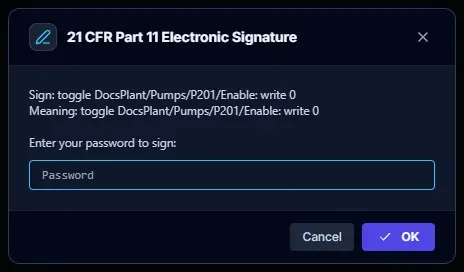
- Title: “21 CFR Part 11 Electronic Signature”.
- What is signed, read-only: “Sign: …”, the tag and the value written.
- The meaning, read-only: the meaning the screen object gives, or else the write itself.
- Your password, empty: it is never pre-filled. There is no name field: the signer is the signed-in user, and the server records the session’s user.
- Cancel writes nothing; the confirm button sends the write with the signature. A wrong password is refused, nothing is written, and the dialog asks again.
3.2 Signature derivation
Section titled “3.2 Signature derivation”- Product
- Data store
- Device or controller
- Person or role
- Data or telemetry
- Command to equipment
- Refusal
Read as text
The signed-in person sends the write with their own password and the meaning of the signature. eaxScada runs the write checks, then verifies the password of the signed-in user. It records ESIG_VERIFIED in the Access audit, with the tag and value signed. It then records the write first in the audit trail, with the signature text: who signed, when, and the meaning. Only then is the value written.
Participants
- Person (person or role): signed in
- eaxScada (product): server
- Access audit (data store): security store
- Audit trail (data store): audit.duckdb
- Controller (device or controller): PLC or device
Steps, in order
- Person → eaxScada (command to equipment): POST /api/tags/write. value, reason, own password, meaning
- eaxScada: The write checks first: permission, the tag, the screen; limits, engineering range, interlocks
- eaxScada: Verifies the signature: the signer is the signed-in user; not the AI co-pilot, not an API token; not locked or disabled; the password is right
- Refused:
- eaxScada → Person (refusal): signature_rejected. 403 when the tag needs it, else 401
- eaxScada → Access audit (data or telemetry): ESIG_VERIFIED, first. write <path> = <value>; meaning
- eaxScada → Audit trail (data or telemetry): MANUAL_OVERRIDE, first. signed by <user> at <time>; meaning
- eaxScada → Controller (command to equipment): Writes the value. through the driver
- eaxScada → Person (reply): Answers with the result
On submission, the server runs the write checks, then verifies the password of the signed-in user against the stored bcrypt hash (the lockout applies) and records ESIG_VERIFIED in the Access audit, with the tag and value signed and the meaning. The signature kept with the write is text, not a hash:
signed by <user> at <UTC time, RFC 3339>; meaning: <meaning>It is stored in the signature field of the write’s MANUAL_OVERRIDE record, which is written before the value is sent. The record hash (2.1) covers that field, so the signature cannot be changed without breaking the chain. Without a meaning, the reason of the write is the meaning.
3.3 A refused signature is not an ended session
Section titled “3.3 A refused signature is not an ended session”A wrong password in a signature dialog refuses the signature, never the session: the dialog stays open with its message and an empty password field, and the person stays signed in. Every route that checks an e-signature answers the same way:
| Answer | When |
|---|---|
403, "status": "signature_refused" |
A wrong password, an unknown or disabled signer, the AI co-pilot, an API token, a tag the signer may not write. |
403, "status": "signature_rejected" |
A tag write signed with a wrong password (POST /api/tags/write, approving an AI setpoint with POST /api/mcp/approve), on a tag that requires a signature or on one that does not. It is journaled (WRITE_DENIED_SIGNATURE_REQUIRED or WRITE_DENIED_SIGNATURE_REJECTED). Earlier versions answered a wrong signature on a tag that required none with 401. |
429 |
The account is locked (section 4.2): 5 wrong passwords from one address lock it from that address, 20 from all addresses lock it everywhere, for 15 minutes, and the right password is refused there while it lasts. |
400 |
A missing password or field. |
503 |
The server could not hand out a ticket (the open-ticket cap, the HA store); 503 AUDIT_NOT_WRITTEN when the signature could not be recorded. |
401 |
No session only ("code": "no_session" where the answer is JSON): sign in again. Never a wrong password. |
This covers the signature-ticket routes (POST /api/auth/signature-ticket, the deploy e-signature, a design review’s decision, a checkpoint revert or delete, the backup settings and recovery key, a report signature and the report archive purge), the genealogy signatures (the signer’s and a correction’s second person’s), applying an AI proposal, the supervisor co-signature of a batch start (its answer stays plain text), and POST /api/auth/signature, the signature eaxPLC asks eaxScada for. Each wrong password counts toward the lockout on every route.
eaxPLC tells the two apart too: a refused signature keeps the person signed in and shows the refusal in the deploy dialog; a missing eaxScada session makes the eaxPLC Studio ask the person to sign in again (Deploy settings).
4. Account lifecycle and IEC 62443 SR 1.3 lockout
Section titled “4. Account lifecycle and IEC 62443 SR 1.3 lockout”To protect plant networks against brute-force and credential-stuffing attacks, eaxScada enforces the IEC 62443-4-2 SR 1.3 account lockout policy (internal/security/manager.go).
4.1 Account states
Section titled “4.1 Account states”| State | Enum | Description |
|---|---|---|
| Active | StatusActive |
Normal. The user can sign in. |
| Locked (automatic lockout) | StatusLocked, lockout_until > 0 |
Frozen after too many consecutive failed attempts. Time-limited: lifts by itself (section 4.3). |
| Locked (administrative lock) | StatusLocked, lockout_until = 0 |
Locked by a security administrator (Security > Users > Lock, or POST /api/auth/users/lock). No expiry: only an administrator’s unlock lifts it. |
| Disabled | StatusDisabled |
Deactivated by the security administrator. Cannot sign in, whatever the password. |
The two kinds of lock share the locked status; lockout_until tells them apart (the automatic lockout always stores a future time). A locked account, of either kind, is refused at sign-in (password, LDAP, OIDC and SAML), for electronic signatures and for PLC tokens, and its open sessions stop working at their next request.
Read as text
An account is ACTIVE. Wrong passwords at sign-in or in a signature are counted; the fifth in a row locks it automatically for 15 minutes, and the right password is refused while it lasts. The next attempt after the 15 minutes makes it active again before the password is checked. An administrator can lock an account with no end time, unlock it, or disable it and enable it again.
States
- DISABLED (state): no sign-in, no signing
- ACTIVE (state): wrong passwords counted
- LOCKED (state): automatic, 15 min
- LOCKED (state): by an administrator
Transitions
- Start → ACTIVE (transition)
- ACTIVE → ACTIVE (transition): wrong password. Each wrong password at sign-in or in a signature counts, fewer than five in a row.
- ACTIVE → LOCKED (transition): 5th wrong. The fifth wrong password in a row locks the account for 15 minutes, recorded ACCOUNT_LOCKED. The right password is refused while it lasts.
- LOCKED → ACTIVE (transition): after 15 min. At the next sign-in or signature after the 15 minutes the account is active again, with no failed attempts, before the password is checked: a wrong password then counts as the first. An administrator's unlock or a password reset also ends it.
- ACTIVE → DISABLED (transition): disabled. An administrator disables the account in the user editor, recorded ACCOUNT_STATUS_CHANGED.
- DISABLED → ACTIVE (transition): enabled. An administrator sets the account active again, recorded ACCOUNT_UNLOCKED.
- ACTIVE → LOCKED (transition): locked by an administrator. No end time; never the last active Administrator, never the administrator's own account. Recorded ACCOUNT_LOCKED.
- LOCKED → ACTIVE (transition): unlocked. Only an administrator's unlock ends it, recorded ACCOUNT_UNLOCKED first. A password reset does not.
4.2 Lockout parameters
Section titled “4.2 Lockout parameters”Wrong passwords are counted per account and per client address, over the last 15 minutes:
- 5 wrong passwords from one address lock the account from that address only, for 15 minutes. The account still signs in from every other address. So someone at a shared screen cannot lock an operator out of every other screen. This lock is recorded as
ACCOUNT_LOCKED_ADDRESS. - 20 wrong passwords from all addresses together lock the account everywhere, for 15 minutes: distributed guessing stays slow. Before this release, 5 wrong passwords from anywhere locked it everywhere.
- A correct password clears the count of its own address only. An administrator’s Unlock or password reset clears every address’s count and lock.
- The client address is the connection’s address, or the one a trusted proxy sends (7.2). A forged
X-Forwarded-Forfrom another machine changes nothing. - The per-address counts are kept in the server’s memory: a restart clears them. The account-wide lock is stored in the node’s security store. On an HA cluster the shared record below also keeps the counts and locks, so a restart of one node does not clear them.
On a high availability cluster, the lockout is shared by the nodes (since eaxScada 528843ae). A single node is unchanged.
- Wrong passwords of sign-ins and of electronic signatures are counted across the cluster. 5 wrong passwords from one address lock the account from that address on every node. 20 from all addresses together lock the account on every node. Both last 15 minutes, as on a single node.
- Each node keeps counting in its own memory, and also merges its counts into one record per account that the cluster replicates, in the HA bucket
ha_lockouts. The node decides from that record, so a wrong password or a lock on any node applies on every node at its next attempt. Two nodes counting at the same moment never lose a count. - Accounts are matched by username. Users stay each node’s own, so create the same accounts on every node. A name that a node does not know is counted on that node only.
- A node that refuses a sign-in because of a lock set by the cluster copies the account lock into its own security store, so Security > Users on that node shows the account as locked.
- A correct password clears the count of its own address on every node. An administrator’s Unlock or password reset on one node clears the lock and every count of the account on all nodes. An administrative lock (4.1) is still each node’s own, like the users.
- The record holds no password. Its key is a SHA-256 hash of the username. Broker users are denied the
ha_lockoutsbucket, as every other HA bucket.
When the shared lockout store does not answer. The cluster fails safe in both directions: an unreachable store never unlocks anything, and never refuses every sign-in.
- If the store does not answer within 500 milliseconds, or cannot be used yet (for example while it is not replicated), that attempt uses the node’s own checks only: its own counts and locks, as on a single node. The node keeps counting.
- The node records
LOCKOUT_SHARED_UNAVAILABLEin its Access audit, at most once a minute, and its HA status shows that sign-in lockouts are per node: in System Health, HA section, and inGET /api/ha/statusunderbuckets, asha_lockouts. - When the store answers again, the node merges the counts and locks it made meanwhile into the store, and records
LOCKOUT_SHARED_RESTORED. A lock made while the store did not answer then holds on every node until it expires. - Limits:
- While the store does not answer, a node does not know about locks that only other nodes set.
- An unlock made while the store does not answer applies on that node only, and is recorded as
LOCKOUT_SHARED_UNAVAILABLE. The other nodes keep the lock until it expires. When the store answers again, a lock it still holds applies on that node again too: unlock the account again then. - Keep the clocks of the nodes in sync (NTP). An unlock from another node is compared with the time the lock was set.
The diagram in 4.1 counts the wrong passwords of sign-ins and of electronic signatures alike. A sign-in with a wrong password answers 401. An electronic signature counts its wrong passwords toward the same lockout, but answers 403 signature_refused and, once locked, 429, never 401: the person stays signed in (section 3.3).
4.3 Automatic recovery (automatic lockout only)
Section titled “4.3 Automatic recovery (automatic lockout only)”When a user under an automatic lockout signs in or signs after the 15-minute window, the account returns to StatusActive with no failed attempts before the password is checked, without an administrator, so a lockout cannot paralyse the plant floor. A wrong password at that attempt counts as the first of a new series.
This applies to the automatic lockout only. An administrative lock never expires: it holds across sign-in attempts and server restarts until an administrator unlocks the account. A password reset by an administrator clears the failed-attempt counter and an automatic lockout, but it does not lift an administrative lock or re-enable a disabled account. Locking an account that is under an automatic lockout turns it into an administrative lock.
A new local password must be at least 12 characters: one an administrator sets when creating, changing or resetting an account, and one a user chooses to replace a default or first password. A shorter one is refused (400, password must be at least 12 characters). Passwords set before this rule keep working until they are changed.
4.4 Audit records
Section titled “4.4 Audit records”| Event | When |
|---|---|
ACCOUNT_LOCKED |
An administrator locks an account (details name the administrator), or the account-wide automatic lockout starts (details give the end time). |
ACCOUNT_LOCKED_ADDRESS |
The account is locked from one client address (details give the address and the end time). |
ACCOUNT_UNLOCKED |
An administrator unlocks an account. |
LOCKOUT_SHARED_UNAVAILABLE |
HA cluster: the shared lockout store does not answer, so this node uses its own lockout checks (at most once a minute; details give since when and why). Also recorded when an unlock could not reach the store: the unlock applies on this node only. See 4.2. |
LOCKOUT_SHARED_RESTORED |
HA cluster: the shared lockout store answers again, and this node merged its counts and locks into it (at most once a minute). |
LOGIN_REJECTED, ESIG_REJECTED |
A sign-in or signature on a locked or disabled account. |
LOGIN_FAILED, ESIG_FAILED |
A wrong password (with the attempt count). |
CROSS_ORIGIN_REFUSED |
A request with a cookie (or a sign-in) from a page of another origin was refused (403, code cross_origin); details give the method, the route and the reason. At most one record a minute per client address. See 7.1a. |
A status change made through the user editor (POST /api/auth/users) is audited the same way.
An account change ends its sessions at once. Disabling, locking or deleting an account, or changing its roles or groups, signs it out everywhere: its sessions end, its live-value sockets close within 3 seconds and its NATS connections are closed. The person signs in again to get their new rights. An account never changes between a person and a viewer identity (4.5).
4.5 Viewing-only stations
Section titled “4.5 Viewing-only stations”A view-only station is a screen, such as a control-room wall or a line panel, that shows the process with nobody signed in. It answers a common need: the process must stay visible, and anyone who needs to act signs in on the same screen. See Set up a view-only station.
What it is. An administrator registers the station and pairs one browser with a one-time code. The browser then holds a station credential in its own cookie. The station views as a viewer identity: an account of its own kind, with no password, that never signs in. Optional address ranges only narrow a station; an address is never an identity.
What it can do. Read, and nothing else:
- only the station’s screens, and only the tags its viewer identity may read;
- alarms, read only, unless the station hides them;
- no command, no acknowledgement, no e-signature, no Studio, no configuration, no records, no API or PLC token, no broker connection, no remote access.
How that is enforced. By the server, by the kind of account, at two layers. A gate refuses every route outside a short reviewed list of reads, and every request other than a read is 401, never run as the viewer identity. Then each write, signature, token and administration path refuses a viewer identity again, whatever roles, groups or rules it holds: an Administrator role given to it by mistake changes nothing. A request with an ended person’s session is never downgraded to the station: it is refused. Refusals are recorded as VIEWONLY_REFUSED.
Every action needs a signed-in person. A person signs in on the station in a dialog over the running screen. From then on the screen has that person’s rights only, and every command, acknowledgement and signature is theirs. When the person signs out, their idle time ends or their session reaches its maximum, the screen returns to viewing only. The station never signs.
IEC 62443-3-3. A view-only station is a read path without identification and authentication (SR 1.1). Treat it as a deliberate exception the asset owner accepts in the risk assessment. It is read only, limited to chosen screens and tag paths, registered per device, revocable at once, and recorded: STATION_* records for its administration, VIEWONLY_START, VIEWONLY_SIGNIN, VIEWONLY_RETURN and VIEWONLY_REFUSED for its use. The refusal by account kind answers SR 2.1 (authorization enforcement).
On a high availability cluster. The stations are replicated between the nodes (since eaxScada df57e95a): a station paired, changed, disabled or deleted on one node is the same on every node, and a disable or a delete stops the screen and ends its sessions on every node within moments. A station change the cluster does not confirm is refused (503 store_unavailable), nothing changed. The system fails closed: a node uses no station credential until it holds the cluster’s stations, a few seconds after it starts or while it has lost the cluster’s change feed (VIEWONLY_REFUSED, “stations not synchronized with the HA cluster”). Viewer identities are each node’s own, like users: a node without a viewer identity of the station’s viewer username refuses the station. Each change a node applies from the cluster is recorded as STATION_REPLICATED. Pairing codes are redeemed only on the node that issued them. Sign-in lockouts are shared by the nodes since eaxScada 528843ae (4.2). A single node is unchanged.
21 CFR Part 11 and EU GMP Annex 11. Viewing only is not a signed-in user. Nothing done on a station is attributable to a person, so a station creates no electronic record and never signs. Every record and every signature on it is made by the person signed in, with their own password.
4.6 Idle time and session maximum
Section titled “4.6 Idle time and session maximum”Every person’s session has an idle time (it ends after this long without input) and a session maximum (it ends this long after sign-in, used or not; never more than 12 hours). Both are set per group, with security defaults for users whose groups set none. The shortest value among a user’s groups applies, and a view-only station’s idle cap shortens it for a person signed in there. New installations start with 30 minutes of idle time; upgraded installations keep idle time off until it is set. See Session limits.
- The server ends the session, not the browser: at the first request past a deadline, and by a sweep every 5 seconds without any request. The session’s live-value socket closes within 3 seconds and its NATS connections are closed.
- Only a person’s input counts as activity: real input in the browser, and the operator and engineering requests the server accepts. Live data, polling and scripts never keep a session alive.
- A countdown warns before the end, with Stay signed in. Open command dialogs close without sending at the end.
- Signatures are bound to the session. A signature ticket is void once the session that started it ends.
POST /api/auth/signature, which eaxPLC calls, accepts a session only within its idle and absolute deadlines. An SSO sign-in on a station gets the station’s idle cap like a password sign-in.
IEC 62443-3-3. The idle time per group, enforced by the server, answers SR 2.5 (session lock after a period of inactivity) and SR 2.6 (remote session termination): eaxCloud remote sessions get the same limits. Session ends are recorded (SESSION_IDLE_END, SESSION_MAX_END, SESSION_POLICY_CHANGED for a change of the limits).
21 CFR Part 11 and EU GMP Annex 11. Part 11 names no automatic sign-out, but auditors look for one under §11.10(d) (limiting system access to authorized individuals) and §11.300 (controls for identification codes and passwords), and Annex 11 §12.1 asks for logical access controls. The idle time with its countdown and server enforcement is the usual answer. eaxScada’s signatures ask for the password every time (§11.200(a)), and a signature cannot be completed after the session that started it has ended.
4.7 Broker connections
Section titled “4.7 Broker connections”Connections to eaxScada’s embedded NATS broker are recorded in the Access audit too.
| Event | When |
|---|---|
NATS_WATCHER_CONNECTED |
A watcher identity (--nats-watcher, EAX_NATS_WATCHERS) connects. User watcher-<name>, the client address, and details naming what it may do: subscribe plc.*.birth, plc.*.status, uns.telemetry.>; publishes nothing. See NATS identities on the broker. |
NATS_AUTH_REJECTED |
A client the broker refuses (a key registered to no device, watcher or active user, a missing or invalid signature, no valid key, token or credentials), with the reason and the client address. At most one record a minute per client name and address; the next record gives the number of rejections not recorded since. |
NATS_CONNECTION_CLOSED |
eaxScada closed a user’s open broker connection, with the reason and the client address: the session ended or was refused, the account is no longer allowed, the user’s rights changed (with the change, for example “rule X deleted by admin”), or the user’s rights could not be read. |
A PLC’s device key connecting is logged (“device connected”), not audited.
A change of rights applies to open broker connections. Changing a topic rule, a role, a group or a group’s roles closes, at once, the open NATS connections of every user whose broker rights change. A change that leaves a user’s rights the same closes nothing. A change made another way (an SSO sign-in that changes the account’s groups, another HA node) takes effect within 2 seconds. A backup restore runs only with the server stopped, so every connection is authorized again at the next start. The client connects again and gets its rights as they are now; its session is not ended. If a user’s rights cannot be read, their NATS connections are closed and new ones are refused (fail-closed), the Administrator’s included. Device, watcher and the server’s own connections are never closed this way.
Rejections are recorded with a limit. A client that retries a refused connection in a loop cannot flood the audit trail:
- one
NATS_AUTH_REJECTEDrecord a minute per client name and address; the port is ignored, since a reconnect comes from another port; - at most 8 client names per address get their own record; the others from that address share one entry;
- at most 1024 entries in all; beyond that, new clients share one entry.
Every rejection is still refused and written to the server log.
5. Role-based access control (RBAC)
Section titled “5. Role-based access control (RBAC)”No client or user has implicit access.
5.1 Six standard roles
Section titled “5.1 Six standard roles”| Level | Role | Privileges |
|---|---|---|
| 100 | Administrator |
Everything: driver configuration, user management, key generation. |
| 80 | Lead_Engineer |
Screen authoring in Dev Studio, eaxPLC program deployment, UDT parameters. |
| 60 | Process_Supervisor |
Recipe editing, production setpoint overrides, alarm shelving. |
| 40 | Shift_Operator |
Runtime monitoring, manual tag commands, alarm acknowledgement. |
| 20 | Compliance_Auditor |
Read-only: audit trail verification, history queries, SOE inspection. |
| 10 | AI_CoPilot |
Governed MCP access. No direct actuation: writes go through the human-in-the-loop queue. |
Two roles exist for system actors and are created by an administrator when needed: Alarm_Manager (alarm handshake) and Genealogy_Capture (genealogy handshake). Their topic write (publish) rules decide which PLC tags those actors may write; a DENY rule wins. Do not give them to people.
5.2 Explicit DENY overrides ALLOW
Section titled “5.2 Explicit DENY overrides ALLOW”In a large plant, an operator may inherit plant-wide permissions but be barred from safety systems.
eaxScada evaluates every matching rule, and any explicit DENY wins over an ALLOW (internal/security/manager.go):
Example
Section titled “Example”- An operator has the role
Shift_Operator. - Rule 1:
ALLOWpublish onPlant/> - Rule 2:
DENYpublish onPlant/Safety/>
When the operator tries to write the tag Plant/Safety/AreaA/EmergencyStop from a screen or the API:
- Both rules match (the parent area and the safety branch).
- The explicit
DENYin rule 2 overrides rule 1. - The request is rejected with
HTTP 403 Forbidden; nothing is written. - The attempt is recorded in the Access audit as
AUTHZ_DENIED, because a deny rule matched, and asWRITE_DENIED. A write refused only because no rule allows it is recordedWRITE_DENIEDalone.
Feature DENY rules and the Administrator
Section titled “Feature DENY rules and the Administrator”A DENY feature rule (target type feature) refuses the right it matches: the right itself, its family (genealogy.*, recipe.*, batch.*), the catch-all * (feature:*) or a prefix ending in * (shiftlog_*, reports*, batch*). For the shift log, Analytics and Reports, genealogy, recipe and batch rights, the right to write screen scripts (screens.script, also refused by screens.*) and the right to write dashboard card code (dashboards.code, also refused by dashboards.*), such a rule refuses the right to the Administrator too: the DENY * that shuts a person out of every feature shuts them out of all of these. The Administrator keeps security administration, so can always remove the rule. The default rules of a new or upgraded install hold no feature DENY, so no one loses a right at the upgrade unless a rule of yours matches. A catch-all or prefix pattern in an ALLOW rule grants none of these rights.
PLC control and server files follow the same rule (16 November):
- PLC control (
plc_control: start, stop, force I/O, deploy and roll back PLC programs). A DENY rule of target type feature or api that matchesplc_control(exactly,*,feature:*or a prefix ending in*such asplc*) refuses PLC control to everyone, the Administrator and the engineer roles included. Before, Lead_Engineer and Administrator held PLC control before any rule was read, so no DENY reached them. Without a matching DENY, level 80 and above (Lead_Engineer, Administrator) hold it as before. An ALLOW grants it only when it namesplc_controlexactly (orfeature:plc_control): an ALLOW*used to grant it and no longer does. - Server files (
server_files.list,.stat,.read,.write,.delete,.mkdir). A DENY*,feature:*or a prefix ending in*now refuses every server file operation, the Administrator included, as a DENY of the operation orserver_files.*already did. An ALLOW still needs the operation’s name orserver_files.*; the catch-all ALLOW*grants none of them.
The permission dialog lists every right, with its module, description and edition badge, and says what a typed catch-all, prefix or DENY affects: see Add a feature permission rule. Per feature: Set up shift logs, Grant report rights, Part and lot genealogy, Record lots and measured amounts.
Rules that cannot be read refuse these rights. When the server cannot read a person’s permission rules, it refuses the shift log, Analytics and Reports, genealogy, recipe and batch, server file, PLC control, screens.script and dashboards.code rights to everyone, the Administrator included: a DENY it cannot see is never taken as no DENY. Except for server files, the reason is “permissions could not be read; <right> refused”; a WARN is logged with the user and the right. A store that holds no rules is not such a failure: the default rights apply. The same holds for every other check: see When the security store cannot be read.
When the security store cannot be read
Section titled “When the security store cannot be read”To decide a right, the server reads the person’s roles and groups, the roles of each group, and the rules of the person, of each role and of each group. When one of these reads fails, the check refuses. A record that no longer exists (a group removed in the meantime) is not a failure: it holds no rules.
| Check | Refused while the rules cannot be read |
|---|---|
| Tag writes and reads, screens | Everyone except a person who holds the Administrator role directly: this role is allowed before any rule is read, as before. |
| PLC control | Everyone, the Administrator, Lead_Engineer and Engineer included (16 November). Before, these roles held directly were allowed before any rule was read. |
| Broker (NATS) connections | Everyone, the Administrator included: the connection is refused rather than opened with a rule set that lacks the DENY rules that could not be read. |
plc.force from an MCP client |
Everyone, the Administrator included. Before, rules that could not be read were skipped and the role allowed the force. |
Genealogy, recipes and batches, Analytics and Reports, the shift log, server files, screens.script, dashboards.code |
Everyone, the Administrator included. |
Role names. When the person’s groups, or the roles of a group, cannot be read:
- Restrictions stay. The person is treated as the AI co-pilot: an AI role held through a group cannot be ruled out, so the AI restrictions apply. The exception is a person who holds the Administrator role directly (it is read with the account): security administration stays open to them, so that the store can be repaired.
- Grants stop. A role name grants nothing while the groups cannot be read: role levels, the auditor’s reads, and the role lists of the shift log and of server file roots. An Administrator role held only through a group grants nothing either.
Sign-in and sessions. A person who signs in while their rules cannot be read gets a session, with permissions: null and a permissions_error (see the sign-in and profile API): an Administrator can then reach security administration to repair the store, while every check above refuses. Each request of a session reads the account again; when the account cannot be read, the request is refused with 401 (“user account no longer active”).
Logs. Each refusal is logged as a WARN with the user, the right and the cause (“permissions could not be read: right refused”; for a session, “session refused: the account could not be read”). For the frequent checks (tags, screens, PLC control, role names, the profile, sessions) at most one line per check and user every 10 seconds, with the number of refusals not logged in between (refusals_not_logged). The cause, such as a database message, is never sent to the client.
When the security store reopens after a failed write
Section titled “When the security store reopens after a failed write”The security store (data/security/scada_security.duckdb) handles a failed write as the other database stores do (17 November). A write that fails in the database (a failed commit, a full disk, an I/O error) closes the store’s file and opens it again before any later change is acknowledged; a change acknowledged after the reopen survives a restart. After every failed write and every reopen, the users, roles, groups, rules, identity-provider settings and API tokens are loaded again from the file before the store serves, so what the server enforces is what the file holds. The audit chain goes on from the file’s last record.
While the store is reopening or down (the reopen failed and is retried, 1 s doubling to 1 min), or its contents could not be loaded again:
| What | While the store does not serve |
|---|---|
| Every permission check | Refused, the Administrator included: tag writes and reads, screens, PLC control, the broker, every feature right. The Administrator bypasses are off, and so is security administration: nothing can be changed through a store that does not serve. The AI co-pilot restrictions apply to everyone. |
| Sessions and API tokens | Each request is refused with 401 (“user account no longer active”). The session is not ended: it works again once the store serves. |
| Sign-in | Refused, with no session: “sign-in refused: the security store is unavailable; try again in a moment”. The same text whatever the password, so it tells nothing about it. |
| Changes (users, roles, rules, tokens) | Refused; nothing is changed, in memory or in the file. |
A sign-in needs its own writes. A sign-in is also refused, with the same text, when the store cannot save its last-login time, a failed attempt (which could lock the account) or the reset of an expired lockout. Before, these writes could fail unnoticed: a failed attempt went uncounted, so the lockout could be bypassed.
Usually the store is open again within seconds. System Health > Database stores shows its live state on the security row (open, reopening, down) with its reopens and last cause: see Database stores. The page itself needs a session, so while the store is down it cannot be opened; the server log can. If it stays down, check the free disk space and the permissions of data/security/; the server log has “security store unavailable: refused” lines with the cause.
This is not the case above, where one read fails while the store serves: there a person holding the Administrator role directly keeps security administration, and a sign-in opens a session with permissions: null.
5.3 Default topic permissions of a new install
Section titled “5.3 Default topic permissions of a new install”A new security store gives the standard roles rights on every tag (>), whatever your tag names are:
| Role | Publish (tag writes) | Subscribe (reads) | Screens |
|---|---|---|---|
Administrator |
> (the role also bypasses topic checks) |
> |
view and edit |
Lead_Engineer |
> |
> |
view and edit |
Process_Supervisor |
> |
> |
view |
Shift_Operator |
> |
> |
view; editing denied |
Compliance_Auditor |
DENY > |
> |
none |
AI_CoPilot |
DENY > |
> |
none |
The role rules say who may write at all. Each tag’s own protections apply on top of them, to every role:
- Write policy: a tag written by a button that requires a confirmation or an electronic signature, or a protected tag, refuses a write without it (
403 confirmation_requiredorsignature_required), whoever sends it and through any API (see Signed commands). - Read-only mappings: a tag mapped read-only to a device refuses every write.
- Plant emergency stop: see below. The AI co-pilot never signals it.
The AI_CoPilot role writes nothing itself. An AI agent proposes a setpoint change (scada_stage_tag_write); a person approves it with their own password, and the write is authorized, checked against the write policy and recorded as that person’s, never as the agent’s.
Narrow the defaults to your plant in Security > Permissions: for example replace the operator’s publish > with Plant/Line1/>, and add a DENY rule on a safety branch. A DENY rule wins over every ALLOW (5.2).
The operator’s emergency-stop signal follows the project setting. The HMI’s “signal emergency stop” control sets one tag, the active project’s safety.plant_estop_tag (Studio, SCADA Project Manager, field Safety: plant emergency-stop signal tag). A project that sets none uses the legacy tag Site1/Safety/PlantEmergencyStop; a new project is created with Plant/Safety/EmergencyStop. The signal raises the critical alarm ALM-PLANT-ESTOP-SIGNAL: it annunciates, it does not stop equipment, so the tag must be an internal tag (a tag mapped to a driver channel is refused). Who may set it:
- a role whose publish rules allow the configured tag (with the defaults:
Shift_Operator,Process_Supervisor,Lead_EngineerandAdministrator); - on an upgraded store, also a role that may publish the legacy path
Site1/Safety/PlantEmergencyStop: that right moves to the configured tag, and only to that tag, not to anything else under its namespace; - a deny rule on the configured tag still wins;
- the AI co-pilot is always refused, whatever its rules say;
- changing the setting (saving or activating a project, or deploying) is refused with
409while the signal is set or its alarm is not back to normal and acknowledged, so an active annunciation never moves or disappears. Reset the signal, acknowledge the alarm, then change the tag.
On an HA cluster projects are replicated, this setting included: a change is saved on the primary and every node applies it. While the signal is active, a node keeps the current tag, logs an error and applies the change once the signal is clear, so an active annunciation is never dropped. A node that becomes primary applies its active project’s setting the same way (see What HA replicates).
Rules you add are evaluated least-privilege, default deny: a path no ALLOW rule covers is refused.
Reading is restricted by the subscribe rules, and defaults to deny. A user receives a tag’s value, alarms, history and audit records only when a subscribe (read) rule of their roles, groups or account allows the tag’s path, and no deny rule matches it. The Administrator role reads everything. This applies to:
| Read path | What a user without read access to a tag gets |
|---|---|
Live data socket (/ws): tag snapshots and updates, alarms, staged AI setpoints, audit events |
Nothing about the tag: a subscription to it is refused, checked when the view subscribes (Live data socket). A permission change closes open sockets within about 3 s; the browser reconnects and subscribes again with the new rights. |
GET /api/tags, /api/alarms, /api/alarms/active, /api/alarms/journal, /api/history |
The tag is left out; a history request naming it is refused (403). |
GET /api/alarms/definitions, POST /api/alarms/test-eval |
Definitions on the tag are left out; adding, deleting or test-evaluating one is refused (403). |
GET /api/audit |
Records about the tag (a write with its old and new value, a refused write, a staged or approved AI setpoint, a recipe setpoint) are left out. Records about anything else are unchanged. |
AI setpoint staging (POST /api/mcp/stage, GET /api/mcp/staged, tool scada_stage_tag_write) |
Staging a change on the tag is refused (403): the staged action shows its current value. Pending actions on the tag are left out. |
| AI gateway (MCP resources and tools) | See MCP AI gateway: topology, alarms and alarm definitions are filtered; free historian SQL needs read access to every tag. |
Tag paths are matched with / as the separator, so Plant/> grants everything under Plant/.
Clients that connect to the embedded broker with their own user credentials or NKey get the same rules as NATS subject permissions (Subject-level access control):
- A tag-path rule applies to the tag’s telemetry subjects,
uns.telemetry.<path with "/" as ".">:Plant/Area/>becomesuns.telemetry.Plant.Area.>.*(one level) and a trailing>stay wildcards. A rule written as a subject (dots, no/, for exampleuns.command.write) and>are kept as they are. - Deny rules apply on the broker too, and a deny wins. In a deny, a
*level denies everything under the levels before it:Plant/*/Tempdeniesuns.telemetry.Plant.>. - A rule that cannot be written as a subject (an empty level, a wildcard inside a level such as
Tank*,>before the end) fails closed: an allow is dropped, a deny denies everything under the levels before the bad one. Each such rule is logged as a warning (NATS permission rule not expressed exactly on the broker: fail-closed). - A role with no subscribe rule gets only its replies (
_INBOX.>) and the PLC API subjects, no telemetry. - A tag-path publish rule grants nothing on the broker: a value is published on
uns.telemetryby eaxScada, and a command carries its tag in the payload. A client that sends commands needs the subject ruleuns.command.write; the write checks then decide which tags it writes. - A tag name that contains
.is published as several tokens, so it shares subjects with deeper paths:Plant/Area/>also coversPlant/Area.X/.... Protect sensitive tags with deny rules. - No user connection gets JetStream or the broker’s own subjects, whatever its role,
>included:$JS.>,$JSC.>,$KV.>,$O.>,$SYS.>,$SRV.>,$MQTT.>and$NRG.>are denied both ways. A client reads live telemetry, not the buffer of theTELEMETRYstream, and cannot touch the key-value stores the server keeps its tags in. - A user publishes on
uns.telemetryonly with a rule that names it (uns.telemetry.>,uns.telemetry.Line1.>). An allow that only happens to cover it, such as>oruns.>, does not grant it. A user with both (>from one role, auns.telemetryrule from another) publishes no telemetry at all, and the conflict is logged. A producer of telemetry, such as eaxPLC, connects as a device with its NKey. - A NATS channel ingests a telemetry message only when its subject names the tag of its payload:
uns.telemetry.Plant.FT101.PVcarriesPlant/FT101.PV, or the message is dropped and counted (eaxscada_uns_ingest_refused_total{reason="TELEMETRY_SUBJECT_MISMATCH"}). A publisher allowed only part of the namespace cannot set another tag by naming it in the payload. - Roles whose rules are only
>or subjects (the rules of a new installation) keep what they had, except JetStream, the broker’s own subjects and telemetry publishing, as above. - A change of these rules reaches connections already open: a connection whose rights change is closed and connects again with the new rights (4.7).
5.4 Where the security store lives
Section titled “5.4 Where the security store lives”Users, roles, groups, role and group assignments, permissions, identity-provider settings and the audit trail persist across restarts in every edition, in the security store under data/security/. The release server uses the embedded database store for every edition; builds without the embedded database (the command-line tools) use the files data/security/security_store.json and auth_audit.jsonl. A store that exists but cannot be opened stops the server; it is never replaced by a new one. A store that fails a write while the server runs reopens and refuses every check meanwhile: When the security store reopens after a failed write.
A new store holds the six standard roles and their default permissions, and no group. Its one account, admin, gets a random first password in data/security/initial_admin_password that must be changed at the first sign-in; see First sign-in. The AI_CoPilot role has no built-in account: an external AI agent connects to the MCP gateway with an account an administrator creates for it. An upgrade never creates, changes or deletes an account. Sample accounts of earlier versions that still have their published password are named in a start-up warning and in a banner of Security > Users.
6. Enterprise single sign-on (Pro and Enterprise)
Section titled “6. Enterprise single sign-on (Pro and Enterprise)”In Pro and Enterprise (and in Free, which is Enterprise for evaluation), eaxScada integrates with corporate identity providers through the FederationManager (internal/security/providers.go): LDAP / Active Directory, SAML 2.0 and OpenID Connect. Starter uses local bcrypt authentication and local users.
| Provider | How a user signs in | Roles |
|---|---|---|
| LDAP / Active Directory | With their directory user name and password, checked by the directory over ldaps://, or ldap:// with StartTLS. Plain LDAP is refused unless it is set explicitly (insecure_no_tls). |
The user’s groups (memberOf by default) mapped to eaxScada roles; a user with no mapped group is refused. |
| SAML 2.0 | Through the identity provider in the browser, started by eaxScada (/api/auth/saml/login); the provider posts a signed response to /api/auth/saml/acs, which must be addressed to eaxScada, within its validity and answer a request eaxScada made. A login started at the identity provider is refused. |
The groups attribute mapped to eaxScada roles. |
| OpenID Connect | Through the identity provider in the browser, with the authorization-code flow (PKCE, state and nonce); eaxScada never sees the password. It checks the ID token’s signature, issuer, audience, expiry and nonce. | The groups claim (groups by default) mapped to eaxScada roles. |
6.1 Just-in-time provisioning
Section titled “6.1 Just-in-time provisioning”The first time a corporate user signs in through SSO:
- If the user does not exist yet, eaxScada creates a local user record with
StatusActive. - Roles are assigned from the SAML assertion or the LDAP group memberships.
6.2 Provider self-test (/api/auth/providers/test)
Section titled “6.2 Provider self-test (/api/auth/providers/test)”Check SSO connectivity and latency without signing out:
curl -X POST http://localhost:8080/api/auth/providers/test \ -H "Content-Type: application/json" \ -d '{"provider_id": "corp-ad-ldap"}'Response:
{ "status": "ONLINE", "provider": "corp-ad-ldap", "type": "LDAP", "latency_ms": 4.2, "tls_handshake": "TLS_ECDHE_RSA_WITH_AES_256_GCM_SHA384", "bind_success": true}7. Network trust: origins, proxies and live-data sockets
Section titled “7. Network trust: origins, proxies and live-data sockets”7.1 Who may open the live-data socket (/ws)
Section titled “7.1 Who may open the live-data socket (/ws)”The studio and the operator runtime receive live tag and alarm values over the /ws WebSocket. A browser attaches the session cookie to a WebSocket handshake whatever page starts it, so eaxScada checks the handshake’s Origin:
- The server’s own origin is accepted: the scheme and host the browser used to reach eaxScada (the request’s
Host, withhttpswhen the connection is TLS). - An allow-listed origin is accepted:
server.allowed_origins, for a portal on another host that embeds the HMI. Each entry isscheme://host[:port]; the scheme and port are part of the origin. The same list lets those pages send requests that change something with the cookie (7.1a). - Any other origin is refused with
403, logged (WebSocket refused, reasonorigin) and counted ineaxscada_websocket_refused_total{reason="origin"}. - No
Originheader means the client is not a browser. It is accepted only when it carries its token itself (Authorization: Bearer ...or?token=), never with a session cookie alone.
server: allowed_origins: - "https://hmi.plant.example"eaxPLC’s telemetry socket (/api/telemetry) applies the same same-origin rule.
7.1a Cookie-authenticated requests from another origin
Section titled “7.1a Cookie-authenticated requests from another origin”The session cookie is SameSite=Lax and the station cookie Strict, so a page on another site cannot send them. A page of the same site can: another application on a sibling subdomain (tools.plant.example next to hmi.plant.example) or on another port of the same host. Its POST would carry the operator’s cookie to routes that write to equipment. So eaxScada checks where every request that changes something comes from (cross-site request forgery protection):
- What is checked: a
POST,PUT,PATCHorDELETEthat a cookie authenticates: the session cookie (scada_session), the olderscada_tokencookie, or a view-only station’s cookie. The sign-in routes/api/auth/loginand/api/auth/change-default-passwordare checked even without a cookie, so that a page of another origin cannot sign the browser in as an account of its choice. - What is accepted: a request from the server’s own origin (the scheme and host the browser used, as in 7.1; behind a trusted proxy also its
X-Forwarded-HostandX-Forwarded-Proto), and from an origin listed inserver.allowed_origins. eaxScada reads what the browser says and a page cannot change:Sec-Fetch-Site, elseOrigin, elseReferer. - What is refused: a request from any other origin (another port, a sibling subdomain), and one whose origin is opaque or malformed (
Origin: null, as from a sandboxed frame or a local file). The answer is403with"code": "cross_origin"and the reason; nothing runs. - The record: each refusal is recorded as
CROSS_ORIGIN_REFUSEDin the Access audit, with the method, the route and the reason, at most once a minute per client address, so a page retrying in a loop cannot flood the trail. The refusal is answered whether or not the record is written. - What is unaffected: clients that send their token in the
Authorizationheader (API tokens, PLC tokens, the eaxCloud remote-access responder, which presents its own fixed origin); the single sign-on callbacks, which the identity provider posts from its own site;GET,HEADandOPTIONS(the/wshandshake keeps its own check, 7.1); and a request with none of the three headers, which is not a browser (a script or a tool that sends a cookie it was given).
A portal on another origin that sends commands to eaxScada with the operator’s session needs its origin in server.allowed_origins (or EAX_ALLOWED_ORIGINS). The same list allows the /ws socket and these requests; there is no separate list.
7.1b Where the browser keeps the session
Section titled “7.1b Where the browser keeps the session”A browser holds its session in the scada_session cookie only. The cookie is HttpOnly: a script in the page cannot read it, so a script injected into a page cannot copy a long-lived credential.
- The session token is never kept in Web Storage. The sign-in page, the runtime’s in-place sign-in and the Studio keep no token in
localStorageorsessionStorage, on a view-only station or not. Browser pages send noAuthorization: Bearerheader; every page request and the/wssocket use the cookie. - An old token is removed. A
scada_tokenan older version left in Web Storage is removed when a page loads and at every sign-in. - What stays:
scada_user, the account’s public fields (name, roles, no secret), stays inlocalStorageoff a station, for the user badge. A station keeps nothing. - Lifetime: unchanged. The cookie ends with the server session (idle time, session maximum, sign-out; see Session limits). Sign-out still ends the session on the server and clears the storage.
- Requests that change something with the cookie must come from eaxScada’s own origin (7.1a).
- Programmatic clients are unaffected. API tokens, MCP clients, eaxPLC and eaxCloud remote access still send
Authorization: Bearer. A custom script or bookmarklet that readlocalStorage.scada_tokenno longer finds a token there. Give it an API token instead.
After the sign-in page. The redirect parameter of /login is followed only when it is a path of this site. It must start with one /, not // or /\, contain no backslash or control character, and resolve to this origin. Anything else goes to /. So a link such as /login?redirect=//other.example cannot send the user to another site after a sign-in.
7.2 Trusted reverse proxies (server.trusted_proxies)
Section titled “7.2 Trusted reverse proxies (server.trusted_proxies)”- Service or process
- Person or role
- External system
- Check or decision
- Trust boundary
- Data or telemetry
- Refusal
Read as text
A reverse proxy listed in server.trusted_proxies forwards the client's request; from it, eaxScada takes the client address from X-Forwarded-For, read from the right past every trusted proxy, or from X-Real-IP, and the public scheme and host. From any other peer those headers are ignored and the connection's own address counts. The /ws origin check then accepts the server's own origin or an allowed origin, and answers 403 otherwise.
Parts
- eaxScada server (trust boundary)
- Client (person or role): browser, program
- Reverse proxy (service or process): listed in server.trusted_proxies
- Any other peer (external system): not in the list
- Client address (check or decision, inside eaxScada server): trusted peer: X-Forwarded-For read from the right past each trusted proxy, or X-Real-IP; any other peer: its address
- /ws origin check (check or decision, inside eaxScada server): the server's own origin (host and scheme from a trusted proxy) or allowed_origins; no Origin: a token, no cookie
Connections
- Client → Reverse proxy (data or telemetry). The client sends its request to the reverse proxy.
- Reverse proxy → Client address (data or telemetry). From a trusted proxy eaxScada believes X-Forwarded-For, X-Real-IP, X-Forwarded-Proto and X-Forwarded-Host.
- Any other peer → Client address (data or telemetry): headers ignored. From any other peer the forwarding headers are ignored: any client can write them.
- Client address → /ws origin check (data or telemetry): scheme, host
- /ws origin check → Any other peer (refusal): 403. A /ws handshake from another origin, or without an Origin and with a session cookie only, is refused with 403.
eaxScada records a client address in the audit trail (sign-in, sign-in failures, electronic signatures, tag writes), uses it for per-address limits, and checks it for the /metrics localhost rule. By default that address is the TCP connection’s: X-Forwarded-For, X-Real-IP, X-Forwarded-Proto and X-Forwarded-Host are ignored, because any client can send them.
Behind a reverse proxy, list the proxy’s addresses (CIDRs or single addresses). From those peers only, eaxScada takes the client address from X-Forwarded-For, read from the right past every trusted hop (a value the client put on the left cannot win), or from X-Real-IP; and it takes the public scheme and host from X-Forwarded-Proto and X-Forwarded-Host for the origin checks (the /ws socket, 7.1, and requests that change something, 7.1a). When the proxy is not listed here, a proxy that rewrites Host makes the browser’s own origin look foreign, and both checks refuse it.
server: trusted_proxies: - "127.0.0.1/32" # a proxy on the same machine - "10.20.0.0/16" # the DMZ proxiesPaths the proxy must pass. Besides the signed-in routes (/api/, /ws, the Studio and /runtime), eaxScada serves a few public paths that need no sign-in and hold no site or user data: /login, /favicon.ico, /static/ and, for the installable app, /manifest.webmanifest and /sw.js (GET only). A proxy that blocks /manifest.webmanifest or /sw.js leaves eaxScada working in the browser, but the app cannot be installed. See Install eaxScada as an app.
The environment variables EAX_TRUSTED_PROXIES and EAX_ALLOWED_ORIGINS (comma-separated) replace these lists in containers. An entry that is not an address, CIDR or origin stops the server at startup rather than trusting nobody or everybody by accident.
A proxy that routes only part of the API. The Studio, the runtime and the history page ask three optional routes in the background: /api/remote/sessions (the remote-session banner), /api/collab/reviews?live=1 (the live-change chip) and /api/genealogy/status (the genealogy entry). When one answers 404, the page stops asking it, and so do the next pages of the same browser tab for 10 minutes. After a 403 the page stops asking until it is reloaded. A route that does not answer, or answers 408, 429 or 5xx, is asked less often, the wait doubling from 15 s up to 5 minutes; a 2xx brings back the normal rhythm. So a route you block at the proxy with 404 or 403 costs one request per page, and a route you open again later is asked again in a new tab, after 10 minutes in the same tab, or at the next page load after a 403. Nothing is shown to the user. Buttons and dialogs that call these routes are not affected.
The /metrics localhost rule (metrics.allow_localhost) follows the same trust: a request with forwarding headers from an untrusted peer is never “local”, and behind a trusted proxy both the proxy and the client it names must be on the loopback interface.
7.3 WebSocket limits
Section titled “7.3 WebSocket limits”| Limit | eaxScada /ws |
eaxPLC /api/telemetry |
Past the limit |
|---|---|---|---|
| Largest client message | 64 KiB (the browser sends only its tag subscriptions on /ws) |
1 MiB (a watch list of 2000 symbols) | Socket closed with 1009 |
| Client messages per second | 20, burst 40 | - | The message is refused (SUBSCRIBE_REFUSED rate) |
| Tags and views one socket subscribes | server.ws_max_tags, default 50,000; server.ws_max_views, default 256 |
- | The tags past it are not subscribed (limited); a new view is refused |
| Sockets per session | server.ws_max_per_session, default 8 |
--ws-max-per-session, default 8 |
Socket closed with 1008, logged and counted |
| Sockets per client address | server.ws_max_per_ip, default 32 |
--ws-max-per-ip, default 32 |
Socket closed with 1008, logged and counted |
| Messages waiting to be sent to one socket | server.ws_send_queue, default 4096 |
- | Socket closed with 1013 (try again later) and logged; the browser reconnects and subscribes again |
For the socket caps, 0 keeps the default and a negative value removes the cap (except ws_send_queue, which must not be negative). ws_max_tags and ws_max_views take 0 for the default or a value in their range (1 to 500,000, 1 to 4,096); out of range, the server does not start. Tag values never fill the send queue: each socket’s changes are merged and sent as one batch every 100 ms (server.ws_batch_ms), at most two batches wait for a socket, and a slow socket gets the latest values, not a backlog. See How live values reach screens.
Each /ws socket has its own send queue and writer: a browser that stops reading (a frozen tab, a saturated link) is closed once its backlog is full, and never delays the other sockets. Each socket receives its messages in order. Refusals are counted in eaxscada_websocket_refused_total{reason="per_session"|"per_ip"} and eaxplc_websocket_refused_total{reason="per_session"|"per_ip"}; eaxplc_websocket_open gives the telemetry sockets open now.
7.4 What the PLC forwards to eaxScada
Section titled “7.4 What the PLC forwards to eaxScada”The eaxPLC studio’s AI assistant panel reaches eaxScada through the PLC with the user’s credential. The PLC forwards only the exact assistant endpoints the panel uses (status, projects, chat, conversations, proposals and their apply and reject), built from fixed path segments; only the project query parameter is passed on. A path with .., an encoded separator or dot (%2f, %2e, %5c), double encoding or a backslash is refused before anything reaches eaxScada. eaxScada’s own calls to a PLC (/api/plc/audit/*, /api/plc/config, /api/plc/forces, the MCP PLC tools) use fixed API paths and refuse any other shape the same way.
8. See also
Section titled “8. See also”- The Unified Namespace: authentication on the NATS broker.
- Operator runtime: e-signatures in the operator interface.
- Set up a view-only station and Session limits.
- MCP AI gateway: how the human-in-the-loop queue uses this security model.
- Part and lot genealogy: the genealogy ledger, its rights and its personal data.