

Let the AI assistant check a deploy
Before people approve a deploy, the AI assistant reads what the deploy changes and points out what deserves a second look: a button moved to another tag, a missing tag, a confirmation removed, text that tries to instruct a reviewer. Its findings are advisory: the assistant never approves, never rejects and never deploys. People decide, and the approvers confirm they saw the findings.
Before you start
Section titled “Before you start”| What | Who | Edition |
|---|---|---|
| Ask for the assistant’s check with a review | Lead_Engineer or Administrator | Pro, Enterprise |
| Run the check again | Lead_Engineer or Administrator | Pro, Enterprise |
| Approve or reject | a signed-in person at the policy’s level, never the requester | Pro, Enterprise |
| Require the assistant’s check before a deploy: switch it on | Lead_Engineer | Pro, Enterprise |
| Switch the required check off | Administrator | Pro, Enterprise |
| The two-person review policy | Enterprise |
- The AI assistant must be enabled and set up, and the project must allow at least one enabled provider. See Allow the AI assistant in a project. The check runs on the project’s provider (its default when allowed and enabled, else the first allowed enabled one), so a project kept on local models is checked by a local model.
- The check is for project deploys (screens, pages, docks, dashboards, navigation). A review of a PLC program gets no assistant check.
- You know the review flow: Review screens and PLC programs before deploy.
1. Ask for the check when you request a review
Section titled “1. Ask for the check when you request a review”- Choose Deploy → Request review… and pick Project.
- Tick Ask the AI assistant for an advisory review of the deploy as well (it never approves).
- Give the title, tick the reviewers and press Request review.
The check starts in the background, as you: the review page opens at once and shows the check running.
When the assistant cannot review the project (switched off by configuration, not in the edition, not set up, or no allowed provider is enabled), the option is disabled with the reason. A request sent through the API with assistant: true is then refused 409 assistant_unavailable.
2. What the assistant reads, and what it cannot do
Section titled “2. What the assistant reads, and what it cannot do”The assistant is given what the deploy changes, the deploy preview first:
- the command targets added, removed and changed, with their element and tags;
- the screen scripts added or removed;
- the write-policy changes (confirmations, e-signatures, limits, interlocks, screen access levels);
- then, for each changed screen, its elements added, removed and changed, with the fields and texts.
It may read the project further with read tools only (the project, screens, pages, alarms, eaxTags and scripts, UDTs, driver tags, the PLC program and symbols), with your rights, through read requests only. It never reads people, roles, groups or driver channels. Any other tool it asks for (to propose, approve, decide, deploy or write) is refused before it reaches the server, and listed on the check.
The check writes only its own record and its comment threads. It holds no handle on decisions, signatures or deploys: a decision coming from it would be refused. The AI co-pilot account cannot start a check, and still cannot sign, decide or acknowledge a deploy.
3. Read the findings
Section titled “3. Read the findings”When the check completes, the review page shows the AI assistant (advisory) card:
- the summary, for example advisory review: 2 findings (2 high);
- Reviewed by: the provider’s configured name, and whether it runs locally or in the cloud;
- Manifest checked: the deploy manifest the assistant was given;
- its summary, and the tools that were refused to it;
- the findings in a grid: severity (info, low, medium, high, blocking), the finding, where (screen, element, tag) and the detail, with filters and Export CSV. High and blocking findings carry a warning marker, and a chip above the grid (2 to read before deciding) filters to them. Show comment opens the finding’s comment.
Each finding on a screen element is also a comment thread on that element: a pin in the designer, written by ai-assistant and labelled AI · advisory. When the element is no longer on the screen, the comment pins the screen; a finding with no place on a screen stays on the check only. Reply to it and resolve it like any other comment.
A finding of any severity, blocking included, is the assistant’s opinion. It never blocks the deploy by itself.
When the check fails
Section titled “When the check fails”The check is bound to the manifest it was given. If the project is saved while it runs, it ends failed (“the project changed while the assistant was checking it”) and does not count: request a re-review. After a failure (the provider not answering, for example), press Run the check again.
A check is refused for a review whose manifest is no longer the one to deploy, and while a check of the same review is running. Once the check has completed and approvals were given on the review, it is not run again: request a re-review to check again.
4. Approve, having seen the findings
Section titled “4. Approve, having seen the findings”- Press Approve… on the review.
- While the check is running, the approval is refused: wait until it completes.
- When the completed check has findings, the dialog shows their count. Tick I have seen the assistant’s N finding(s). They are advisory; I decide.
- Check the meaning you sign, enter your password and press Sign and approve.
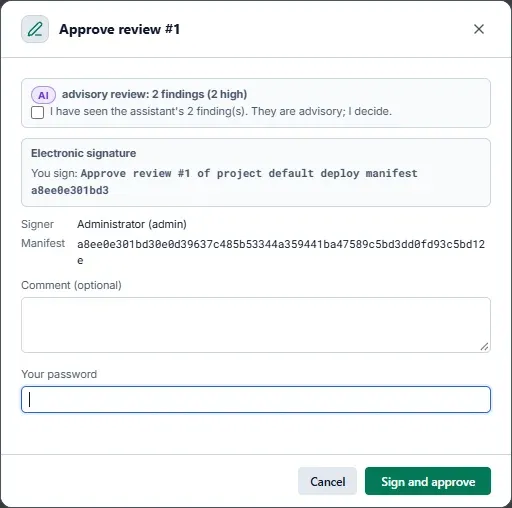
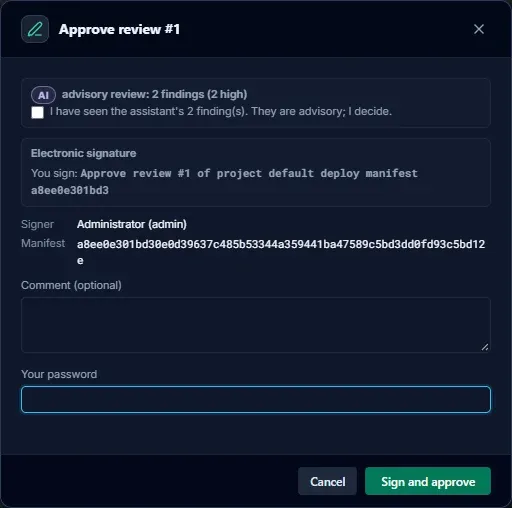
Without the confirmation, the approval is refused (409 assistant_findings_unseen) and the signature ticket is not used: tick the box and sign again. The decision records which check you confirmed, and the audit trail says the approver saw it.
5. Require the check before a deploy (optional)
Section titled “5. Require the check before a deploy (optional)”- Open Project → Open / Switch Project… and its Review before deploy section.
- With the review policy on (One approver, or Two-person review in Enterprise), tick Require the AI assistant’s check.
- Press Save review policy.
A deploy then also needs the approving review’s assistant check to have run to completion on exactly the manifest the deploy publishes. A check not run, still running, failed, or completed on another manifest refuses the deploy (409 REVIEW_REQUIRED, with the reason). Only approvals that confirmed the check’s findings count toward the policy’s approvals. The Deploy dialog shows the check with the review: Assistant check (required): advisory review: 2 findings (2 high).
Switching the requirement on needs Lead_Engineer; switching it off is an Administrator’s change. Every change is journaled as REVIEW_POLICY_CHANGED (“assistant check required” in the policy text).
While the assistant is unavailable to the project, the check is not required, even when the setting is stored: the section shows it as not in force, and deploys need the review alone.
Audit trail
Section titled “Audit trail”| Record | When |
|---|---|
ASSISTANT_REVIEW_STARTED |
a person started the check (written first) |
ASSISTANT_REVIEW_COMPLETED |
by ai-assistant, before the check is stored: the summary, the findings’ digest, the tools run and refused |
ASSISTANT_REVIEW_FAILED |
the check failed, with the reason |
COLLAB_THREAD_CREATED |
by ai-assistant, one per finding posted as a comment |
The security audit records AI_REVIEW and AI_REVIEW_FAILED with the provider, the tokens and the tools.
Through the API
Section titled “Through the API”POST /api/collab/reviewswith"assistant": trueasks for the check with the review.POST /api/collab/reviews/{id}/assistant-checkruns it (again);202.GET /api/collab/reviews/{id}carriesassistant_checkandassistant_availability.POST /api/collab/reviews/{id}/decidecarries"assistant_check_seen": "<digest>"when the completed check has findings.PUT /api/collab/policycarries"assistant_check": true|false; a body without it keeps the stored value.
Fields and refusals: Design reviews API.
Not covered
Section titled “Not covered”- PLC program reviews get no assistant check.
- A check started just before an approval is signed can still be running when the approval is stored. The required check still waits for it to complete.
Result
Section titled “Result”Every project review can carry the assistant’s advisory findings, pinned where they apply. Approvers confirm they saw them before they sign, and, when the project requires it, no deploy goes out without a completed check of exactly what is deployed.