Storage tank card
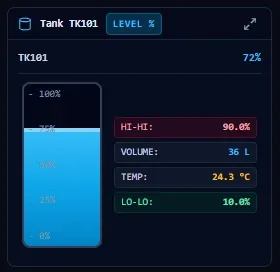
A storage tank on one card: the level drawn in the tank, the volume and the temperature, with HI-HI and LO-LO lines drawn as display marks. The values read <folder>/Level, /Volume and /Temperature unless a tag is set for one of them.
| Card palette | Full Industrial Faceplates › Storage Vessel / Tank |
| Card kind | storage_tank (body.faceplate) |
| Default size | 3 × 3 grid cells |
Settings
Section titled “Settings”Double-click the card (or select it and press Enter) to open its settings. The settings are stored in the card’s body.params.
| Shown as | Key (body.params) |
Type | Unit | Default | Allowed values | What it does |
|---|---|---|---|---|---|---|
| Equipment name | tankName |
Text | "Storage Tank" |
The name shown on the card. | ||
| Tag folder | tagPrefix |
Tag path (read) | "" |
The folder holding the equipment’s tags (Plant/Processing/Pumps/P101). Each value reads <folder>/<signal> exactly, unless a tag is set for that signal. Settings hint: The folder holding this equipment’s tags, e.g. Area/Equipment. Each value below reads <folder>/<name> exactly, unless a tag is set for it. | ||
| Level tag (optional) | levelTag |
Tag path (read) | — | The level tag. Empty: <folder>/Level. Settings hint: Empty = <folder>/Level. | ||
| Volume tag (optional) | volumeTag |
Tag path (read) | — | The volume tag. Empty: <folder>/Volume. Settings hint: Empty = <folder>/Volume. | ||
| Temperature tag (optional) | temperatureTag |
Tag path (read) | — | The temperature tag. Empty: <folder>/Temperature. Settings hint: Empty = <folder>/Temperature. | ||
| HI-HI limit shown (%) | hiHiLimit |
Number | % | — | Level of the HI-HI line drawn on the tank. Display only: alarms are set in the alarm definitions. Settings hint: Display only; alarms are configured in the alarm definitions. | |
| LO-LO limit shown (%) | loLoLimit |
Number | % | — | Level of the LO-LO line drawn on the tank. Display only. |
Quality and parameters
Section titled “Quality and parameters”Values come with their quality: a Bad or Uncertain value is marked on the card, and a value not yet received shows a dash, never an invented number. A card on a screen with parameters takes {Name} in its tag paths.
Examples
Section titled “Examples”Tank TK102 with its level only
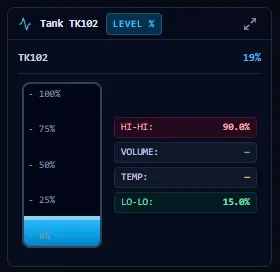
Section titled “Tank TK102 with its level only”TK102 has only a level tag: the volume and temperature show a dash, never an invented number.
- Add the card; Tag folder
Plant/Processing/Tanks/TK102, Equipment nameTK102. - HI-HI limit shown 90, LO-LO limit shown 15.