

Grant the right to write screen scripts
Decide who may write the code that runs on the operators’ screens. A screen script runs in the operator’s browser under the operator’s session: whatever it does, it does as the operator who pressed the button. Writing one is therefore a right of its own, screens.script, apart from saving screens.
Who holds it
Section titled “Who holds it”| Account | screens.script |
|---|---|
| Administrator | Yes, unless a DENY rule takes it away (the Administrator keeps security administration, so can always remove the rule). |
| Lead_Engineer, and any custom role of level 80 (engineer) or more | Yes, unless a DENY rule takes it away. |
| Process_Supervisor, Shift_Operator, Compliance_Auditor, any role below level 80 | Never, whatever an ALLOW rule says. |
The AI co-pilot (an account holding AI_CoPilot, whatever its other roles) |
Never. An AI client does not write code that runs in the operator’s page; a person adds scripts in the Studio. |
These are the roles that could already save screens: after the upgrade nothing is to migrate, and your engineers keep writing scripts. If the permission rules cannot be read, the right is refused to everyone, the Administrator included.
What needs the right
Section titled “What needs the right”The server compares the scripts of the document you save with the stored version’s (each script’s kind and text). Only adding or changing script text needs the right. A script is:
- a Run script action (
run_command) with a command, on an object, a condition or an event; - a screen’s or a popup’s startup script (on-startup action Script);
- any other
scriptmember of an object.
Bindings, conditions, chart options and text templates are expressions, not scripts: they need no right.
Needs screens.script |
Needs no right |
|---|---|
| Adding a script; changing a script’s text | Moving, resizing, restyling or renaming objects of a screen that has scripts |
| Copying or pasting an object that has a script (one more of the same script) | Renaming the screen |
| Turning a stored command or startup text into a script (action type Run script, startup type Script) | Removing a script, or an object that has one |
| Duplicating a screen that has scripts | Saving a screen whose scripts you did not touch |
| Restoring a screen version, or reverting a checkpoint, whose scripts differ from the stored ones |
The same check covers every way a screen, popup, display, report or component is saved: the Studio, version restore, duplicate, Find and replace, Make translatable, an AI proposal applied by a person (checked as that person), the MCP screen tools, starter templates and checkpoint reverts.
Take the right from an engineer role
Section titled “Take the right from an engineer role”To let a role design screens but not write scripts (for example a contractors’ group at engineer level):
- Open Security > Permissions and add a rule:
- Target Role (or group, or user): the role, for example
Contractor_Engineer; - Target Type: SCADA Feature;
- Action:
execute(not read for feature rules); - Target Subject / Pattern:
screens.script(orfeature:screens.script). A wider pattern denies it too:screens.*(everyscreens.right), the catch-all*(feature:*) and any other prefix ending in*; - Effect: DENY.
- Target Role (or group, or user): the role, for example
- Save. It applies at the user’s next save.
A matching DENY rule that applies to an Administrator (through their user, a role or a group) takes the right from them too. Before you upgrade, check your DENY rules with *, feature:* or another pattern ending in *: they took no screens.script before, and now they do. An ALLOW rule never gives it to a role below level 80: raise the role’s level instead, if that role should write scripts.
What a refused save looks like
Section titled “What a refused save looks like”The save stores nothing. The Studio says why, naming the script that was added or changed:
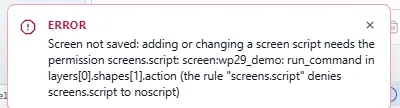
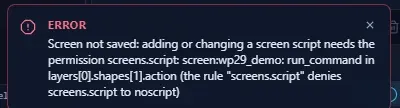
Over HTTP the answer is 403:
{ "error": "adding or changing a screen script needs the permission screens.script: ...", "status": "script_permission_required", "code": "SCREEN_SCRIPT_PERMISSION", "permission": "screens.script", "doc": "screen:line1", "scripts": [{ "kind": "run_command", "where": "layers[0].shapes[1].action" }]}kind is run_command, startup or script; where is the member’s path in the document (never the script’s text). A refused checkpoint revert answers the same way.
Each refusal is recorded in the Access audit as SCREEN_SCRIPT_REFUSED, with the user, the document and the number of scripts, and logged by the server.
Related
Section titled “Related”- Migrate screen scripts to the sandbox: the sandbox, and the project setting Legacy screen scripts (Administrator only).
- Script a screen
- Why screen scripts run in a sandbox
- Keep accounts and audit trails in order