

Alarms
Migrated page, not yet verified against the current code. Treat values, paths and examples as indicative until this notice is removed.
eaxScada includes an alarm engine (internal/alarms/alarms.go) that implements the five-state lifecycle of ANSI/ISA-18.2-2016 (Management of Alarm Systems for the Process Industries). Every edition has the full lifecycle, deadbands and shelving. Every edition also keeps a queryable Sequence of Events journal in the columnar historian engine.
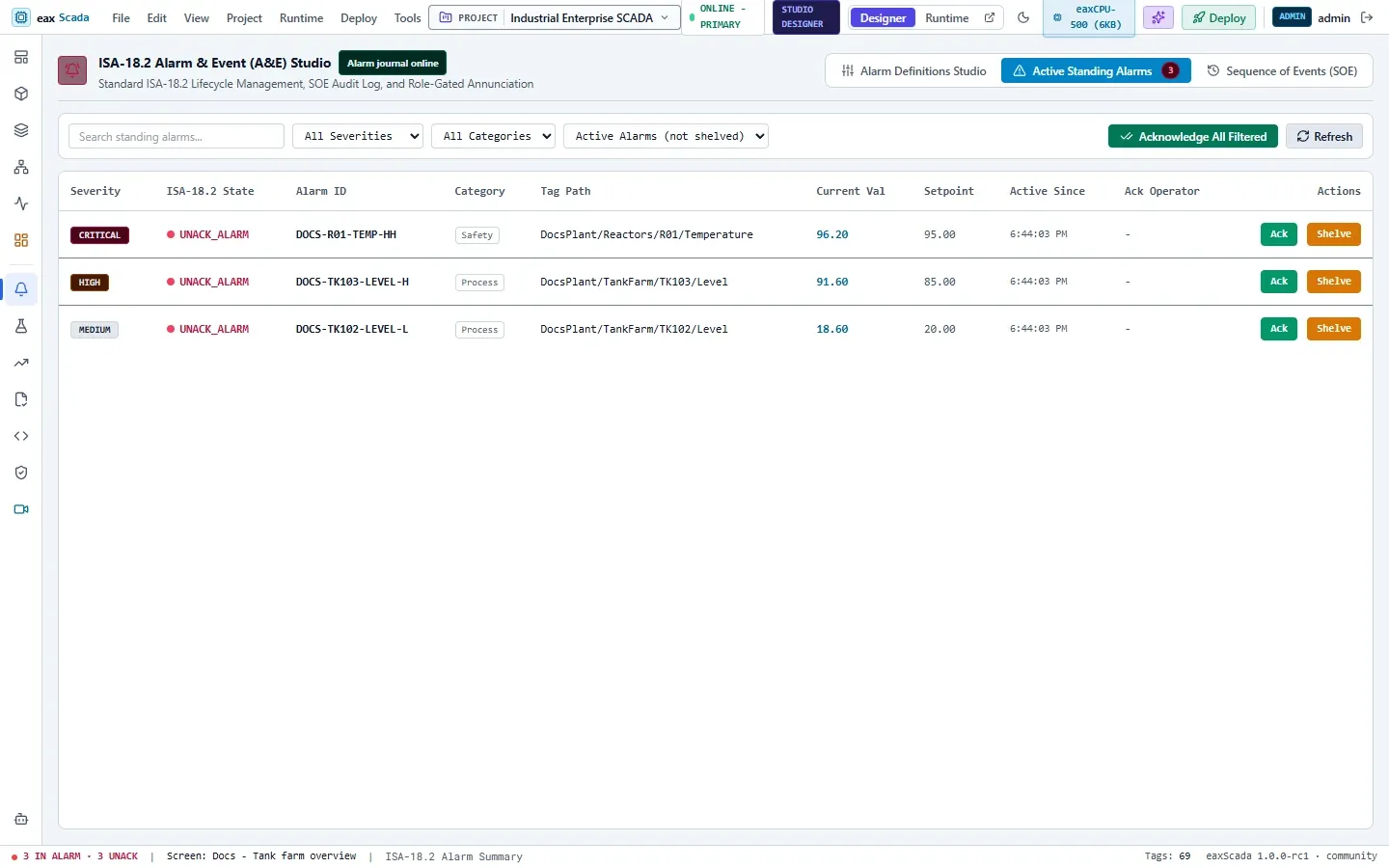
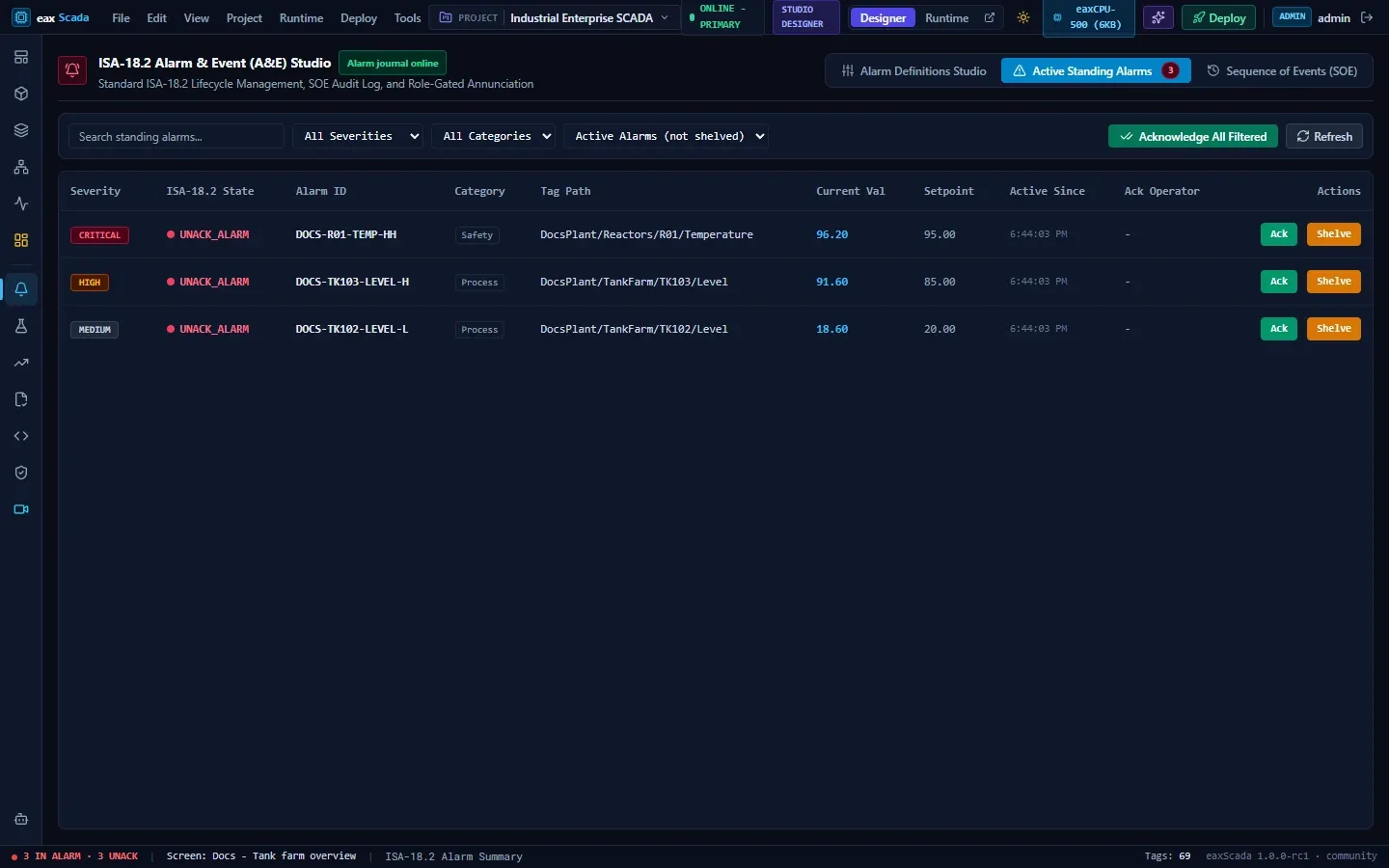
1. The ISA-18.2 state machine
Section titled “1. The ISA-18.2 state machine”Read as text
An alarm starts in NORMAL. When its condition is met it trips to UNACK_ALARM. From there it is either acknowledged (ACK_ALARM) or its condition clears first (RTN_UNACK). Both paths lead back to NORMAL. An operator can shelve an alarm for a set time, whatever state it is in.
States
- NORMAL (state): within limits, no alarm
- UNACK_ALARM (state): active, not acknowledged
- RTN_UNACK (state): cleared, not acknowledged
- ACK_ALARM (state): active, acknowledged
- SHELVED (state): suppressed for a set time
Transitions
- Start → NORMAL (transition)
- NORMAL → UNACK_ALARM (transition): condition met, after the trip delay. An alarm that needs no acknowledgement goes straight to ACK_ALARM.
- UNACK_ALARM → RTN_UNACK (transition): clears before acknowledgement
- RTN_UNACK → UNACK_ALARM (transition): trips again
- RTN_UNACK → NORMAL (transition): acknowledged
- UNACK_ALARM → ACK_ALARM (transition): acknowledged
- ACK_ALARM → NORMAL (transition): condition clears
- From any state → SHELVED (transition)
- SHELVED → NORMAL (transition): shelve ends or is lifted. If the condition is still met, the alarm trips again at once.
States
Section titled “States”NORMAL: the process value is within limits. No alarm.UNACK_ALARM: the process value crossed the setpoint. The alarm is active and needs acknowledgement. It blinks and can sound.ACK_ALARM: the operator acknowledged; the condition is still abnormal. Blinking stops and the indicator turns solid.RTN_UNACK: the process returned to normal before acknowledgement. Acknowledgement is still needed, to confirm the transient was reviewed.SHELVED: the operator temporarily suppressed the alarm for an authorised duration.
2. Condition types and deadbands
Section titled “2. Condition types and deadbands”| Condition | Trips when | Returns to normal when |
|---|---|---|
HIGH_HIGH / HIGH |
Val ≥ Setpoint |
Val < Setpoint − Deadband |
LOW_LOW / LOW |
Val ≤ Setpoint |
Val > Setpoint + Deadband |
DEVIATION_HIGH |
(Val − Target) ≥ Setpoint |
(Val − Target) < Setpoint − Deadband |
RATE_OF_CHANGE |
abs(dVal/dt) ≥ Setpoint |
abs(dVal/dt) < Setpoint − Deadband |
BAD_QUALITY |
the tag’s value is Bad (cannot be read) | the tag reads again (Good or Uncertain) |
No chattering: the deadband keeps a noisy signal that hovers at the threshold from producing hundreds of nuisance transitions.
Values that cannot be read
Section titled “Values that cannot be read”An alarm is evaluated only on a value that is a reading:
- A Bad value holds every alarm of its tag. The alarm keeps the state it had: it neither trips nor returns to normal on a Bad value. A pending trip or clear delay is cancelled, and the alarm shows the last reading. A rate-of-change alarm never measures across a Bad spell. When the tag reads again, the alarm is evaluated normally.
- Each alarmed tag gets one “Signal unreadable” alarm (id
ALM-QUALITY-…), in alarm while the tag is Bad. Its priority is the highest of the tag’s alarms. It is not raised before the tag’s first reading, nor while the runtime is stopped (out of service). It is acknowledged and shelved like any alarm. ABAD_QUALITYdefinition on the tag replaces it, with your own priority, texts and delay. - Uncertain and Overridden values are evaluated as read; the alarm shows the value’s quality.
- The plant e-stop signal: while it cannot be read, the CRITICAL alarm
ALM-PLANT-ESTOP-UNREADABLE(“E-stop signal unreadable”) stands and e-stop buttons show a fault label. - A device that delivers no first reading within 3 scans (5 to 60 s) turns its tags Bad, so their “Signal unreadable” alarm is raised. Tags of a disabled channel are out of service (“channel disabled”), not Bad.
Local tags with no initial value
Section titled “Local tags with no initial value”A local tag (eaxTags) can have no initial value: set "no_initial": true in its definition, in the eaxTags file or the API. The export keeps it. Use it for a measured value that a script, a driver or an operator writes.
- Its initial value must be 0. A definition with
no_initialand another initial value is refused: “a tag with no initial value (no_initial) has initial 0”. - At every start the tag has no value. It is Bad, “waiting for initial data”, with timestamp 0. It never starts at its initial value as a Good reading.
- The first write gives it a value. A script’s
tags.setmakes it Good. A writable tag gets back the value an operator wrote, as any writable tag does. - Its alarms are held while it waits. A limit alarm neither trips nor returns to normal, and the tag raises no “Signal unreadable” alarm. The first real value is evaluated normally.
- A tag without the option starts at its initial value, Good, as before.
- Every save keeps the option. In the Studio’s eaxTags editor it is the checkbox No value until written; while it is ticked, the initial value is 0 and cannot be edited. The tag API keeps the option when a save leaves it out; only
"no_initial": falseclears it. (eaxScada merge 9da99c3c.) - The tags grid shows a waiting tag as a muted dash, never 0. The Quality column reads “Bad (waiting for initial data)”, and it can be filtered and exported.
- A new tag has the option by default. The New local tag dialog starts with No value until written ticked, Simulated and Writable by operators off. Ticking Writable (a setpoint or mode) clears the option so the tag starts at its initial value, until you set the option yourself. Existing tags keep their flags. See eaxTags local tags, which also lists every member of a tag definition.
Starter templates bring no made-up readings. In every starter template, each measured value (each local tag that is not writable) has no_initial. A freshly applied template shows these values as “waiting for initial data” and raises no alarm, until a script, a driver or an operator writes them. Two setpoints keep their defaults: the bottling line speed (FL03/SpeedSetpoint, 32000 bph) and the pharma temperature setpoint (TIC501/Setpoint, 36.8 °C). A plant that applied a template earlier keeps its tags unchanged: an apply never overwrites a tag that exists.
3. Acknowledgement and shelving
Section titled “3. Acknowledgement and shelving”3.1 Acknowledge (POST /api/alarms/ack)
Section titled “3.1 Acknowledge (POST /api/alarms/ack)”When an operator acknowledges an alarm in the runtime:
{ "alarm_id": "ALM-REACTOR-HIGH-TEMP", "reason": "Cooling water bypass valve opened; core temperature stabilizing", "signature": "e4f8a92..."}If the alarm definition has RequireComment: true, the request is rejected without a justification.
3.2 Shelve (POST /api/alarms/shelve)
Section titled “3.2 Shelve (POST /api/alarms/shelve)”Shelving mutes an alarm during a known condition (sensor recalibration, line sanitation):
- Preset durations:
5m,15m,1h,8h(a shift),24h. - Mandatory justification, as 21 CFR Part 11 requires.
- Automatic expiry: when
time.Now() >= ShelvedUntil, the alarm is unshelved. If the condition is still present, it re-entersUNACK_ALARMat once. - A shelve is stored before it takes effect. When the alarm store cannot write it, the shelve is refused and the alarm stays shown. The operator gets an error, the audit trail gets
ALARM_SHELVE_FAILED, and the API answers503with"code": "ALARM_STORE_NOT_WRITTEN"and the store’s error. A refused shelve is not in effect. (Before this release such a shelve held for the session only and was answered as made.) - An unshelve always takes effect: the alarm is shown again at once. If the store cannot remove the stored shelve, the removal is retried in the background and the system alarm
ALM-SYS-ALARM-STOREstands until it is saved. Meanwhile the unshelve’s answer carries a"warning"(“the unshelve is in effect but not saved yet; it is retried”). - A shelve whose time passed while the server was stopped is dropped at start-up. It is journaled as
UNSHELVEbySYSTEM(“shelve expired while the server was stopped”) and is never shown shelved again.
4. Sequence of Events (SOE) journal
Section titled “4. Sequence of Events (SOE) journal”Every edition logs alarm transitions to a local JSONL journal (data/alarms/journal.jsonl). The release server, in every edition, also commits each state transition to the scada_alarm_journal table of the columnar historian engine (builds without the embedded database keep the JSONL journal only):
CREATE TABLE IF NOT EXISTS scada_alarm_journal ( event_id VARCHAR PRIMARY KEY, alarm_id VARCHAR, tag_path VARCHAR, severity VARCHAR, -- CRITICAL, HIGH, MEDIUM, LOW, INFO event_type VARCHAR, -- TRIP, ACK, RTN, SHELVE, UNSHELVE, SHOWN, SIGNAL previous_state VARCHAR, current_state VARCHAR, value DOUBLE, timestamp BIGINT, -- Nanosecond resolution ack_user VARCHAR, ack_reason VARCHAR, shelved_user VARCHAR, shelved_reason VARCHAR, shelved_until BIGINT);To read the journal, use the alarm history API: GET /api/alarms/history (filters, sorting, cursor paging, total count) and GET /api/alarms/history.csv (the whole filtered range). Both apply each user’s alarm visibility. See Alarm classes, history and counts API.
4.1 Root-cause analysis and DVR replay
Section titled “4.1 Root-cause analysis and DVR replay”Every event has a nanosecond timestamp, so engineers can reconstruct the exact sequence of an incident, or scrub through it with DVR replay:
SELECT timestamp, alarm_id, event_type, current_state, value, ack_userFROM scada_alarm_journalWHERE timestamp BETWEEN 1726248000000000000 AND 1726248300000000000ORDER BY timestamp ASC;4.2 Where the definitions are kept
Section titled “4.2 Where the definitions are kept”Free and Starter keep the alarm definitions in data/alarms/alarm_definitions.json; Pro and Enterprise keep them in the alarm database. When an installation moves to Pro or Enterprise, the first start imports the file once, validated, in one transaction; shelves are not carried over, and a database that has ever held alarms is never merged with a file. See Move alarm definitions to Pro or Enterprise.
4.3 Store before live
Section titled “4.3 Store before live”What operators see as an alarm definition or a shelve is always what the alarm store holds:
- A definition save or delete is written to the alarm store before it is made live. When the store cannot write it, the change is refused: the API answers
503with"code": "ALARM_STORE_NOT_WRITTEN", the audit trail getsCREATE_FAILED,UPDATE_FAILEDorDELETE_FAILEDafter the change’s record (see 4.4), the running definitions are unchanged and nothing is committed to the HA cluster. Before this release the change was live but lost at the next restart, and a refused delete removed the alarm until the restart. - Built-in alarms registered by the server itself (such as the
ALM-SYS-…system alarms) stay in force whatever the store says: they are registered again at every start. The failure is logged and counted. - A failed store write leaves the store as it was. A refused change never reaches the file at a later write, and a definition is replaced in one transaction.
- On an HA standby, a replicated definition the store cannot write is reported to the cluster, which retries it.
- Deleting a tag’s “Signal unreadable” alarm (
ALM-QUALITY-…) is refused before anything reaches the HA cluster store. - Alarm processing never waits on the journal. A journal event the store refuses stays in the recent history in memory and in the notifications, is counted as lost and is logged at most once a minute. It is missing from the stored journal after a restart.
Two system alarms report the alarm store (both High):
| Alarm | Meaning | What to do |
|---|---|---|
ALM-SYS-ALARM-STORE “Alarm store refusing writes” |
The store refused a definition, shelve or unshelve write. A refused definition change or shelve was not made, and the user was told. An unshelve is in effect but the store still holds the shelve: until it is saved, the alarm would come back shelved (for the rest of its shelve time at most) if the server restarted. Active while an unshelve is not saved, and for one hour after the last refused write. | Check free disk space first, then System Health (alarms.store, last failure and its reason) and the server log. Repeat refused changes and shelves once the store writes again. |
ALM-SYS-ALARM-JOURNAL-LOST “Alarm journal could not store some events” |
The store refused journal events (trips, returns, acknowledgements, shelves). The live alarm list is not affected; those events are in the recent history from memory only and gone after a restart. Clears one hour after the last lost event. | Check free disk space, System Health (alarms.store.journal_lost, the last loss and its reason) and the server log. Export the alarm history before a restart if the events must be kept. |
The counters are listed in Observability metrics.
4.4 Alarm definitions in the audit trail
Section titled “4.4 Alarm definitions in the audit trail”Alarm definitions were not recorded in the audit trail before this release: no record before or after a change. Now:
- Creating, changing and deleting a definition is recorded before the change (
POSTandDELETE /api/alarms/definitions, an approved AI proposal, and the replay of an approved live change). The records areALARM CREATE,ALARM UPDATEandALARM DELETE, with the definition before and after and the SHA-256 of each. - Without its record the change is refused with
503and"code": "AUDIT_NOT_WRITTEN"; the running definitions are unchanged. - A change that fails after its record writes
CREATE_FAILED,UPDATE_FAILEDorDELETE_FAILED, including a change the alarm store cannot write (4.3). - A starter template’s alarms are each recorded
ALARM CREATEfirst, within the template’sTEMPLATE_APPLYrecord. An alarm whose record cannot be written is not added, and the template’s answer lists it as failed. - A starter template’s alarms are checked as a manual save is. When an alarm the template would add names a tag the user may not read (the alarm’s tag, or its controller handshake’s
ack_tag,shown_tagorplc_ack_tag), the whole apply is refused with403anddenied_tagslisting those tags (POST /api/dev/templates/apply): nothing is applied and nothing is recorded. A template alarm whose controller handshake does not pass its checks is not added, and the answer lists it as failed. - A checkpoint revert and a server backup restore record each alarm definition they add, change or remove, and any change to the alarm classes, before anything is applied; without the records the revert is refused (
503 AUDIT_NOT_WRITTEN) and a restore waits. See Records written before a revert or restore.
There are no ALARM CREATE, UPDATE or DELETE records for changes made before this release. See Recorded first, refused without the record.
4.5 The journal at a server shutdown
Section titled “4.5 The journal at a server shutdown”When the server shuts down, the alarm engine stops before the alarm journal closes, so no event is lost on the way:
- The local tags, high availability, genealogy, configuration store and cloud link stop first. The alarm events they still cause (a return to normal while a source stops) are journaled as usual.
- The alarm engine stops. It waits for the journal write in progress, so every event raised so far is in the journal.
- From then on no alarm trips or returns to normal (no
TRIP, noRTN), and no delay or shelve falls due. Each alarm keeps its state and is shown suppressed with the reason “server shutting down”. - The journal closes.
The next start evaluates the live values again: a condition that changed while the server was stopped trips or returns to normal then.
An event still raised after the engine has stopped (an operator acknowledgement in the last moment, a controller handshake that ends) is not written to the closing journal. It is never dropped silently: the server log has one WARN line per event, “alarm event not recorded: the alarm journal is closing (server shutting down)”, with the alarm, the event, its state and the count so far (not_recorded).
Before this change the journal was closed first, and an event raised during the shutdown was lost: the log said “alarm journal event not recorded: sql: database is closed”, and the journal file store dropped it without a log line.
5. Controller handshake
Section titled “5. Controller handshake”In Starter, Pro and Enterprise (not Free), an alarm definition can exchange its lifecycle with the controller that raised it (internal/alarms/handshake.go, internal/web/alarm_handshake.go):
shown_tag: eaxScada writes 1 once a signed-in operator’s runtime screen has displayed the alarm.ack_tag: eaxScada writes 1 when the alarm is acknowledged, by an operator or by the controller.plc_ack_tag: a change from 0 to non-zero while the alarm is unacknowledged acknowledges it, as the controller.ack_required: false: the alarm needs no acknowledgement. It is active while its condition holds, returns to normal on its own, and never entersUNACK_ALARMorRTN_UNACK. It plays one short beep per activation when it trips live (following its sound alert and class sound), never repeated; the runtime’s backup horn follows the same rule.
eaxScada writes 1 and never 0; the controller resets the tags. The writes are made by a system actor, the alarm manager, only on tags the role Alarm_Manager is explicitly allowed to write, through the same write policy, range and audit as an operator’s write, only on the HA primary, and only for the alarm’s current activation (each trip is a new activation; a write still pending for a replaced activation is dropped). Writes are retried only while the activation stands: once the alarm is normal or shelved (the end is recorded as ended_time), a signal not yet written gets at most one attempt, and only if it became due at most 5 s before the end or after it; otherwise, or if that attempt fails, it is dropped and never sent, also not by a new primary after a failover. Each signal’s state is pending, written or dropped. Setup, the grant, the row warnings and a controller example: Connect alarms to the controller (handshake).
5.1 What the journal and the audit trail record
Section titled “5.1 What the journal and the audit trail record”Two journal event types record the handshake. They do not change the alarm’s state:
| Event type | Recorded when | Note |
|---|---|---|
SHOWN |
The first signed-in operator’s screen displayed the activation. | shown on the screen of <user> |
SIGNAL |
A signal tag was written (1). Actor: alarm manager. |
shown signal: 1 written to <tag> (for <user>), or acknowledged signal: …. A dropped signal: shown signal not written: the alarm returned to normal before the write succeeded (<reason>) (or acknowledged signal …). |
An acknowledgement by the controller is an ordinary ACK event whose acknowledger is PLC:<tag>, with the reason “acknowledged by the controller”. The TRIP and RTN records of an alarm that needs no acknowledgement carry the note “no acknowledgement required”.
In the audit trail:
ALARM_SHOWN: by the operator whose screen showed the alarm.ALARM_ACKNOWLEDGE: byPLC:<tag>(role Controller) for a controller acknowledgement, as for an operator’s.MANUAL_OVERRIDE(written) andMANUAL_OVERRIDE_REFUSED(refused or failed): the signal writes, byalarm manager (for <user>)oralarm manager (for PLC:<tag>), roleAlarm_Manager. A refusal is recorded once per distinct reason, not on every retry. A signal dropped because the alarm ended first is oneMANUAL_OVERRIDE_REFUSEDrow with the codeSIGNAL_DROPPED_ALARM_ENDED.
The AI assistant cannot set the handshake settings: an alarm it proposes with ack_required, ack_tag, shown_tag or plc_ack_tag is refused, and its changes to an existing alarm leave them as they are.
6. Built-in PLC fault alarms
Section titled “6. Built-in PLC fault alarms”For each eaxPLC edge runtime registered with --edge-plcs, eaxScada creates a critical alarm ALM-PLC-<ID>-FAULT that turns on when that PLC stops on a fault (watchdog or scan fault). See Run an edge runtime next to eaxScada.
7. See also
Section titled “7. See also”- Alarm classes, history and counts API: colours, blink and sound per class, priority and state; the alarm history; counters.
- Connect alarms to the controller (handshake).
- Expression language: alarm blinking on screens.
- Security and 21 CFR Part 11: e-signatures on acknowledgements.
- MCP AI gateway: the
scada/diagnose_alarmprompt. - Historian.