

Create a global variable list and a structure
You declare a recipe structure once, keep twenty recipes and a line speed in a global variable list, and use them from any program.
Before you start
Section titled “Before you start”- The project is on the PLC (the Studio shows the Changes view and the project tree). You are an engineer (Lead_Engineer or Administrator).
- Pick names that are not keywords.
TYPE,END_TYPE,STRUCT,END_STRUCT,UNION,END_UNION,FUNCTION,END_FUNCTION,VAR_GLOBALandVAR_EXTERNALare reserved, in any letter case.
1. Create the structure
Section titled “1. Create the structure”-
In the project tree, click + (Add POU).
-
POU Type: Data type (DUT). Data type form: Structure (STRUCT). POU Name:
ST_Recipe. Click Create POU. -
The data type opens in the code editor, checked out to you. Write the members:
TYPE ST_Recipe :STRUCTTemp_SP : REAL := 180.0;Time_s : DINT := 600;Hold_s : DINT := 30;END_STRUCTEND_TYPE -
Save (Ctrl+S). The PLC’s compiler checks the text and marks any error at its line.
The type’s name must be the POU’s name. A data type POU holds exactly one TYPE. The other forms (enumeration, subrange, union, alias type) are in the same Data type form list; see ST language: phase 3 additions.
2. Create the global variable list
Section titled “2. Create the global variable list”-
Click + again. POU Type: Global variables (GVL). POU Name:
GVL_Line. Click Create POU. -
The list opens with one variable, already marked read-only from outside (
{attribute 'access' := 'read'}). Replace it with your globals:VAR_GLOBAL{attribute 'access' := 'read_write'}{attribute 'write_range' := '0.0..120.0'}LineSpeed : REAL := 12.5;Recipes : ARRAY[1..NumRecipes] OF ST_Recipe;EStopOk : BOOL;PumpRun AT Recipes[2].Time_s : DINT;END_VARVAR_GLOBAL CONSTANTNumRecipes : INT := 20;MaxSpeed : REAL := 120.0;END_VAR -
Save.
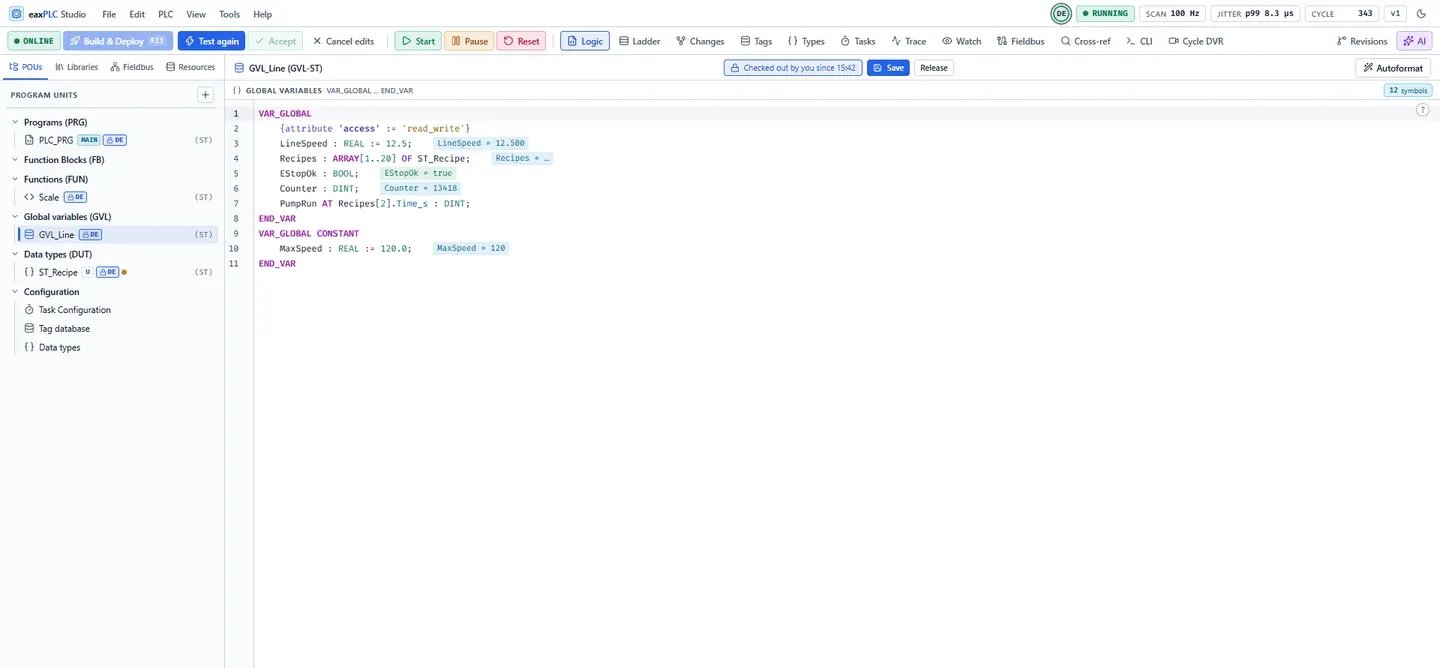
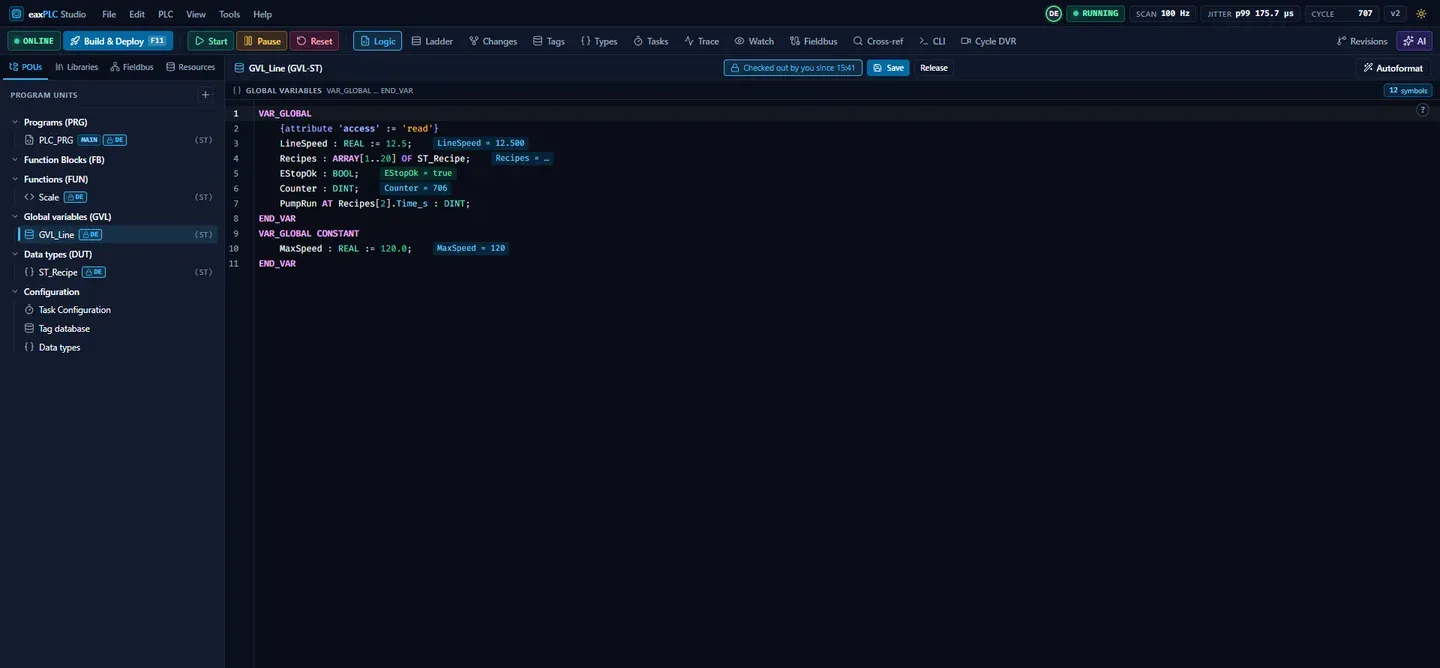
What this list shows:
- An attribute sits on the line before the declaration it applies to. Without an
accessattribute a declaration you type yourself is read-write from outside; see Set external access and write limits. - An array bound can be a CONSTANT, here
NumRecipes, or a constant expression such asNumRecipes * 2. PumpRunis an alias: a second name forRecipes[2].Time_s, with no storage of its own and exactly its target’s type.- A list holds
VAR_GLOBALblocks only. Do not write{gvl ...}lines: the PLC writes them when it links the project.
3. Use the globals in a program
Section titled “3. Use the globals in a program”Open a program and use the names directly:
IF EStopOk THEN Speed := LIMIT(0.0, LineSpeed, MaxSpeed); Oven.SP := Recipes[Step].Temp_SP;END_IF;You may also declare VAR_EXTERNAL LineSpeed : REAL; END_VAR to show the dependency (the type must match), or VAR_EXTERNAL CONSTANT to make a global read-only in that POU.
A program variable may not have a global’s name: rename one of them (Speed is a global variable (GVL_Line): rename the local or use the global).
4. Run it
Section titled “4. Run it”The new POUs are part of the saved project, but nothing runs until you test or deploy:
- On a running line, click Test edits (Make online edits). The impact report lists the new globals as Added.
- Otherwise, Build & Deploy.
Result
Section titled “Result”- The project tree shows Data types (DUT) ›
ST_Recipeand Global variables (GVL) ›GVL_Line. - The Tags view (tag database) has one row per global, with its scope Global: GVL_Line, and the alias with Alias of
Recipes[2].Time_s. - The Types view lists
ST_Recipewith its size, members, and used by 20 instances. - Every program reads the same
LineSpeed, initialised before any task runs in the first cycle.
Troubleshooting
Section titled “Troubleshooting”| Message | Fix |
|---|---|
| expected variable name, got “Type” (TYPE is a reserved keyword: rename the variable) | A variable has a reserved name. Rename it; add {attribute 'was' := 'Type'} on the new name to keep its value (Online changes to data structures). |
| global variable X declared twice (in GVL_A and GVL_B) | A global name is used in two lists. Keep one. |
| VAR_GLOBAL belongs in a global variable list, not in a PROGRAM or FUNCTION_BLOCK … | Move the block into a GVL POU. |
| CONSTANT NumRecipes needs a value | Give every CONSTANT an initial value. |
| alias PumpRun : INT, but Recipes[2].Time_s is DINT (an alias has exactly its target’s type) | Declare the alias with the target’s type. |