

Connect MQTT and Sparkplug B inputs (network I/O, not for safety functions)
Network I/O, not for safety functions. An MQTT input brings values that
other clients publish on a broker into the PLC’s %I area. The program reads
them like any input, together with a quality signal that tells it when a
value is not Good. An MQTT input never drives a safety target, never drives
an output and never sends a command.
A fieldbus bus of type MQTT broker ("type": "mqtt") connects the PLC to
one broker. Each of its sources is one Sparkplug B edge node (or one of
its devices), or one JSON topic root. Each entry of a source maps one
Sparkplug B metric or one JSON topic to a %I address, and must also have a
quality output.
- Service or process
- Data store
- External system
- Data or telemetry
- Refusal
Read as text
Sparkplug B edge nodes and JSON publishers publish to one MQTT broker. The MQTT input bus of the PLC holds one connection to that broker and keeps, for each entry, the latest value with its quality code and time. The scan thread copies each entry into the process image at the start of a cycle: the value at its %I address and the quality outputs beside it. The program reads both. The storage an entry drives is never a safety target, and no outside write reaches it.
Parts
- Publishers (external system): Sparkplug B edge nodes, JSON publishers
- MQTT broker (external system): one per bus
- MQTT input bus (service or process): sources and entries, off the scan thread
- Program (service or process): reads the value and its quality
- Process image (data store): the %I value; quality bit, status, timestamp, age
- Scan thread (service or process): reads the inputs
- Downstream (external system): NATS UNS, MQTT publisher, OPC UA
- Safety target (data store): storage of a variable on the safety list
- Outside write (external system): on any path
Connections
- Publishers → MQTT broker (data or telemetry): publish
- MQTT broker → MQTT input bus (data or telemetry): topics of the sources. Over TLS. A plaintext connection to a broker on another computer is refused unless it is allowed with a reason.
- MQTT input bus → Scan thread (data or telemetry): latest value, code and time. Per entry. A message the rules refuse (a retained Sparkplug B message, a source that says it is simulated, a message over a limit) places no value.
- Scan thread → Process image (data or telemetry): each cycle. Before the program runs. A Good value with no update within its maximum age turns Stale here, even when the network side hangs.
- Process image → Program (data or telemetry): inputs
- Process image → Downstream (data or telemetry): the worse quality. A variable wholly inside an entry's value is published, and read over OPC UA, with the worse of the PLC's quality and the entry's.
- Process image → Safety target (refusal): never. A configuration whose entries cover a safety target is refused (SAFETY_TARGET), and so is a deploy, a rollback or an online test that puts a safety target onto storage an entry drives (MQTT_INPUT_SAFETY_TARGET).
- Outside write → Process image (refusal): IO_INPUT_DRIVEN. A write through the runtime API, UNS and MQTT commands, OPC UA or Modbus TCP onto a byte or bit an entry writes is refused.
| Edition | MQTT inputs |
|---|---|
| eaxPLC Free | No. A configuration with an enabled MQTT bus is refused, and a saved one is not started. |
| eaxPLC Standard | Yes. An MQTT bus does not count as the edition’s one fieldbus master. |
| eaxPLC Performance | Yes |
MQTT inputs are network I/O, not for safety functions, in every edition. A bus that was approved keeps starting after the licence lapses, as the other buses do.
Before you start
Section titled “Before you start”- A broker you control, reachable from the PLC. Use
ssl://(ortls://,mqtts://) orwss://. An unencrypted broker on another computer is refused unless you allow it with a reason (see Broker security). - Access rules on the broker. They are the trust boundary: any client the broker lets publish on the input topics drives these PLC inputs.
- Free
%Iaddresses for each value and its quality outputs. - You are signed in as an engineer: applying a fieldbus configuration needs your e-signature. Test connection and Browse also need the engineer role.
- eaxPLC Standard or Performance.
Add the broker
Section titled “Add the broker”- Open Fieldbus and click + MQTT.
- Set the broker connection:
- Brokers: one or more URLs, tried in order:
ssl://,tls://,mqtts://,wss://(encrypted), ortcp://,mqtt://,ws://(plaintext). No user name or password in a URL: use the fields below. - Client ID: empty uses
eaxPLC-<plc id>-in, cut to 23 characters with a hash suffix when the PLC id is long. Your own ID has at most 128 characters and no/,+or#. It must not be the ID of this PLC’s own MQTT publisher: a broker drops the older session of a duplicate ID. - User name, Password, CA certificates (PEM), Client certificate (PEM) and Client key.
- Keepalive (s): 2 to 60, default 5. A lost broker is noticed within about 1.5 × the keepalive.
- Messages/s (whole bus), Max payload (bytes) and Max metrics per payload: see Limits.
- Brokers: one or more URLs, tried in order:
- Click Test connection. The PLC connects once with these settings and the stored secrets, then disconnects. Nothing is subscribed or published. The test uses its own client ID, so it never drops the running input connection.
The PLC connects with a clean session, subscribes at QoS 1, and subscribes only to the exact topics its entries need (see Broker security).
Add a source
Section titled “Add a source”Select the bus and add a source. Its Source is sparkplug or json.
Sparkplug B source:
- Group ID and Edge node ID (required), and Device ID for one
device of the node. No
/,+or#. One Sparkplug source per node or device on a bus. - Request rebirth: off by default. See Sparkplug B rules.
JSON source:
- Topic root: exact topic levels (no
+or#, no empty level). A root underspBv1.0is refused: use a Sparkplug source. - Timestamp unit:
ns,msors, required. The unit of a payload’stimestampis never guessed. eaxPLC publisher marks a source that is another eaxPLC’s MQTT publisher, which stamps inns. - Online topic (optional): an exact topic saying whether the source is alive.
- Max age (ms) or an Online topic is required. See Quality.
Both kinds:
- Status bit (%IX) (optional): TRUE while the source is alive.
- Max age (ms) (0 to 86 400 000), Max source age (ms) (0 to
86 400 000), On not Good (
hold,substitute,zero) and Messages/s (this source): defaults for the entries.
Click Browse to see what the source sends: the PLC listens for up to 9 s for the node’s NBIRTH and DBIRTH messages (Sparkplug B), or for the topics under the root (JSON). It lists each metric or topic with a suggested PLC type, and you pick the entries. Browse never sends anything, not even a rebirth request.
Map the entries
Section titled “Map the entries”Each entry has:
- Metric (Sparkplug B) or Topic below the topic root (JSON).
- Data type and PLC address in
%Ionly, of the type’s size:BOOLon%IX;SINT,USINT,BYTEon%IB;INT,UINT,WORDon%IW;DINT,UDINT,DWORD,REALon%ID;LREAL,LINT,ULINT,LWORDon%IL. The 64-bit types exist for MQTT entries only.STRINGis not an MQTT input yet. One value per entry. - A quality signal, required: a quality address (
%IX, TRUE only while the value is Good) on the entry, or the source’s status bit. Without one the entry is refused: the program could not know that a value is not Good. - Optional quality outputs: status (
%IB, the quality code), timestamp (%IL, the source’s timestamp in Unix ms) and age (%ID, ms since the last accepted update). - On not Good and Substitute (a literal of the entry’s type,
required for
substitute), and the entry’s own Max age (ms).
The entries are on the data grid with their live value, quality and age.
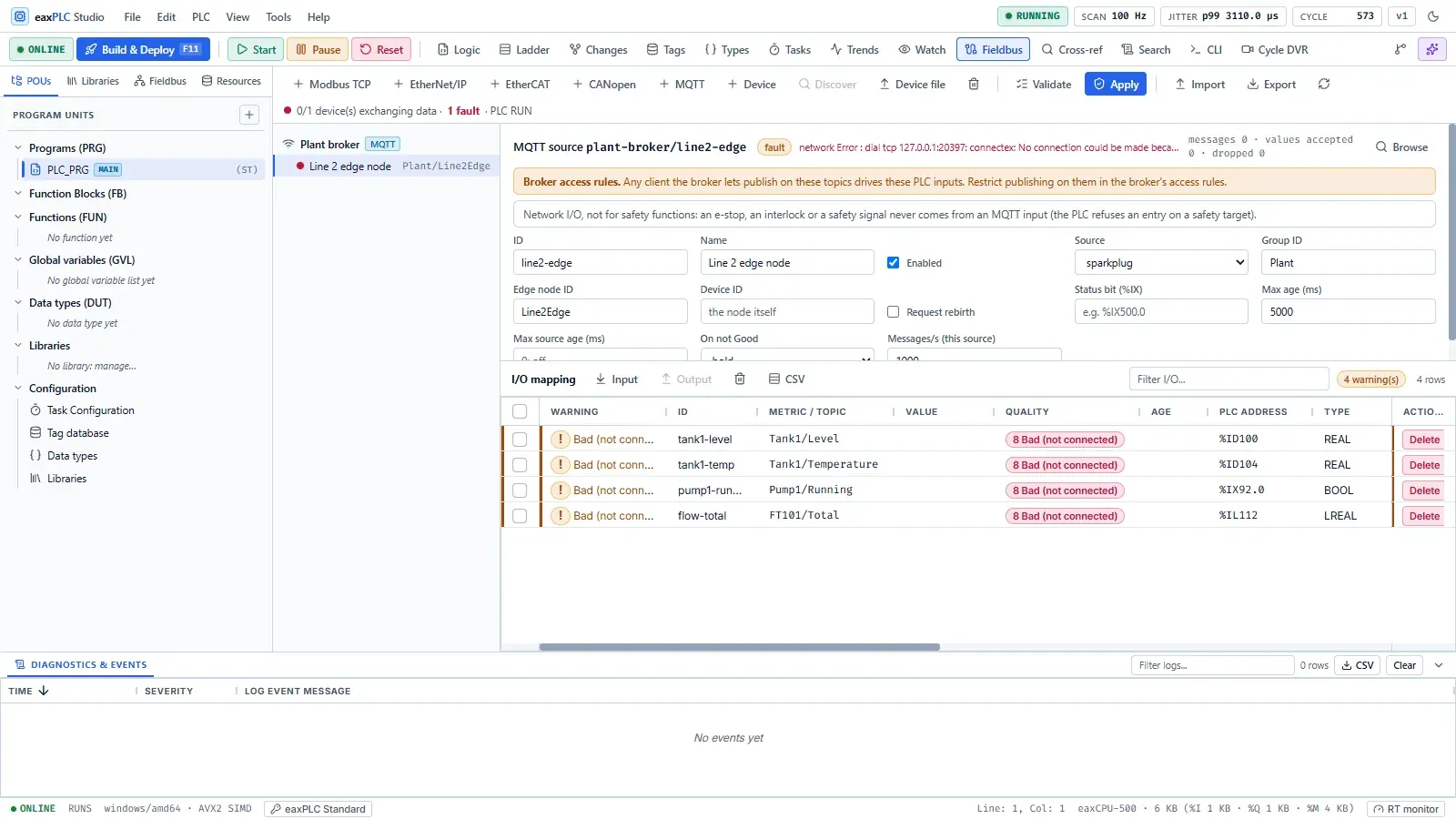
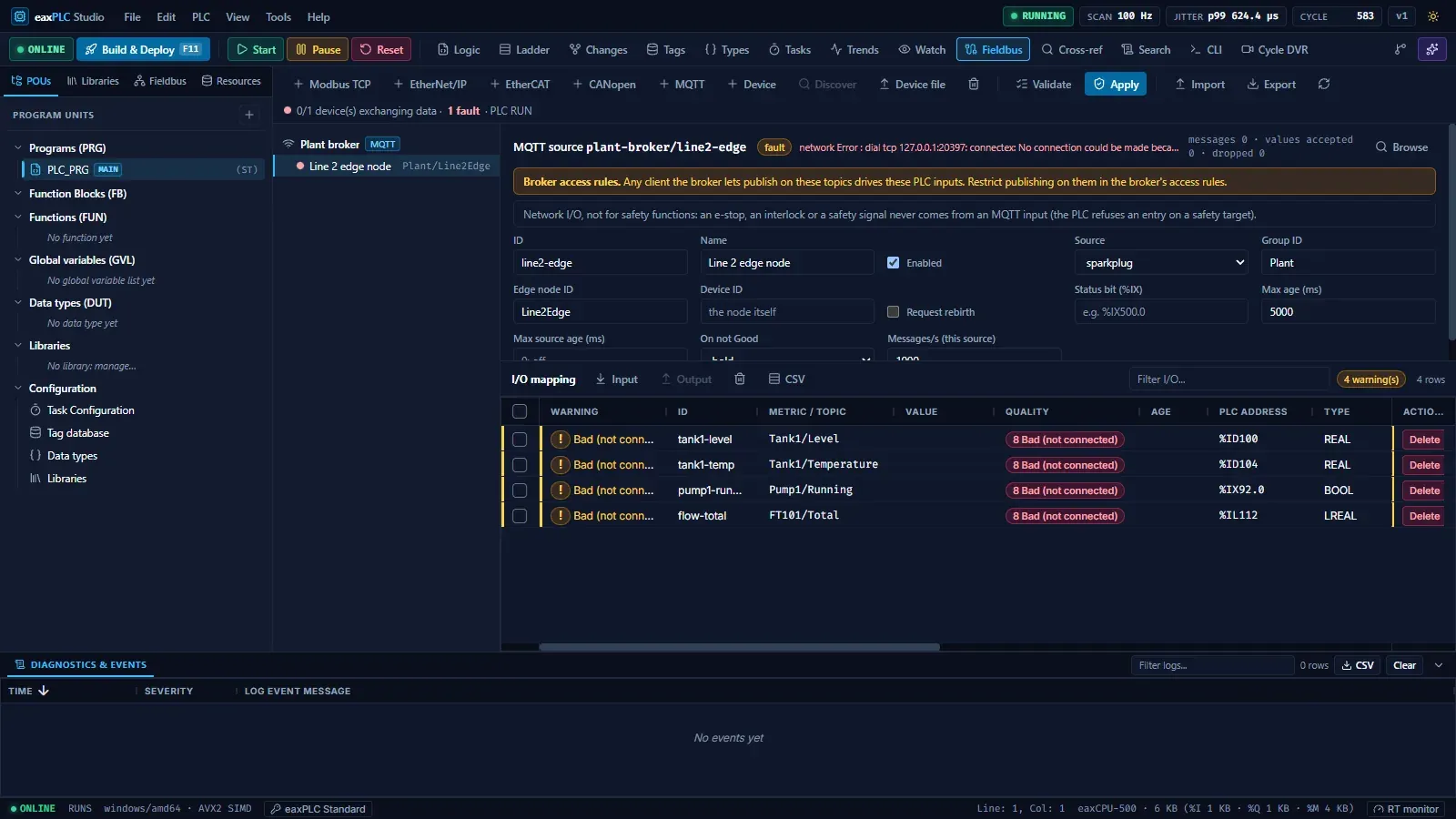
Click Validate, then Apply with your e-signature. The e-signature’s meaning says how many PLC inputs the broker’s publishers drive, and names an allowed plaintext broker with its reason.
A change to a source or an entry of an MQTT bus restarts that bus’s connection (one connection serves all its sources); other buses keep running. An Apply that changes MQTT secrets reconnects every MQTT bus. See Apply fieldbus changes without stopping the other devices.
Values are converted exactly or refused. An integer out of the target
type’s range, a fraction into an integer type, NaN or infinity, or a BOOL
other than 0 or 1 is Bad (code 4) and is never copied: never wrapped, never
clamped. 64-bit integers arrive bit for bit. A REAL takes any finite value
within the 32-bit range, with the loss of precision that implies.
The metrics of one Sparkplug B payload, or one JSON message, reach the program in the same scan. The scan never waits on the network.
Safety: an MQTT input never drives a safety target
Section titled “Safety: an MQTT input never drives a safety target”An MQTT entry’s storage is its value and each of its quality outputs (quality bit, status, timestamp, age), plus its source’s status bit. This storage never covers a safety target (the safety-target list in Project Settings, or eaxScada’s signed list). The PLC checks this at every step:
- Configuration:
PUT /api/fieldbusrefuses such a configuration with422and"code": "SAFETY_TARGET", naming the entry and the target; Validate lists the same problem. Disabled sources count too. If the safety-target list cannot be read, every configuration with an MQTT entry is refused (fail closed). - Programs: a deploy, a rollback, a project deploy or an online test
whose program puts a safety target onto storage an MQTT entry drives is
refused with
409 MQTT_INPUT_SAFETY_TARGET. The running program stays. If the list cannot be checked, the change is refused the same way. - A local safety-target list that names storage an MQTT entry drives is
refused when saved:
409 MQTT_INPUT_SAFETY_TARGET, nothing changed. - eaxScada’s signed list is always accepted. An MQTT bus whose entries then cover one of its targets is stopped: its entries show code 8 and their substitute, and the fieldbus load error and a notice say why.
- A safety-target list that becomes unreadable stops every MQTT bus with entries (fail closed).
- At start-up, a saved MQTT bus that conflicts with the loaded program (for example a file edited by hand) is not started, with a notice.
- Outside writes onto any byte or bit an MQTT entry writes are refused
with
IO_INPUT_DRIVENon every outside path (/api/write, UNS and MQTT commands, OPC UA, Modbus TCP). See Constants, outside writes and forces.
Further limits:
- A simulated PLC never opens an MQTT input connection. Its entries keep
code 8 and their substitute; Test connection and Browse answer
409. - The AI co-pilot cannot configure, test or browse MQTT inputs, whatever
its level: the route guard refuses it, and the handlers refuse it again
(
403). - A source that says it is simulated is refused (code 4): a Sparkplug B
birth with the metric
Properties/SimulatedTRUE or a metric propertysimulatedTRUE, or a JSON payload with"simulated": true. A source that never marks itself as simulated is treated as real: the PLC cannot tell otherwise.
Broker security
Section titled “Broker security”Plaintext. A tcp://, mqtt:// or ws:// URL to anything other than
this computer (localhost or a loopback address) is refused, because anyone
on the network path could inject PLC inputs. To allow it, set Allow an
unencrypted broker on the network with a reason of at least 8 characters;
the e-signature of the change carries the reason.
Secrets are write-only. The password and the client key are stored in
data/fieldbus/secrets.json, restricted to the PLC’s account. They are never
in fieldbus.json, the export, GET /api/fieldbus (it shows Set or
Not set), the e-signature meaning or the audit record, which says
[secrets changed]. A client certificate needs its key and they must
match; a key without a certificate is refused. Clear secrets removes
them at the next Apply.
Access rules. The broker decides who may publish on the input topics. Give the PLC’s input connection its own account that may only subscribe, and let only the real source publish on its topics. The PLC subscribes to:
- Sparkplug B:
spBv1.0/<group>/NBIRTH/<node>,NDATAandNDEATH, andspBv1.0/<group>/DBIRTH/<node>/+,DDATAandDDEATH. Never a command topic, STATE or#; - JSON: each entry’s exact topic and the online topic;
- Browse: the node’s NBIRTH and DBIRTH topics, or
<topic root>/#.
With Request rebirth on, the PLC also publishes on
spBv1.0/<group>/NCMD/<node>. A generic example, to write in your broker’s
own access-rule syntax:
# PLC input connection (account plc-line1-in): subscribe onlyplc-line1-in   subscribe   spBv1.0/Plant1/NBIRTH/Edge7plc-line1-in   subscribe   spBv1.0/Plant1/NDATA/Edge7plc-line1-in   subscribe   spBv1.0/Plant1/NDEATH/Edge7plc-line1-in   subscribe   spBv1.0/Plant1/DBIRTH/Edge7/+plc-line1-in   subscribe   spBv1.0/Plant1/DDATA/Edge7/+plc-line1-in   subscribe   spBv1.0/Plant1/DDEATH/Edge7/+plc-line1-in   subscribe   site/line1/meters/## only with Request rebirth onplc-line1-in   publish     spBv1.0/Plant1/NCMD/Edge7
# the edge node (account edge7): the only publisher of its topicsedge7          publish     spBv1.0/Plant1/+/Edge7edge7          publish     spBv1.0/Plant1/+/Edge7/+edge7          subscribe   spBv1.0/Plant1/NCMD/Edge7
# the meter gateway (account meters-gw): the only publisher under its rootmeters-gw      publish     site/line1/meters/#
# every other account: no publish on spBv1.0/Plant1/+/Edge7,# spBv1.0/Plant1/+/Edge7/+ or site/line1/meters/#
Loop guard. A source that is this PLC’s own MQTT publisher is refused: a Sparkplug source with the publisher’s group and edge node, or a JSON root that overlaps the publisher’s topic root. The PLC would read its own values back as inputs.
Quality
Section titled “Quality”Every entry has a quality code; the program sees it through the quality bit, the status byte, the timestamp and the age. The codes, labels and outputs are listed in MQTT input quality and limits.
- Uncertain is never Good. The quality bit is TRUE only for a Good code; Uncertain (64 to 127) and Stale (68) are FALSE.
- Staleness is decided in the scan. A Good value with no update within Max age (ms) turns Stale (68) in the scan itself, so the inputs go stale on time even if the network side hangs. Sparkplug sources default to 0 (off): their births and deaths say when a node is gone.
- A JSON source needs a quality signal of its own: Max age (ms) on the source (or on every entry), or an Online topic. A publisher that only sends changes never proves it is alive otherwise.
- On not Good the program sees the last value (
hold, the default), the substitute (substitute) or 0 (zero). Before the first value,holdshows the substitute, or 0 without one, with code 8.
Downstream. A variable wholly inside an MQTT entry’s value is published
by the NATS UNS and by the MQTT publisher (JSON quality, Sparkplug B
Quality property) with the worse of the PLC’s quality and the entry’s, and
is republished when only the entry’s quality changes. The OPC UA server
does the same: such a variable is read with the worse of the two as its
status (Good, UncertainLastUsableValue for Stale, Uncertain, or a Bad
status), and its subscriptions are notified when only the entry’s quality
changes. Variables no MQTT entry drives are unchanged. The status mapping is
in MQTT input quality and limits.
Read-only to clients. A variable on storage an MQTT entry drives is
listed read-only in GET /api/registry ("writable": false) and in its OPC
UA access level, and a write onto it is refused (IO_INPUT_DRIVEN).
Sparkplug B rules
Section titled “Sparkplug B rules”- Product
- External system
- Data or telemetry
Read as text
The edge node publishes to the MQTT broker and the PLC receives what it subscribed to. A session starts with the node's NBIRTH and each device's DBIRTH; only then are values placed. Data messages carry a sequence number. A gap in it makes the node's values Uncertain until the next NBIRTH, and the PLC may ask the node for one. A death turns the entries to code 24, comm failure.
Participants
- eaxPLC (product)
- MQTT broker (external system)
- Edge node (external system)
Steps, in order
- eaxPLC → MQTT broker (data or telemetry): Subscribes. births, data and deaths of each source
- The session starts:
- Edge node → MQTT broker (data or telemetry): NBIRTH, then a DBIRTH per device. metric names and aliases, bdSeq
- MQTT broker → eaxPLC (data or telemetry): NBIRTH, DBIRTH
- eaxPLC: Places the values: a device waits for its DBIRTH; a metric no birth names: code 8
- Edge node → MQTT broker (data or telemetry): NDATA, DDATA. each with the next seq
- MQTT broker → eaxPLC (data or telemetry): NDATA, DDATA. values Good
- A gap or a repeat in seq:
- MQTT broker → eaxPLC (data or telemetry): A message with the wrong seq
- eaxPLC: Node and devices: Uncertain: until the next NBIRTH
- eaxPLC → MQTT broker (data or telemetry): NCMD Node Control/Rebirth. only with Request rebirth, once per 30 s
- MQTT broker → Edge node (data or telemetry): NCMD
- Edge node → MQTT broker (data or telemetry): NBIRTH. a new session: the values are placed again
- The node or a device is gone:
- MQTT broker → eaxPLC (data or telemetry): NDEATH or DDEATH. ignored only when its bdSeq is an old session's
- eaxPLC: Entries: code 24, comm failure: NDEATH: the node and its devices; DDEATH: the device
- Births: the aliases come from the node’s NBIRTH and the device’s DBIRTH. No value is placed before a birth: until then the entries show code 8. A device waits for its DBIRTH after each NBIRTH. A metric the last birth does not name stays code 8.
- Deaths: NDEATH turns the node’s and its devices’ entries to code 24
(comm failure); DDEATH does it for the device. A death is ignored only
when the birth and the death both carry a
bdSeqand they differ (a late death of an old session). A birth withoutbdSeqtakes any death, and is counted and shown as a No bdSeq warning. - Sequence: a gap or a repeat in
seqmakes the values of the node and its devices Uncertain until the next NBIRTH. A message dropped by a limit still advances the sequence. - Rebirth request (opt-in, Request rebirth): after a sequence gap,
data before a birth, a DBIRTH before the NBIRTH or an unknown alias, the
PLC sends the node
Node Control/Rebirthon NCMD, at most once per 30 s per node, and logs it. - Ignored: retained Sparkplug messages (the specification never retains them, so they come from an old session) and historical metrics.
- Timestamps: the metric’s timestamp, else the payload’s, else the receive time. A timestamp more than 5 s in the future is accepted as Uncertain (clock skew).
JSON rules
Section titled “JSON rules”- Payload: a bare value (a number,
trueorfalse, or a numeric string), or an object{"value": ..., "quality": n, "timestamp": t, "simulated": b}where onlyvalueis required.null, an object or an array as the value is refused (code 4). qualityis an OPC quality code: missing means Good; one that is not an integer is Uncertain.timestampis read in the source’s Timestamp unit; without one, the receive time is the timestamp.- Retained values: a retained message is the current state when the PLC connects, but not proof that the source is alive. A Good retained value is Uncertain until a live update, unless its own timestamp is within Max source age (ms).
- Online topic:
trueor1marks the source alive;falseor0turns every entry of the source to code 24. - Max source age (ms): an update whose own timestamp is already older than this on arrival is Stale (68), history only. 0 turns it off.
Limits
Section titled “Limits”- Rates: 1000 messages/s per source and 10 000 per bus by default. The source’s limit is checked first, so a flooding source only spends its own share of the bus. Messages over a limit are dropped and counted. Sparkplug B BIRTH and DEATH messages are never dropped for rate.
- Size: 256 KiB per payload and 10 000 metrics per Sparkplug B payload by default. A larger message is dropped and counted, whatever its type; an NBIRTH dropped this way leaves the node without a birth.
- Browse listens up to 9 s, connection included.
The exact ranges are in MQTT input quality and limits, and every field is in the fieldbus configuration reference.
Troubleshooting
Section titled “Troubleshooting”| What you see | Meaning | What to do |
|---|---|---|
... is not encrypted and not on this computer |
A plaintext broker URL to another computer. | Use ssl:// or wss://, or allow plaintext with a reason. |
needs a quality signal |
The entry has no quality address and its source no status bit. | Add a quality address (%IX) or the source’s status bit. |
a JSON source needs max_age_ms or online_topic |
A JSON source with neither. | Set Max age (ms) or an Online topic. |
SAFETY_TARGET: ... writes the storage of the safety target ... |
An entry covers a safety target. | Move the entry, or the variable, off that storage. |
MQTT_INPUT_SAFETY_TARGET on a deploy |
The new program puts a safety target onto MQTT-driven storage. | Move the variable off that address, or remove the MQTT entry. |
Entry code 8, the birth does not name this metric |
The metric is not in the last NBIRTH or DBIRTH. | Check the metric name with Browse. |
| Entry code 4 | The value does not convert exactly, the payload is malformed, or the source says it is simulated. | Check the entry’s type against the source’s, and the payload. |
| No bdSeq warning | The node’s NBIRTH carries no bdSeq. |
Fix the edge node; until then every NDEATH is taken as the current session’s. |