Batch reactor card
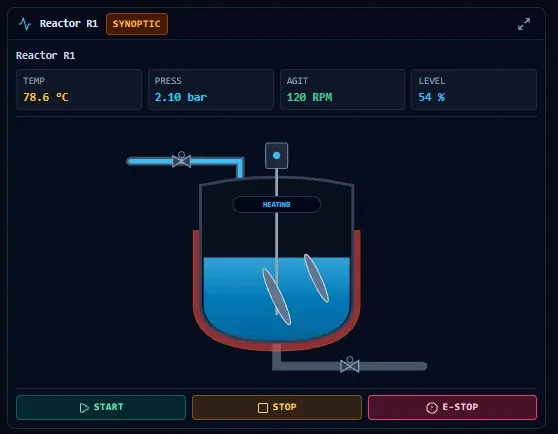
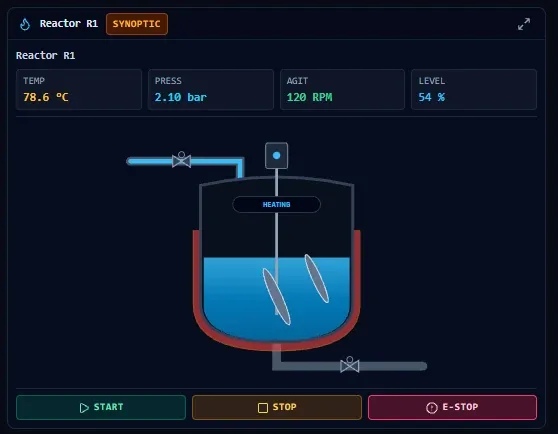
A batch reactor on one card: the vessel with its live level, temperature, pressure and agitator speed, the feed and discharge valves, the heater and the batch state, and START, STOP and E-STOP buttons. Point it at the reactor’s tag folder and each value reads <folder>/<signal> exactly (Level, Temperature, Pressure, AgitatorSpeed, FeedValve, DischargeValve, HeaterState, BatchState), unless a tag is set for that value. A value not yet received shows a dash.
| Card palette | Full Industrial Faceplates › Batch Reactor |
| Card kind | chemical_reactor (body.faceplate) |
| Default size | 6 × 6 grid cells |
Settings
Section titled “Settings”Double-click the card (or select it and press Enter) to open its settings. The settings are stored in the card’s body.params.
| Shown as | Key (body.params) |
Type | Unit | Default | Allowed values | What it does |
|---|---|---|---|---|---|---|
| Equipment name | vesselName |
Text | "Batch Reactor" |
The vessel’s name, shown at the top of the card (the settings call it Equipment name). Empty: no name line. Settings hint: Shown at the top of the card. | ||
| Tag folder | tagPrefix |
Tag path (read) | "" |
The folder holding the equipment’s tags (Plant/Processing/Pumps/P101). Each value reads <folder>/<signal> exactly, unless a tag is set for that signal. Settings hint: The folder holding this equipment’s tags, e.g. Area/Equipment. Each value below reads <folder>/<name> exactly, unless a tag is set for it. | ||
| Level tag (optional) | levelTag |
Tag path (read) | — | The level tag. Empty: <folder>/Level. Settings hint: Empty = <folder>/Level. | ||
| Temperature tag (optional) | temperatureTag |
Tag path (read) | — | The temperature tag. Empty: <folder>/Temperature. Settings hint: Empty = <folder>/Temperature. | ||
| Pressure tag (optional) | pressureTag |
Tag path (read) | — | The pressure tag. Empty: <folder>/Pressure. Settings hint: Empty = <folder>/Pressure. | ||
| AgitatorSpeed tag (optional) | agitatorTag |
Tag path (read) | — | The agitator speed tag. Empty: <folder>/AgitatorSpeed. Settings hint: Empty = <folder>/AgitatorSpeed. | ||
| FeedValve tag (optional) | feedValveTag |
Tag path (read) | — | The feed valve state tag. Empty: <folder>/FeedValve. Settings hint: Empty = <folder>/FeedValve. | ||
| DischargeValve tag (optional) | dischargeValveTag |
Tag path (read) | — | The discharge valve state tag. Empty: <folder>/DischargeValve. Settings hint: Empty = <folder>/DischargeValve. | ||
| HeaterState tag (optional) | heaterTag |
Tag path (read) | — | The heater state tag. Empty: <folder>/HeaterState. Settings hint: Empty = <folder>/HeaterState. | ||
| BatchState tag (optional) | batchStateTag |
Tag path (read) | — | The batch state tag. Empty: <folder>/BatchState. Settings hint: Empty = <folder>/BatchState. | ||
| Show the START / STOP / E-STOP buttons | showControls |
Yes / no | true |
On (the default): the START, STOP and E-STOP buttons are shown. Off: the reactor is shown read-only, without buttons, and the card writes nothing. Settings hint: Off: the reactor is shown read-only, without buttons. | ||
| Confirmation | confirmation |
Choice | "none" |
nonerequireesignature |
What START and STOP ask before they write: none; require, a confirmation dialog; esignature, the signed-in user’s password (the signer is shown read-only, the password field starts empty). The server requires the same for <folder>/StartPB and <folder>/StopPB from every client. E-STOP never asks. Settings hint: none: the command is sent when pressed; require: a confirmation dialog first; esignature: the signed-in user signs with their password. The server requires the same for these tags from every client. Applies to START and STOP; E-STOP is never delayed or disabled. |
|
| Interlock tag (optional) | interlockTag |
Tag path (read) | "" |
A tag that disables START and STOP while it is not 0, has no value or a Bad value (an INTERLOCKED chip is shown); the server refuses them while it is active. E-STOP is never interlocked. Empty: no interlock. Settings hint: While this tag is not 0, or has no value or a Bad value, the card’s commands are disabled and the server refuses them. Empty: no interlock. |
Actions
Section titled “Actions”The buttons write 1 to <folder>/StartPB (START), <folder>/StopPB (STOP) and <folder>/EmergencyStop (E-STOP). START and STOP ask the card’s confirmation or electronic signature first when one is set, and send nothing while its interlock is active. E-STOP is sent at once, never delayed by a dialog nor disabled by the interlock (the tag’s own write policy still applies). Without a tag folder the buttons do nothing.
Commands. The card writes to tags only in the live operator view, never in Edit layout, and only through the guarded write path: the server checks the user’s rights, the tag’s write range and the confirmation or electronic signature the tag requires, and the card reports the server’s answer (a refused write is never shown as done). A card without its tag cannot send anything.
Quality and parameters
Section titled “Quality and parameters”Values come with their quality: a Bad or Uncertain value is marked on the card, and a value not yet received shows a dash, never an invented number. A card on a screen with parameters takes {Name} in its tag paths.
Examples
Section titled “Examples”Reactor R1 from its tag folder
Section titled “Reactor R1 from its tag folder”The card for reactor R1: every value comes from the folder Plant/Processing/Reactors/R1, and the batch buttons write to StartPB, StopPB and EmergencyStop in that folder.
- Click Batch Reactor in the dashboard palette.
- Double-click the card: Tag folder
Plant/Processing/Reactors/R1; titleReactor R1. - Confirmation
require(START and STOP ask first); Interlock tag the reactor’s permissive, if it has one.