

Connect to an EtherNet/IP device
Migrated page, not yet verified against the current code. Treat values, paths and examples as indicative until this notice is removed.
eaxScada reads and writes EtherNet/IP devices that are not Logix controllers - drives (for example Rockwell / Allen-Bradley PowerFlex drives, over EtherNet/IP), remote I/O adapters, third-party devices - by CIP object address: class, instance and attribute. Such a device holds no tag names; each value is an attribute of one of its objects, listed in the device manual or its EDS file.
The connection uses unconnected explicit messages (EtherNet/IP, TCP port 44818), which every EtherNet/IP device answers: Get Attribute Single to read, Set Attribute Single to write, Get Attributes All for the device’s identity, and Multiple Service Packet to read several attributes in one request. It is stored as protocol ETHERNET_IP with controller_type DeviceCIP.
For a Rockwell / Allen-Bradley ControlLogix, CompactLogix or Micro800, use Connect to a Logix controller instead: those are read by tag name.
What is supported
Section titled “What is supported”Supported:
- One connection per device, to the device’s own IP address.
- Values by
@<class>/<instance>/<attribute>(below), with the types BOOL, SINT, INT, DINT, REAL, USINT, UINT and UDINT. - Reads batched: once the addresses are known, one Multiple Service Packet per poll reads them all. A device that refuses the service is read one attribute per request from then on, and the connection says so.
- Writes: Set Attribute Single to exactly the mapped attribute, sent once (see Writes).
- The device’s identity - vendor, device type, product code, revision, serial number, product name - read when the connection opens and shown on the Connection tab, with the request, answer, error-status and timeout counters.
- Errors in words, per tag: a tag whose attribute the device refuses is BAD with the device’s CIP status, for example
CIP status 0x14, attribute not supported,0x16, object does not exist,0x0F, privilege violation,0x10, device state conflict, with the extended status when the device gives one.
Not supported:
- Implicit (Class 1) I/O connections and assembly I/O: attributes are read by explicit messages at the poll rate, not at an RPI.
- Browsing: the device holds no tag names. Map each attribute by its address.
- A device behind a bridge or a chassis (a CIP route): connect to the device’s own IP address. A connection with a route is refused.
- STRING, LREAL, arrays and structures as tag values.
All of this is verified against eaxware’s EtherNet/IP device simulator (tools/plc-sim/ethernetip_server.py --device, a simulated drive, and --device --no-msp, a device without Multiple Service Packet) and against an in-process test device. It has not been verified against real hardware: no drive or adapter has been on the test bench yet.
Addresses
Section titled “Addresses”An address is @ followed by the class, the instance and the attribute, separated by /. Each number is decimal, or hexadecimal with 0x:
| Address | Means |
|---|---|
@0x2A/1/8 |
class 0x2A (AC/DC Drive object), instance 1, attribute 8 (speed reference) |
@42/1/8 |
the same address, in decimal |
@0x93/41/9 |
class 0x93, instance 41, attribute 9 |
@0x01/1/7 |
the Identity object’s product name (a SHORT_STRING: not a tag value, see below) |
@1/0/1 |
instance 0: the attributes of the class itself |
Class 1-65535, instance 0-65535, attribute 1-65535. A leading zero stays decimal (@0x93/017/9 is instance 17). Anything else - a missing part, a sign, a space, 0o or 0b - is refused when the mapping is saved (in the studio or through the API, with the type), and the driver refuses it again before any read or write, so nothing is ever sent to a wrong address.
The type of a mapping must be the attribute’s own CIP type, from the device manual: BOOL, SINT (8-bit signed), USINT (8-bit unsigned), INT (16-bit signed), UINT (16-bit unsigned), DINT (32-bit signed), UDINT (32-bit unsigned) or REAL (32-bit float). The device’s answer must be exactly that size: an attribute read with the wrong type is BAD (the device answered 4 bytes; a INT is 2), never a plausible wrong number.
Example: a drive’s speed reference
Section titled “Example: a drive’s speed reference”This is an example of the form, written for the CIP AC/DC Drive object; check the classes and attributes your drive actually implements in its manual. It is verified against eaxware’s simulated drive, not against a real drive.
| Tag | Address | Type | Access |
|---|---|---|---|
| Speed reference | @0x2A/1/8 |
INT | Read / write |
| Speed actual | @0x2A/1/7 |
INT | Read only |
| At reference | @0x2A/1/3 |
BOOL | Read only |
| Run | @0x29/1/3 |
BOOL | Read / write |
| Running | @0x29/1/7 |
BOOL | Read only |
A drive applies a speed reference or a start written over the network only if it is set to take them from the network (its reference source and control settings). eaxScada does not change the drive’s settings.
Add the connection
Section titled “Add the connection”- Drivers → Add connection, and choose EtherNet/IP device (drives, I/O adapters).
- Device IP address, the port (44818 unless the device uses another) and the request timeout (2000 ms; 100-30000).
- UNS prefix (optional): where this device’s tags go in the UNS.
- Create connection, then Test connection. A success means the device registered an EtherNet/IP session and answered its Identity object: the message names the device (product name, vendor, device type, product code, revision, serial number).
- Map the values with Tag Mappings → + Map New Tag: on an EtherNet/IP device the dialog asks for the address, offers the CIP types and an Access choice, and checks the address before saving. There is no Browse tags for a device.
Writes
Section titled “Writes”- Device or controller
- Check or decision
- Command to equipment
- Refusal
Read as text
A write passes four checks in order before anything is sent: the write policy of the eaxScada server with its electronic signature, the read-only mark of the tag mapping, the write range of the mapping, and the checks of the driver. Each of them can refuse, and then nothing reaches the controller or device. A write that passes is sent as one request to exactly the mapped address. The answer decides: a good answer, an error status, or no answer, which is reported NOT CONFIRMED and never repeated.
Parts
- Write policy (check or decision): and e-signature, in the server
- Read only? (check or decision): the mark of the tag mapping
- Write range (check or decision): of the mapping, if set
- Driver checks (check or decision): before anything is sent
- Refused before sending (outcome): nothing reaches the controller or device. A write is also refused here on a standby node, while the runtime is stopped, and while the connection is down (reported as "write not sent").
- Controller or device (device or controller): one request to exactly the mapped address
- Written (outcome): the write is confirmed
- Refused (outcome): reported with its reason
- NOT CONFIRMED (outcome): applied or not; never repeated
Connections
- Write policy → Read only? (command to equipment). The server has checked the limits and interlocks of the tag, a screen button's confirmation and signature, and the e-signature the tag asks of external writers.
- Read only? → Write range (command to equipment)
- Write range → Driver checks (command to equipment)
- Write policy → Refused before sending (refusal). The write policy refuses the value, or the signature or confirmation it requires is missing.
- Read only? → Refused before sending (refusal). A mapping marked read only refuses every write, whoever sends it.
- Write range → Refused before sending (refusal). The value is outside the write range of the mapping.
- Driver checks → Refused before sending (refusal). An address or a data type that is not valid, or a value the type cannot hold exactly. On a MicroLogix, SLC 500 or PLC-5 also the status (S), input (I) and output (O) files and the status bits of a timer or counter.
- Driver checks → Controller or device (command to equipment): one request. A MicroLogix, SLC 500 or PLC-5: a typed write of the value, or for a bit a write that changes that bit only. An EtherNet/IP device: one Set Attribute Single.
- Controller or device → Written (reply): a good answer
- Controller or device → Refused (refusal): an error status. For example "processor is in program mode" from a controller or "attribute not settable" from a device.
- Controller or device → NOT CONFIRMED (reply, not active): no answer. The request was sent once and the answer is lost: the controller or device may or may not have applied the write. The session is closed and opened again before the next request, so a late answer is never taken for another one.
A write to an EtherNet/IP device tag goes through the same path as every other write: the server’s write policy and e-signature (a screen button’s confirmation and signature, or the tag’s e-signature for external writers), then the mapping’s checks, then the driver. In that order:
- A mapping marked read only refuses every write, whoever sends it, before anything is sent.
- The mapping’s write range, if set, refuses a value outside it.
- The driver refuses, before sending, an address or a type that is not valid, and a value the attribute’s type cannot hold exactly: a fraction for an integer type, a value outside the type’s range (70000 is never sent to a UINT as 4464), anything but 0 or 1 for a BOOL. A value within 10⁻⁹ of a whole number (a scaled value) counts as that number.
- One Set Attribute Single goes to exactly the mapped attribute.
- The device’s answer decides: an error status (for example
attribute not settablefor a read-only attribute, or the device’s own limit asinvalid attribute value) is reported with its words and nothing changed. If the answer is lost, the write is reported NOT CONFIRMED - the device may or may not have applied it - and it is never repeated; the session is closed and reopened before the next request, so a late answer is never taken for another one.
The connection afterwards
Section titled “The connection afterwards”The Connection tab holds the address, port and timeout, the requirements panel, and the Device identity card: the identity the device answered when the connection opened, the raw Get Attributes All reply (the byte-string view of the Identity object, for diagnostics), and the counters. Polling & UNS holds the scan rate and the UNS prefix; Tag Mappings the mapped attributes. A tag the device answers with an error status is marked on its row in the grid; the marker opens the reason.
A connection cannot be switched between Rockwell / Allen-Bradley Logix and EtherNet/IP device while it has mapped tags: a tag name is not an attribute address. Create a new connection instead.
Omron NJ-series and NX-series controllers (variables by name)
Section titled “Omron NJ-series and NX-series controllers (variables by name)”An Omron NJ501, NJ301, NJ101, NX701, NX502, NX102 or NX1P2 controller is read and written by variable name through the CPU’s built-in EtherNet/IP port (TCP 44818). Choose Drivers → Add connection, then the NJ/NX (EtherNet/IP tags) connection type. It is stored as protocol ETHERNET_IP with its own controller type. For CJ, CS and CP controllers, which have no variables by name, use FINS.
Verified against eaxware’s simulator only. No real NJ/NX controller has been on the test bench yet.
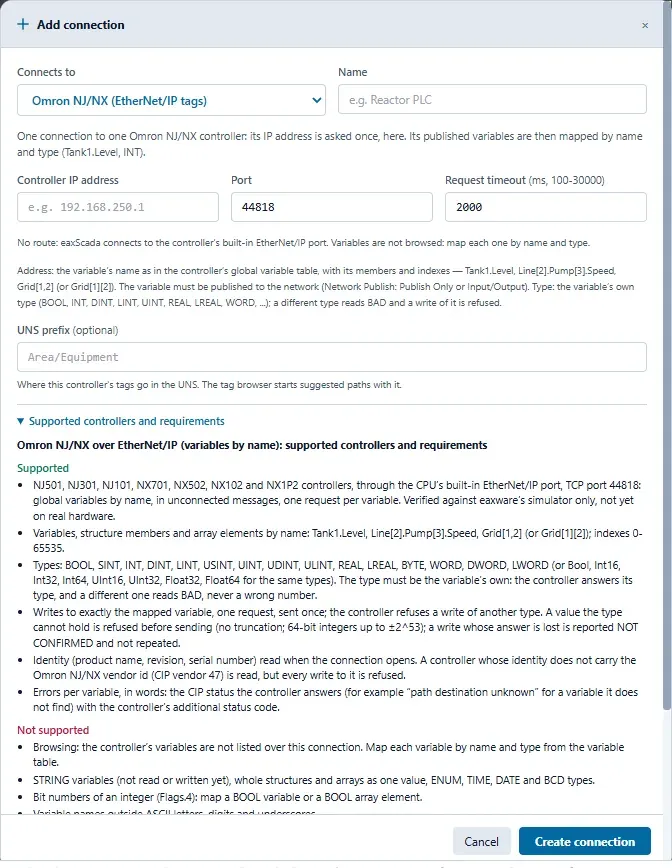
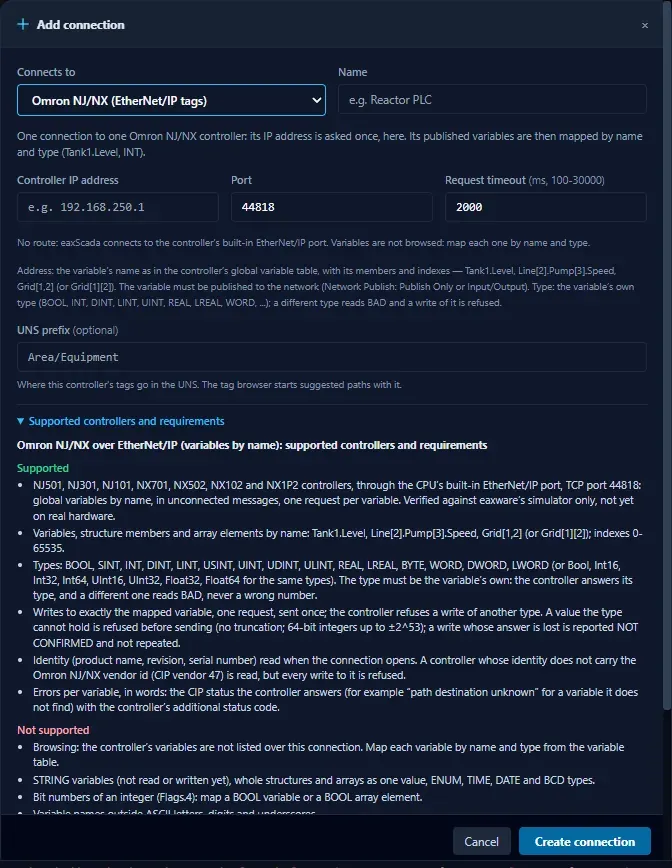
- In the controller first: in the global variable table, set Network Publish to Publish Only (or Input/Output) for every variable you map; other variables cannot be reached. Keep the CIP message server of the built-in port on (the default), and keep TCP 44818 open between eaxScada and the controller.
- Address: the variable’s name as in the global variable table, with its members and indexes:
Tank1.Level,Line[2].Pump[3].Speed,Grid[1,2](orGrid[1][2]). Indexes run from 0 to 65535. Names use ASCII letters, digits and underscores only. A class/instance/attribute address (@…) is refused on this connection. - Type: the variable’s own type, one of BOOL, SINT, INT, DINT, LINT, USINT, UINT, UDINT, ULINT, REAL, LREAL, BYTE, WORD, DWORD or LWORD. The controller answers with the variable’s type, and a different one reads BAD, never a wrong number.
- Not supported:
- STRING variables: not read, and never written;
- whole structures or arrays as one value, and ENUM, TIME, DATE and BCD types;
- bit numbers of an integer (
Flags.4): map a BOOL variable or a BOOL array element instead; - a route through another device: the connection goes to the controller’s own port.
- No browse: the controller does not list its variables over this connection. Map each one by name and type from the variable table.
- Requests: each variable is one unconnected request, for reads and writes alike.
- Writes go through the same checks as above, then:
- one request to exactly the mapped variable, sent once;
- a bad name or type, or a value the type cannot hold, is refused before sending (no truncation; 64-bit integers up to ±2^53);
- the controller’s identity is read when the connection opens: a controller whose identity does not carry the NJ/NX vendor id (CIP vendor 47) is still read, but every write to it is refused;
- a write whose answer is lost is reported NOT CONFIRMED and is never repeated.
- Errors per variable come in words, with the CIP status the controller answers (for example “path destination unknown” for a variable it does not find) and the controller’s additional status code.