

Connect a MicroLogix, SLC 500 or PLC-5 on a serial port (DF1)
Read and write the data table of an older Rockwell / Allen-Bradley MicroLogix, SLC 500 or PLC-5 controller through its serial port (channel 0, RS-232), when it has no Ethernet port or you prefer the serial link. eaxScada speaks DF1 full-duplex on that port and sends the same PCCC commands as over EtherNet/IP, so the addresses, data types and write checks are those of Connect to a MicroLogix, SLC 500 or PLC-5.
Supported controllers, on channel 0 set to DF1 full-duplex:
- MicroLogix 1000, 1100, 1200, 1400 and 1500;
- SLC 5/03, 5/04 and 5/05;
- PLC-5.
The PC reaches the port through a COM port (RS-232) or through a serial device server in raw TCP mode (entered as tcp://host:port).
Before you start: set up the controller’s port
Section titled “Before you start: set up the controller’s port”In the controller’s programming software, on the serial port (channel 0) configuration:
- Driver: DF1 Full Duplex.
- Baud rate, parity and error check (CRC or BCC): note them, eaxScada must use the same. The controllers’ default is 19200 baud, no parity, CRC.
- Node address (the controller’s own DF1 address, 0-254; 1 unless changed): note it, it becomes the station’s node address in eaxScada.
- Duplicate packet detection: keep it on (the default). The controller then discards a message it receives twice: an extra protection, on the controller’s side, against a write being applied twice.
Then:
- Connect the PC (or the serial device server) to the port with a null-modem cable, or the controller’s own programming cable.
- Only one program can use a serial port at a time: close the programming software’s serial driver on that port before eaxScada opens it.
Add the line
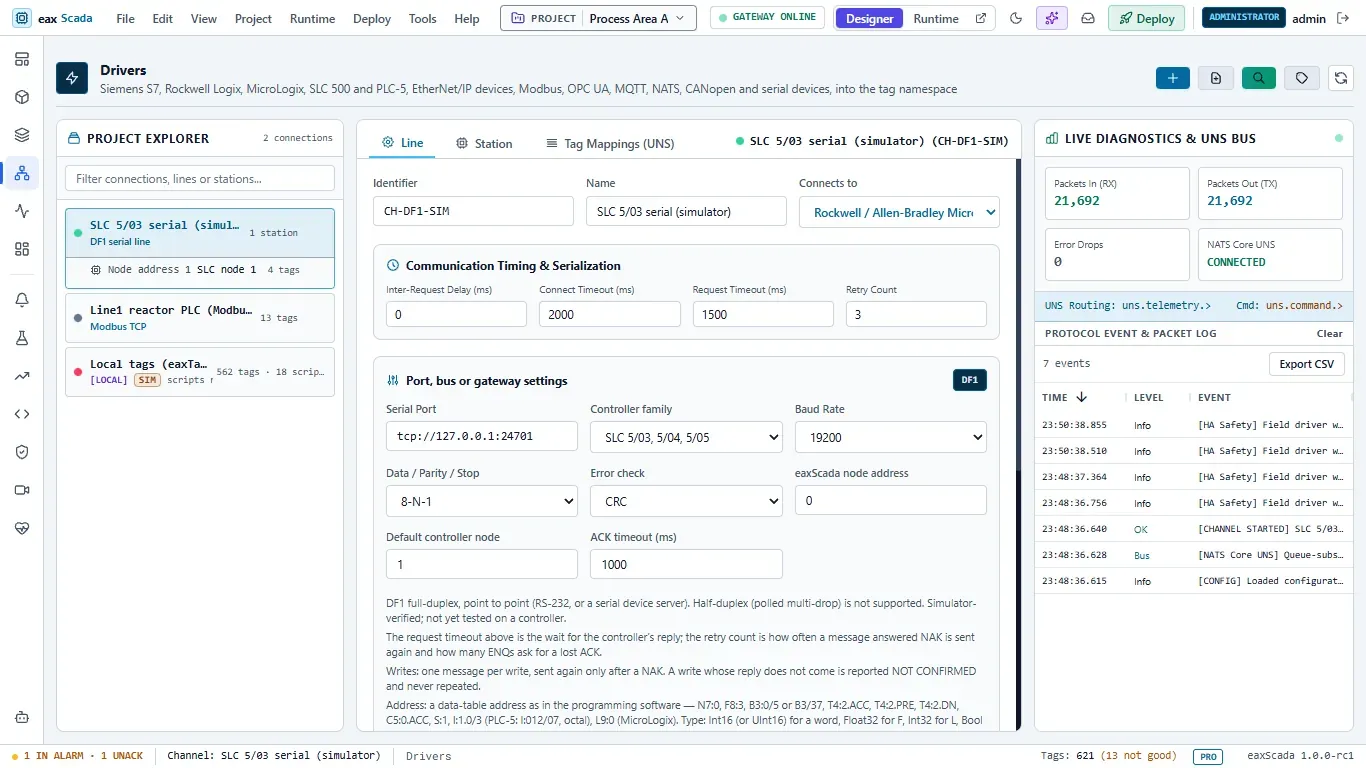
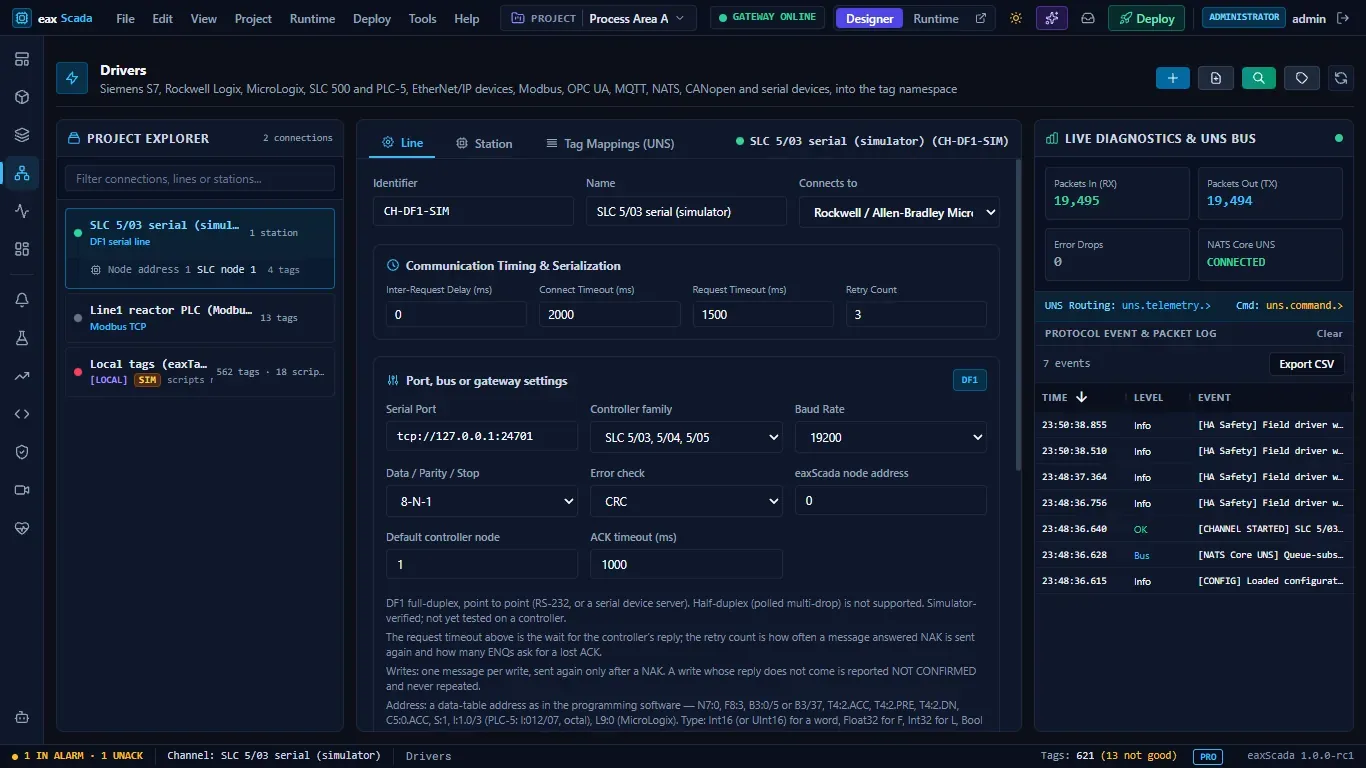
Section titled “Add the line”- In the Studio, Drivers → Add line or gateway (the + button), and in Connects to choose Rockwell / Allen-Bradley MicroLogix, SLC 500, PLC-5 on a serial port (DF1).
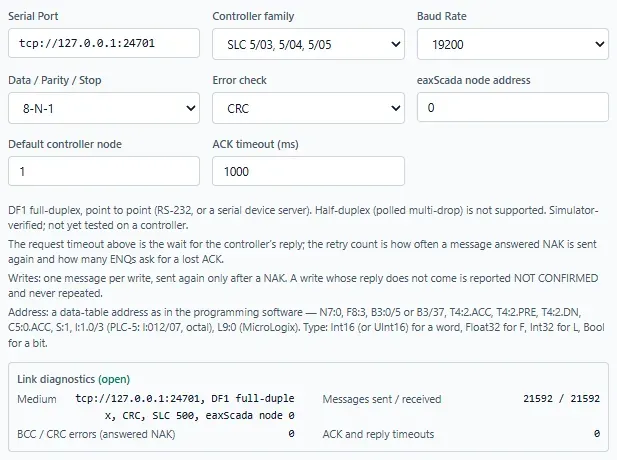
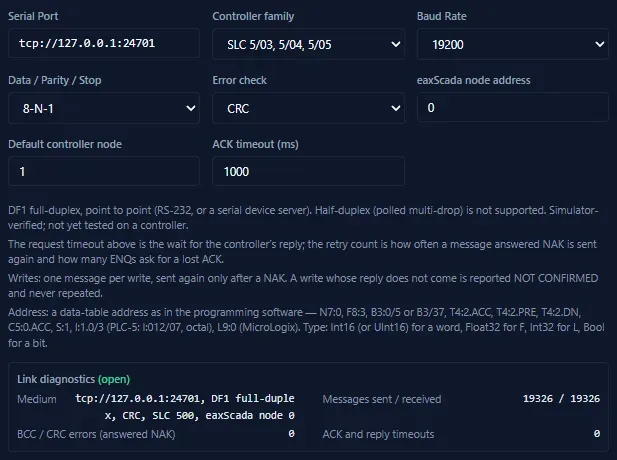
- Fill in the port settings:
| Field | Default | What to enter |
|---|---|---|
| Serial Port | empty | COM5 on Windows, /dev/ttyUSB0 on Linux, or tcp://192.168.1.200:4001 for a serial device server in raw TCP mode. |
| Controller family | MicroLogix 1000 / 1100 / 1200 / 1400 / 1500 | MicroLogix, SLC 5/03, 5/04, 5/05, or PLC-5. It decides the commands sent and the address rules. |
| Baud Rate | 19200 | 1200 to 38400, as on the controller’s port. |
| Data / Parity / Stop | 8-N-1 | 8-N-1, 8-E-1 or 8-O-1, as on the controller’s port. DF1 always uses 8 data bits. |
| Error check | CRC | CRC or BCC, as on the controller’s port. |
| eaxScada node address | 0 | eaxScada’s own DF1 address (0-254), different from the controller’s. |
| Default controller node | 1 | Used only by a station without its own node address. |
| ACK timeout (ms) | 1000 | How long a message waits for the controller’s ACK or NAK before an ENQ asks again (20-10000 ms). |
- Create line. A line with no serial port, a family that is not MicroLogix, SLC 500 or PLC-5, another data-bit count than 8, a node address outside 0-254 or an ACK timeout outside 20-10000 ms is refused before the port is opened.
- In the line’s Communication Timing section:
- Request Timeout is the wait for the controller’s reply after it has acknowledged the message (2000 ms when unset).
- Retry Count is how many times a message answered NAK is sent again, and how many ENQs ask for a lost ACK (0-10).
Add the controller as a station
Section titled “Add the controller as a station”Drivers → Add station, choose the DF1 line, and enter the controller’s Node address (0-254), the one set on its port. On a DF1 line the stations grid shows a Node address column instead of Unit id. Test connection reads the status-file word S:0 at that node: a success names the family and the node that answered.
Map tags
Section titled “Map tags”Tag Mappings → + Map New Tag, with the data-table address and the data type exactly as for an Ethernet controller: N7:0, F8:3, B3:0/5 or B3/37, T4:2.ACC, T4:2.PRE, T4:2.DN, C5:0.ACC, S:1, I:1.0/3 (PLC-5: I:012/07, octal), L9:0 (MicroLogix). Int16 (or UInt16) for a word, Float32 for an F element, Int32 for an L element, Bool for a bit. The rules are in Addresses; the server checks them against the line’s controller family when the mapping is saved, and the driver again before any request.
Each tag is read with its own request: there is no batching on a serial line yet. Count about 25 ms per tag at 19200 baud when you choose the poll rate.
Writes
Section titled “Writes”A write goes through the same path as every other write: the server’s write policy and e-signature, the mapping’s read only flag and write range, then the same driver checks as over EtherNet/IP (status, input and output files, timer and counter status bits, and values the type cannot hold are refused before anything is sent). Then:
- One message per write. The write is one PCCC command with one transaction number, to exactly the mapped address.
- Re-sent only after a NAK. If the controller answers NAK (it discarded the frame), the very same message, with the same transaction number, is sent again, up to the retry count. If the controller’s ACK is lost, an ENQ asks for it again; the message itself is not re-sent unless the answer is a NAK.
- Never re-sent after the controller’s ACK. Once the controller has acknowledged the message, it is not sent again, whatever happens next.
- Confirmed only by the reply. The write succeeds only on the controller’s reply to that transaction number with a good status. A reply with an error status (for example processor is in program mode) is a refusal, reported with its words.
- NOT CONFIRMED, never repeated. A write whose reply does not come (no ACK, a NAK to every copy up to the retry count, no reply, an unusable reply) is reported NOT CONFIRMED: the controller may or may not have applied it. eaxScada never sends it again on its own; check the value and write again yourself if needed.
- Product
- Device or controller
- Data or telemetry
- Command to equipment
- Refusal
Read as text
After the server's write checks and the driver's checks, eaxScada sends one PCCC command with one transaction number. The controller answers the frame with ACK or NAK. Only a NAK makes eaxScada send the very same message again; a lost ACK is asked for with ENQ. After the ACK the message is never sent again. The write succeeds only on the controller's reply to that transaction number with a good status; an error status is a refusal, and every other ending is NOT CONFIRMED and is not repeated.
Participants
- eaxScada (product): DF1 line
- Controller (device or controller): channel 0, DF1
Steps, in order
- eaxScada: Checks the write first: write policy, signature, read only, range; address, file and value type
- A check fails:
- eaxScada: Refused, nothing is sent
- eaxScada → Controller (command to equipment): One PCCC command. one transaction number
- NAK: frame discarded:
- Controller → eaxScada (refusal): NAK
- eaxScada → Controller (command to equipment): The very same message again. up to the retry count
- No ACK in time:
- Controller → eaxScada (reply, lost: it does not arrive): ACK. ACK timeout
- eaxScada → Controller (data or telemetry): ENQ: asks for the answer. the message is not sent again
- Controller → eaxScada (reply): ACK. from here on, never sent again
- Good status:
- Controller → eaxScada (reply): Reply to that transaction. status good
- eaxScada: Write confirmed
- Error status:
- Controller → eaxScada (refusal): Reply with an error status. reported with its words
- No reply in time:
- Controller → eaxScada (reply, lost: it does not arrive): Reply. request timeout
- Anything else:
- eaxScada: NOT CONFIRMED, not repeated: no ACK after the last ENQ; NAK past the retry count; no reply after the ACK, or unusable
Link diagnostics
Section titled “Link diagnostics”The line’s Link diagnostics card (under its settings) and the driver diagnostics show:
| Counter | Means |
|---|---|
| Medium | port and framing, DF1 full-duplex, error check, family and eaxScada’s node address |
| Messages sent / received | DF1 messages sent (re-sends included) and received with a correct check |
| BCC / CRC errors (answered NAK) | received frames with a wrong check or broken framing |
| ACK and reply timeouts | waits for ACK/NAK that ended with nothing, and acknowledged messages whose reply did not come |
| Error statuses answered | replies with a PCCC error status |
| Unexpected or unusable replies | replies that could not be read, or that answered no request in flight |
| Re-sent after NAK | messages sent again because the controller answered NAK |
Rising check errors or NAK re-sends while tags stay GOOD point to the line: cable, baud rate or parity, or noise.
Not supported
Section titled “Not supported”- DF1 half-duplex (a polled multi-drop line, one master polling several slaves): a line set to half-duplex is refused. Set the controller’s port to DF1 full-duplex.
- DH-485 and DH+ links, and a controller reached through another one.
- Browsing: the controller holds no tag names. Map each address.
- Reading several addresses in one request: each tag is one request.
- String (ST), ASCII (A), BCD (D), control (R), message, PID and block-transfer files; indirect and indexed addresses.
Test without hardware
Section titled “Test without hardware”Any line can run in simulated mode ("simulated": true in its settings): no port is opened and values are generated, so you can build screens and mappings before the controller is connected.