Custom card
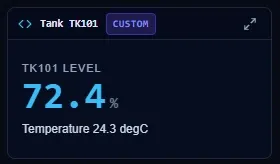
A card you write yourself: HTML, SVG, CSS and JavaScript, run in a sandboxed frame. Elements with data-tag="<tag path>" show the tag’s live value (with data-decimals and data-unit), and a script can follow values with eax.on('<path>', fn), eax.value('<path>') and eax.onAny(fn). The code editor previews the card on real values and offers ready-made examples (value card, SVG tank…). The card cannot reach the operator’s page: it receives values and nothing else, and it cannot write tags. It runs under a strict content policy: no network and no outside address; images and fonts load only when inline in the card (data: URLs), and a blocked load shows “Blocked: outside address”. A card that opens another address is stopped and shows “This card tried to open another address and was stopped”. Adding or changing a card’s code needs the dashboards.code right (Manage dashboards). Every edition has the custom card.
| Card palette | Dashboard palette, Custom cards (HTML / SVG / JS); edited with Edit HTML / SVG / CSS / JS in the card’s settings. |
| Card kind | custom_card (body.widget) |
| Default size | — |
Settings
Section titled “Settings”Double-click the card (or select it and press Enter) to open its settings. The settings are stored in the card’s body.params.
| Shown as | Key (body.params) |
Type | Unit | Default | Allowed values | What it does |
|---|---|---|---|---|---|---|
| HTML | html |
Text | — | The card’s HTML (and inline SVG). data-tag elements show live values. | ||
| CSS | css |
Text | — | The card’s styles. | ||
| JavaScript | js |
Text | — | The card’s script: eax.on, eax.value, eax.onAny and eax.scan (after adding data-tag elements from the script). |
Quality and parameters
Section titled “Quality and parameters”Values come with their quality: a Bad or Uncertain value is marked on the card, and a value not yet received shows a dash, never an invented number. A card on a screen with parameters takes {Name} in its tag paths.
Examples
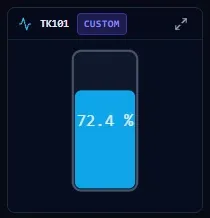
Section titled “Examples”An SVG tank driven by a script
Section titled “An SVG tank driven by a script”An SVG tank whose fill height follows TK101’s level, set by a few lines of script.
- Add a custom card from Custom cards in the dashboard palette, or open Edit HTML / SVG / CSS / JS in a card’s settings.
- HTML: an SVG with a
rectidfillinside the tank outline, and atextidtxt. - JavaScript:
eax.on('Plant/Processing/Tanks/TK101/Level', (v) => { const h = 126 * v / 100; fill.setAttribute('y', 138 - h); fill.setAttribute('height', h); txt.textContent = v.toFixed(1) + ' %'; });