

Enforce interlocks on the server
Migrated page, not yet verified against the current code. Treat values, paths and examples as indicative until this notice is removed.
Pump P-201 must not start while its motor protection is tripped. The START button is disabled on the screen, and the server refuses a start command from any writer (another screen, a script, an API client, a NATS command, an assistant), while STOP keeps working.
How the levels fit together (screen, server, PLC): How eaxScada protects tag writes. The interlock in the PLC stays the real protection: this one keeps operators and integrations from sending a command the PLC would refuse anyway, and tells them why.
- Service or process
- Device or controller
- Field equipment
- External system
- Check or decision
- Data or telemetry
- Command to equipment
- Refusal
Read as text
Any writer that goes through eaxScada sends a write of 1 (START) or 0 (STOP) to the start tag. The eaxScada server reads the trip tag and refuses the write of 1 while the interlock is active; a trip tag that is missing, Bad or simulated counts as active (simulated, unless the interlock is allowed in commissioning). The write of 0 always passes, because STOP has no interlock. A write that passes goes to the PLC, whose own interlock is the real protection. Writers inside the server that write tags directly, and tools that reach the PLC without eaxScada, are not checked.
Parts
- Any writer (service or process): another screen, a script, an API client, a NATS command, an assistant
- Interlock check (check or decision): in the eaxScada server, for this tag and value. It comes after the limits and the engineering range, and before the confirmation and the signature a command asks for, which are still checked for a write that passes. The rule is applied per copy of the screens: the value is refused when a command sending it is blocked and no command sending it is clear; a clear command of a screen above the writer's Required Access Level does not count.
- PLC (device or controller): its own interlock: the real protection
- Trip tag (service or process): 1, missing, Bad or simulated: active. A missing or Bad value does not count as active on a command whose "If the interlock reads a Bad value" is Allow. A simulated value counts as active even then, unless the interlock is ticked "Allowed in commissioning".
- Refused (outcome): 409 interlocked WRITE_DENIED_INTERLOCK
- Pump P-201 (field equipment)
- Outside eaxScada (external system): a PLC or an engineering tool on the network
Connections
- Any writer → Interlock check (command to equipment). A write of 1 (START) or of 0 (STOP) to the start tag, through POST /api/tags/write, a NATS command or an assistant setpoint.
- Trip tag → Interlock check (data or telemetry). The server reads the trip tag when the write arrives.
- Interlock check → Refused (refusal): 1 while the trip is active. START is the only command that sends 1, and its interlock is active: nothing is sent to the PLC.
- Interlock check → PLC (command to equipment): 0 always, 1 if clear. STOP sends 0 and has no interlock, so a write of 0 is never refused by this check. A write of 1 passes while the interlock is not active.
- PLC → Pump P-201 (command to equipment)
- Outside eaxScada → PLC (command to equipment): not through eaxScada. The server never sees these writes: only the PLC can stop them.
Before you start
Section titled “Before you start”- The tags:
DocsPlant/Pumps/P201/Start(the command),DocsPlant/Pumps/P201/Trip(1 when tripped). - You can edit screens (Lead_Engineer or Administrator).
1. Give START its interlock
Section titled “1. Give START its interlock”-
Open the screen and select the START button.
-
Open the button’s dialog (Button Properties Dialog… in the inspector). On the Action tab, the action is Set tag to 1 on
DocsPlant/Pumps/P201/Start, with Require Confirmation. -
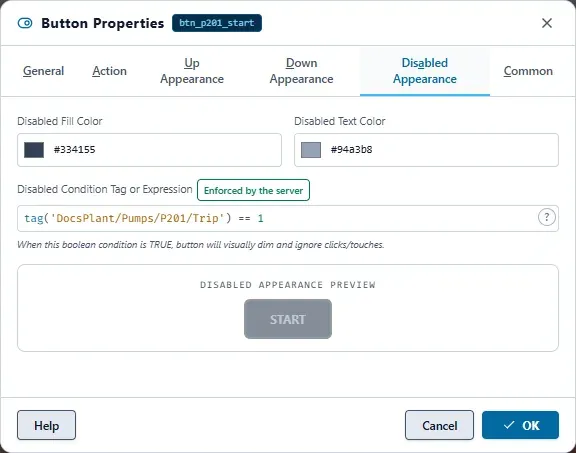
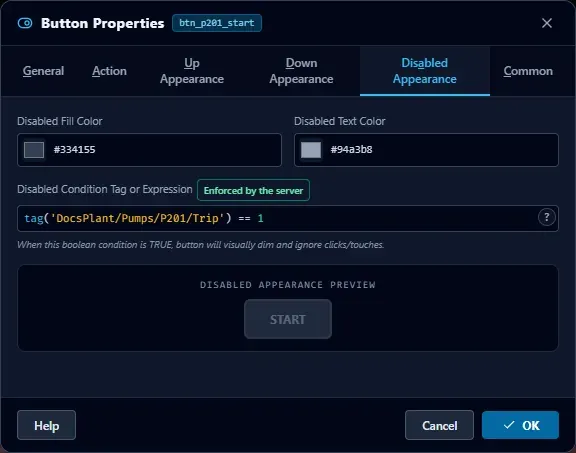
On the Disabled Appearance tab, in Disabled Condition Tag or Expression, write a simple comparison:
tag('DocsPlant/Pumps/P201/Trip') == 1 -
Check the badge next to the field. Enforced by the server means the server will refuse the command while the condition is true. Screen only means it only disables the button on the screen. The badge is judged with the tags the object writes, as the server judges them: a
{Pump}interlock on a{Pump}/Startcommand reads Enforced by the server (per parameter value).
An object without a button dialog (an input, a faceplate command) takes the same interlock in the inspector’s Cond tab, section Security & Touch, field Disable Condition, with that condition enabled.
Other places an interlock can be set
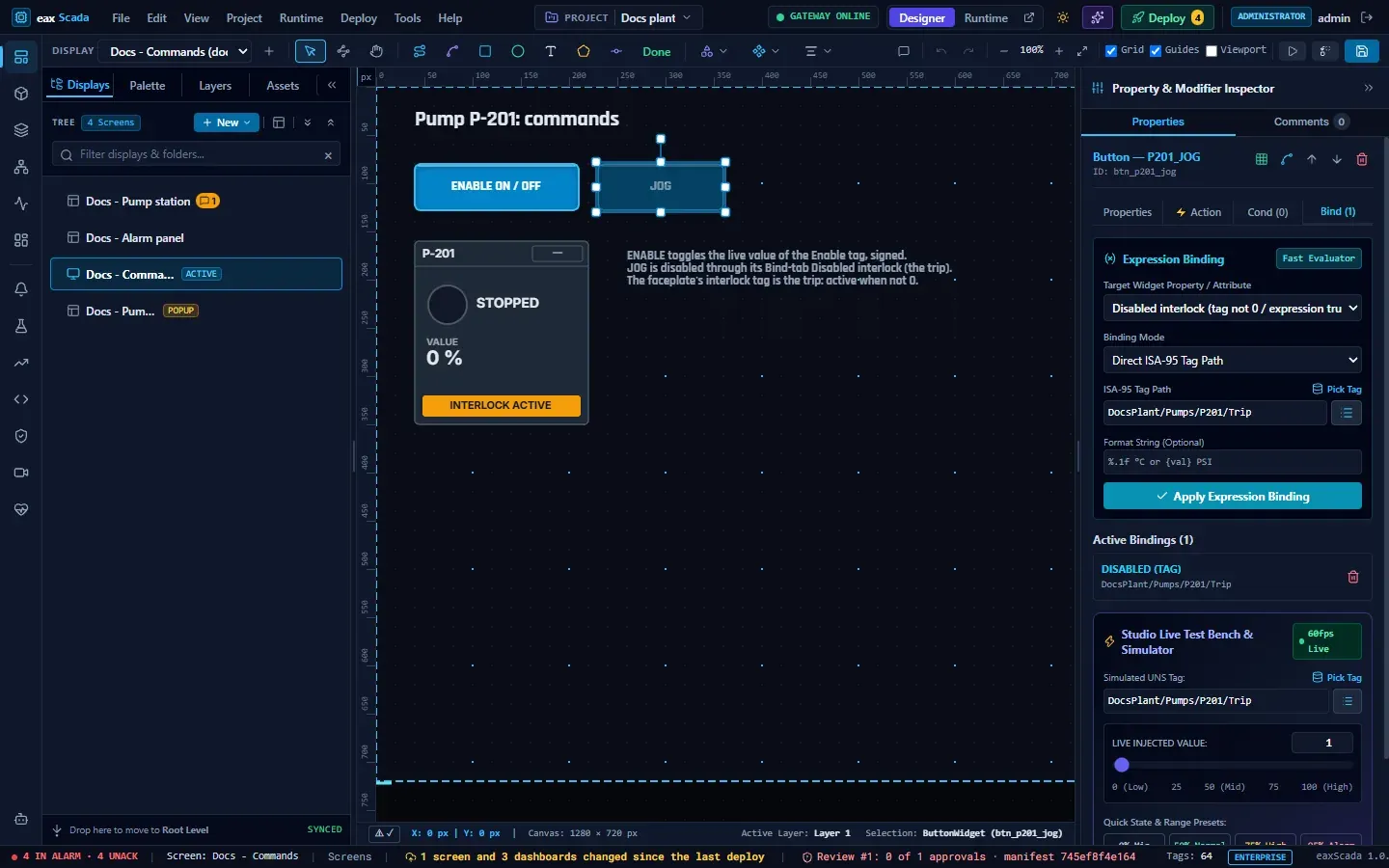
Section titled “Other places an interlock can be set”- A button’s Bind tab. Target Disabled interlock (tag not 0 / expression true): bound to a tag, the button is disabled while the tag is not 0; bound to an expression, while it is true. The server enforces it like a Disabled Condition (a tag binding is
tag('<path>') != 0).
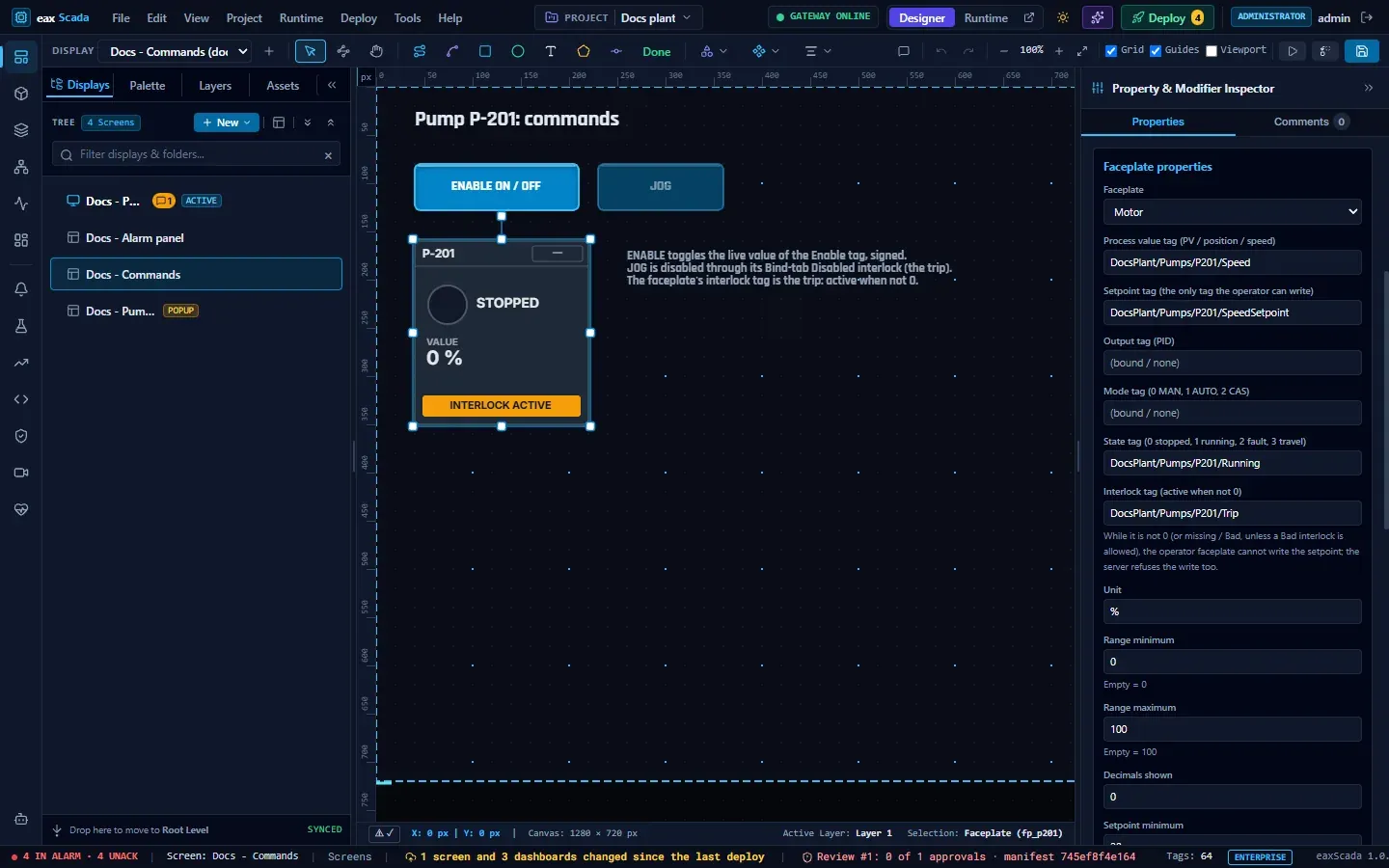
- A Faceplate’s Interlock tag (active when not 0). While the tag is not 0 (any non-zero value, or true), the faceplate shows INTERLOCK ACTIVE, and the operator faceplate a click opens disables its setpoint field and Write button and says why. A missing or Bad interlock tag shows INTERLOCK: NO VALUE and blocks too, unless a Bad value is allowed. The server refuses the setpoint write while the interlock is active. A faceplate without an interlock tag is not a command the server counts: it never lets a value through another object’s interlock on the same tag.
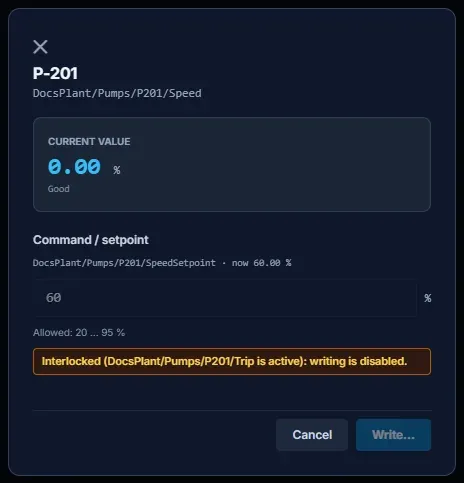
- A dashboard command card’s Interlock tag (push button, batch reactor START / STOP, pump, PID controller): the card’s commands are disabled while the tag is not 0, missing or Bad, and the server refuses them (
409 interlocked). The reactor’s E-STOP is never interlocked.
Keep it a simple comparison
Section titled “Keep it a simple comparison”The server evaluates a tag compared with a number or true / false (==, !=, >, >=, <, <=), joined with &&, ||, ! and parentheses, at most 8 comparisons:
| Interlock | Server |
|---|---|
tag('DocsPlant/Pumps/P201/Trip') == 1 |
enforced |
{DocsPlant/Pumps/P201/Trip} == 1 || {DocsPlant/Pumps/P201/Local} != 0 |
enforced |
!(tag('DocsPlant/Line/Permissive') == 1) |
enforced |
tag('A/Speed') - tag('A/Setpoint') > 5 |
screen only (arithmetic) |
tag('A/Level') > tag('A/High') |
screen only (two tags compared) |
Math.abs(tag('A/Speed')) > 5 |
screen only (a function) |
For a condition the server cannot evaluate, compute it in the PLC or an eaxTags script into one tag (A/StartPermissive) and compare that tag.
A screen-only interlock never opens another object’s interlock. When another object sends the same value to the same tag and its server interlock is active, the write is refused (409 interlocked): “A command whose interlock only the screen evaluates does not count: the server cannot tell whether it is disabled”. This holds too for an object that has a clear server interlock and a screen-only one. Alone, a screen-only object lets the value through. Before 20 November (eaxScada 9b768ccf), a screen-only object counted as not blocked and let the value past the other object’s interlock.
Tag paths in an interlock
Section titled “Tag paths in an interlock”An interlock built from a tag path (a button’s Bind-tab Disabled interlock tag, a Faceplate Interlock tag, a dashboard card Interlock tag) is written tag('<path>') != 0. The path is quoted and escaped the same way on the screen and on the server, so a quote, a backslash or a line break in a path no longer breaks the interlock or changes its meaning. The server also reads a path you escape by hand, for example tag('Area/O\'Brien') == 1, and enforces it.
A path the server cannot read as one tag is refused, not passed:
- What it covers: a path with a backtick, braces or brackets (for example
[default]Line/Tag). A{...}screen or component parameter is filled in from the command’s tag path first (see Interlocks with a parameter); one that cannot be filled in is refused the same way. - Fail closed: the server refuses every write of the command (
409 interlocked, “cannot be evaluated … fail closed”), whatever the tag reads. Before, such an interlock let every write through. - With Allow: when If the interlock reads a Bad value is Allow (a stop, a trip, an emergency command), the interlock never blocks. The server logs it once per command as a warning:
interlock cannot be evaluated: the command is never blocked by it (onBadQuality allow). - The lint names it in the Problems panel (
interlock-client-only): “The interlock cannot be evaluated: the server refuses every write of this command. Use a tag path without backticks, braces or brackets.” or, with Allow, “The interlock cannot be evaluated: the command is never blocked by it (“If the interlock reads a Bad value” is allow). Use a tag path without backticks, braces or brackets.” - On the screen, an expression that does not parse behaves like a Bad value, and a warning is logged once per object.
The decision for every plain path is unchanged, and so are the thresholds.
Interlocks with a parameter
Section titled “Interlocks with a parameter”A screen with parameters, or a reusable component, can use {Name} in an interlock, for example {Pump}/Trip on a START that writes {Pump}/Start. Each parameter set has its own interlock, already filled in. For a value in no set (a tag in the allowed folders but in no set, or a component instance that leaves a parameter undefined), the server reads the parameters from the tag path being written and fills them in. A write to Plant/P107/Start checks Plant/P107/Trip.
- Evaluated per value: the badge next to the interlock reads Enforced by the server (per parameter value). The server refuses the write while the filled-in interlock is active.
- The tag does not exist: the filled-in interlock reads as a Bad value, so the write is refused (
409 interlocked), unless If the interlock reads a Bad value is Allow. - Fail closed: a
{...}that the command’s tag path cannot fill in (a parameter the tag path does not have, such as{Line}/Permissiveon a command to{Pump}/Start, or a brace that is not a parameter) makes the server refuse every write of the command. The badge reads Refused by the server (fail closed) and names the braces. With Allow, the interlock never blocks, and the server logs it once as a warning. - Dashboard cards: a card takes no parameters. A card whose Interlock tag has a brace refuses every write (fail closed).
- Quoting: the values are filled in first, then the path is quoted. A value with a quote or a backslash names one tag, never more of the expression.
- Expressions: an interlock written as an expression with
{Name}is filled in only when every value is a plain tag path (letters, digits,_ . - /). Otherwise it stays screen only, and it never lets a value past another object’s interlock on the same tag. An expression whose{Name}can never be filled in stays screen only too (not fail closed); the Problems panel warns about it. - Exact targets: a button on a screen with parameter sets that writes an exact tag (
Line/Start) with a{Pump}interlock is decided by the sets: each set’s filled-in interlock. The interlock of the screen as designed does not open them: a path interlock fails closed, an expression stays screen only and does not count. - More than one reading: a tag path that can be split into parameter values in more than one way (
{A}/{B}/Startforx/y/z/Start) is checked for each split, and the write is refused if any of them is active. Past 64 splits the command fails closed. - The lint: the Problems panel lists
interlock-parameter(warning) for each interlock that fails closed or never blocks, andinterlock-per-parameter(info) for each interlock evaluated per value.
Use only the parameters of the command’s tag path in its interlock, or define the station as a parameter set.
List the affected objects before upgrading
Section titled “List the affected objects before upgrading”Before 20 November (eaxScada 119aefbc), an interlock with a {...} was not evaluated by the server for a value in no set: the command let every value through. After the upgrade, such an interlock is evaluated per value, or refuses every write. To list the objects that now refuse every write, never block, or stay screen only, run the audit command of the server binary.
Run it with the new version’s binary, before you switch the service to it, so the project is judged by the new version’s rules. Point it at the project folder (the folder that holds data/), or at a copy of it:
eaxscada interlock-audit --workdir <project folder>- Read-only: the command reads the screens (
pages/), the components (components/) and the dashboards, and writes nothing. It can run while the server runs. - Folders: by default
<workdir>/data/studioand<workdir>/data/dashboards(--workdirdefaults to the current folder).--studio <folder>and--dashboards <folder>name other folders. A dashboards folder that does not exist holds no dashboards. - Output: one line per object, tab-separated: the document, the object, the field, what the server does (
fail closed,never blocks (allow)orscreen only) and the braces it cannot fill in. The count follows on the error output.--jsonprints the list as JSON. - Exit status:
0none found,1objects listed,2a usage or read error. A studio folder with neitherpages/norcomponents/is an error (2), never “none found”. eaxscada ilparam-auditis the same command under the earlier tool’s name. It also takes the studio data folder as its last argument:eaxscada ilparam-audit --dashboards <dashboards folder> <studio data folder>.
You can also open each screen’s Problems panel and look for interlock-parameter.
2. Decide what a Bad value does
Section titled “2. Decide what a Bad value does”If the trip tag is missing or its quality is Bad, the interlock counts as active and START is disabled. That is right for a start. Set If the interlock reads a Bad value (inspector, Cond tab, Security & Touch) to Allow only on commands that must work when a sensor fails, such as a stop. The Problems panel warns about a stop or trip command that a Bad value would block (command-stop-blocks-on-bad-quality).
3. Leave STOP without an interlock
Section titled “3. Leave STOP without an interlock”STOP writes 0 to the same tag. The server refuses a value only when every object that sends that value to that tag is interlocked (an object whose interlock only the screen evaluates does not count): a STOP without interlock means a write of 0 is always allowed, even while the trip blocks a write of 1.
4. Save and check the Problems panel
Section titled “4. Save and check the Problems panel”Save the screen. With live editing off, the server already enforces the new interlock: protection from the saved copy applies at once, while removing one waits for the deploy. Open the Problems panel (Ctrl+Shift+M): every interlock the server does not enforce is listed as interlock-client-only, and every interlock with a {...} the command’s tag path cannot fill in as interlock-parameter.
5. Verify
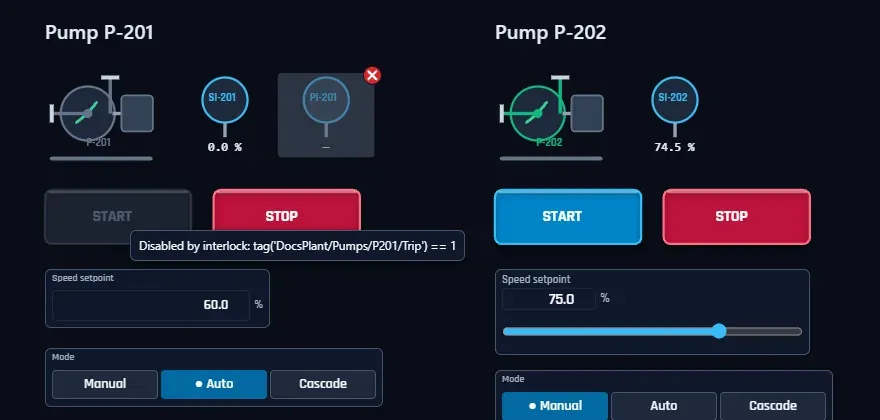
Section titled “5. Verify”- In the operator runtime, START is disabled while the trip is 1. Hovering it says why:
-
A direct write of 1 is refused, whoever sends it:
Terminal window curl -s -X POST https://scada.example.com/api/tags/write \-H "Authorization: Bearer <session token>" -H "Content-Type: application/json" \-d '{"path":"DocsPlant/Pumps/P201/Start","value":1,"confirmed":true}'{ "status": "interlocked", "path": "DocsPlant/Pumps/P201/Start","reason": "tag('DocsPlant/Pumps/P201/Trip') == 1","sources": [{ "screen_id": "docs_pump_station", "shape_id": "btn_p201_start", "action_type": "set_1" }] }The answer is
409, and the audit trail recordsWRITE_DENIED_INTERLOCK. A signature or a confirmation does not lift it. -
A write of 0 (STOP) goes through.
-
GET /api/security/write-policy(Lead_Engineer, Administrator) lists the tag underinterlocked, with every object that writes it, the values, the interlocks and whether the server evaluates each.
What the server does not cover
Section titled “What the server does not cover”The interlock covers writes that come through eaxScada. Drivers, server scripts, eaxTags scripts and the simulator write tags directly, and a PLC or engineering tool on the network does not go through eaxScada at all. The interlock of a group is not inherited by its children on the server (the screen disables them): put the interlock on each command. See How eaxScada protects tag writes.
Related
Section titled “Related”- Style object states: the disabled look and the “why” tooltip.
- Reusable screens with parameters:
{Pump}/Tripinterlocks enforced per station. - Check screens before deploying